
Visitor management systems usually get attention only after something goes wrong. A queue builds at the gate. A contractor signs in with handwriting no one can read. A VIP arrives at the wrong entrance. A fire alarm goes off and the site team realises the paper log at reception doesn't match who is on site.
That's the gap modern security teams are trying to close.
Across Australia, visitor management systems have moved well beyond digital reception desks. Used properly, they become part of a broader operating model that connects front-of-house staff, gatehouse control, guards, event supervisors, and emergency response. For venues, construction projects, retail centres, and corporate sites, that integration is where the true value sits. The software records the movement. The security team acts on it.
SEO title: Positive 2026 Visitor Management Systems Guide for Australian Security
SEO meta description: Visitor management systems help Australian businesses improve compliance, streamline check-in, and connect digital visitor tracking with guards, gatehouse control, and site security.
Suggested URL: /visitor-management-systems-guide-australia
The End of the Tattered Sign-In Sheet
A paper sign-in sheet fails in predictable ways. People skip fields. Names are illegible. Exit times are missing. Pages go missing. Reception staff get distracted. During a busy arrival window, nobody has a reliable picture of who is on site.
That's a poor look for any organisation. It's a serious risk for a festival, construction site, hotel loading dock, or multi-tenant office.

Why manual logs break down under pressure
The problem isn't just speed. It's control.
A clipboard can't verify whether a contractor completed induction. It can't tell a guard that a delivery driver has been approved for the rear gate only. It can't give a chief warden a live occupancy view during an evacuation. And it definitely can't help security teams separate public traffic from staff, VIPs, performers, vendors, or restricted-zone contractors.
According to Software Advice on Australian visitor management systems for SMEs, over 78% of Australian medium-to-large enterprises now use digital check-in systems to track occupancy and maintain audit-ready logs for incidents. That shift matters because the compliance burden hasn't eased. It's increased.
Practical rule: If your site depends on accurate occupancy data during an incident, paper isn't a backup. It's a weak point.
What good operations look like at the front gate
A well-run entry point does three things at once:
- It moves people through quickly so queues don't spill into unsafe or uncontrolled areas.
- It verifies authority so only approved visitors enter the correct zones.
- It creates a usable record for audits, investigations, and emergency response.
That's why visitor management systems now sit closer to security operations than reception admin. The check-in point is where compliance, customer experience, and physical security meet. When that point is organised, the rest of the site runs better.
What Exactly Is a Visitor Management System
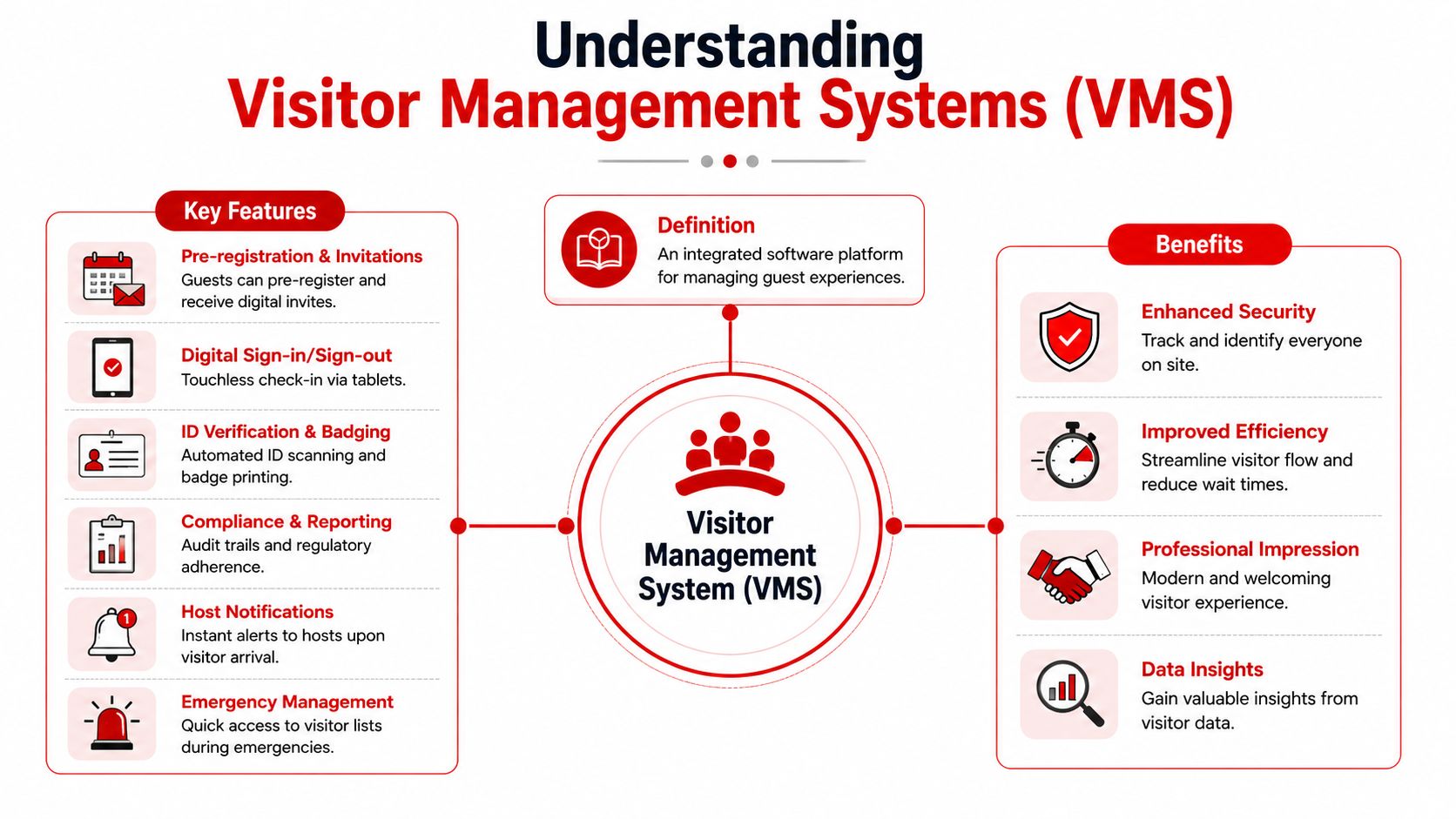
A visitor management system is a digital platform that manages the full visit, not just the sign-in moment. It handles pre-registration, arrival, identity capture, host notification, access permissions, and departure records in one connected workflow.
Paper logs capture a name. A proper VMS captures context.
The simplest way to think about it
The best analogy is air traffic control. Every approved arrival has a flight plan, a destination, a time window, and a monitored movement path. A VMS does something similar for people on site. It tells your team who is expected, who has arrived, where they should go, and whether they should still be there.
That matters even more when the system ties into door permissions. If you're comparing the types of access control systems, the key point is that visitor management and access control should work together. One handles registration and approvals. The other enforces where a person can physically go.
Core functions that actually matter on site
Most buyers get distracted by polished dashboards. Operational teams should focus on the workflow:
- Pre-registration lets hosts send visitors a link or QR code before arrival.
- Self-service kiosks reduce dependence on a staffed desk.
- QR check-in cuts friction for repeat traffic and scheduled guests.
- ID capture or verification helps confirm identity when the site needs tighter control.
- Instant host notifications stop visitors waiting around unattended.
- Audit logs create a usable history of entry and exit activity.
- Zone-based permissions keep visitors out of areas they were never meant to enter.
A strong system also supports different visitor types without forcing everyone through the same process. A contractor, courier, board guest, festival supplier, and performer don't need identical workflows.
The right question isn't “Can this system sign people in?” It's “Can this system support the way our site actually operates?”
Speed matters, but not on its own
According to WaitWell's overview of visitor management systems, modern visitor management systems with biometric verification and real-time tracking can reduce average check-in time to under 15 seconds, compared with 45 to 60 seconds for manual logbooks, which also carry a 12% error rate.
Those gains are useful, but the primary operational win is consistency. When the same approved process happens every time, the site stops relying on memory, handwritten notes, and verbal handovers.
Critical Benefits for High-Traffic Australian Sectors
A visitor management system doesn't deliver the same value everywhere. The gain depends on the site type, the traffic pattern, and the consequence of getting entry control wrong. High-traffic sectors in Australia tend to need the same foundation, but they use it differently.
Events and hospitality venues
Events have fast surges, mixed access categories, and a constant need to separate public areas from restricted ones. For organisers, the value of visitor management systems sits in controlled entry, clean audit trails, and live visibility of who has entered the venue.
In the Australian event sector, VMS adoption has increased by 65% since 2022, and 88% of venue managers report these systems improve compliance with RSA and state security regulations by recording accurate entry and exit times, according to Capterra's Australian visitor management software directory.
That's especially relevant when one venue has multiple classes of arrival on the same day:
- General admission patrons need fast throughput.
- VIPs and artists need protected routing and controlled meet points.
- Vendors and contractors need restricted service access.
- Security staff and supervisors need reliable movement data when conditions change quickly.
If you want a practical feature benchmark, the overview of Nimbio Guestview features is useful because it shows how visitor workflows can be structured around invitations, sign-in, notifications, and record-keeping rather than a single reception-screen moment.
Construction and industrial sites
Construction sites are different. The core issue isn't polished reception. It's proving that the right person entered the right zone under the right conditions.
A workable process usually includes induction checks, contractor validation, restricted-area controls, and a current muster list. Without a digital workflow, gatehouse teams end up making approval decisions from emails, printed lists, and phone calls. That slows entry and increases inconsistency.
On these sites, visitor management systems work best when they support:
- Contractor-specific check-in paths instead of generic guest forms
- Zone restrictions for plant areas, hazardous workspaces, and controlled compounds
- Live occupancy records for evacuation and incident review
- Host or supervisor notifications that confirm a visitor has arrived
A site manager doesn't need a prettier sign-in screen. They need fewer judgment calls at the gate.
Corporate, retail, and mixed-use premises
In offices and retail environments, the risk profile is usually lower than a festival perimeter or construction gate. The need for professionalism is higher.
A digital system creates a stronger arrival process, but its primary benefit is consistency across different entry points. Front desk teams, loading bays, after-hours staff, and mobile patrols can all work from the same log. That reduces confusion when a guest arrives early, a courier uses the wrong entrance, or a tenant asks security to grant access outside standard reception hours.
The most common mistake in these environments is buying for looks. Reception design matters, but only after the system can support security, reporting, and practical access rules.
Navigating Australian Compliance and Regulations
Compliance is where weak visitor processes get exposed. If a business can't show who entered, when they entered, what consent was captured, and how long the data is retained, the problem isn't administrative. It's operational and legal.
WHS needs a live picture of occupancy
A visitor management system helps with Work Health and Safety obligations because it creates a current record of who is on site. During an evacuation, the priority is knowing who still needs to be accounted for and whether they were staff, visitors, or contractors.
That's much harder with disconnected logs, multiple entrances, and handwritten sheets sitting at separate desks. Digital check-in gives site leaders a single source of truth, which is what emergency teams need under pressure.
In emergencies, the best record is the one your wardens can access immediately, not the one someone promises to find at reception.
Privacy law is a buying filter, not an afterthought
For Australian organisations with annual turnover above A$3 million, the Privacy Act 1988 and the Australian Privacy Principles apply. That means a visitor platform needs proper controls for retention, deletion, and consent capture. Hybrid Hero's comparison of visitor management software in Australia highlights that revenue threshold as a critical trigger for local compliance obligations.
Many buyers make a bad assumption. A vendor saying it takes privacy seriously isn't enough. A generic global privacy position doesn't automatically cover Australian requirements. Your process needs to define what data is collected, why it is collected, who can view it, and when it is removed.
Accessibility and local standards still matter
If the platform will be used by the public, contractors, or diverse staff groups, usability affects compliance in practice. Systems designed to meet WCAG level AA and AGIMO Web Guide standards, including screen-reader support, are better suited to public-facing and regulated environments, as described by Five Faces visitor management solutions.
A compliant system shouldn't force workarounds at the front desk. If staff have to bypass the process for accessibility reasons, the log stops being complete.
Your Checklist for Selecting the Right System
Buying a VMS without a selection framework usually ends in one of two mistakes. Teams either buy a polished reception tool that can't support site security, or they buy a heavy enterprise platform that staff avoid using because it slows everyone down.
Use this checklist in vendor conversations.
Visitor management systems selection checklist
| Criteria | Key Question | Why It Matters |
|---|---|---|
| Integration | Does it connect with your existing access control, HR, roster, or contractor systems? | If it can't share data, staff will duplicate work and errors will creep in. |
| Entry workflow | Can it support different check-in paths for guests, contractors, VIPs, and deliveries? | One-size-fits-all workflows create bottlenecks and poor controls. |
| Zone permissions | Can it limit access to authorised areas only? | Sensitive areas need enforceable restrictions, not verbal instructions. |
| Hardware flexibility | Does it run on standard tablets or require specific kiosks and printers? | Hardware choices affect rollout speed, cost, and resilience across sites. |
| Offline resilience | What happens if connectivity drops at the gate or reception? | Busy sites still need a controlled entry process during outages. |
| Host notifications | How are hosts, supervisors, or security teams alerted? | A delayed alert often means a visitor is left waiting or unmanaged. |
| Reporting | Can you quickly export audit logs, occupancy records, and incident histories? | A system is only useful if records can be retrieved when needed. |
| Privacy controls | Can retention, deletion, and consent settings be configured properly? | Local compliance depends on process control, not just software branding. |
| Accessibility | Is the sign-in flow usable for people with different access needs? | A process that excludes users becomes inconsistent in real life. |
| Support model | Who provides support, when, and from where? | Sites operating after hours need timely help when the check-in process fails. |
| Scalability | Will it work across a single office, a venue network, and temporary event sites? | Growth often exposes tools that looked fine in a small pilot. |
Questions that expose weak systems quickly
A short demo can hide a lot. Push vendors on the operational detail.
- Ask for exception handling. What happens when a contractor arrives without pre-registration, a VIP changes arrival gate, or a badge printer stops working?
- Ask about security team use. Can guards and supervisors see the same records in real time, or is the platform built only for reception staff?
- Ask how permissions are revoked. Visitor credentials should stop working when the visit ends or when the approval changes.
- Ask for role-based access. Not everyone should see the same visitor data.
What works and what usually doesn't
What works is a system that matches the site's actual rhythm. Events need speed and controlled segmentation. Construction needs validation and mustering. Corporate offices need professional flow with reliable records.
What usually doesn't work is buying from a generic feature list. Good visitor management systems are operational tools. They should fit the gate, the foyer, the service entrance, and the emergency plan.
Unifying Digital Systems with On-Site Security Teams
Software alone doesn't secure a site. It informs the people who do.
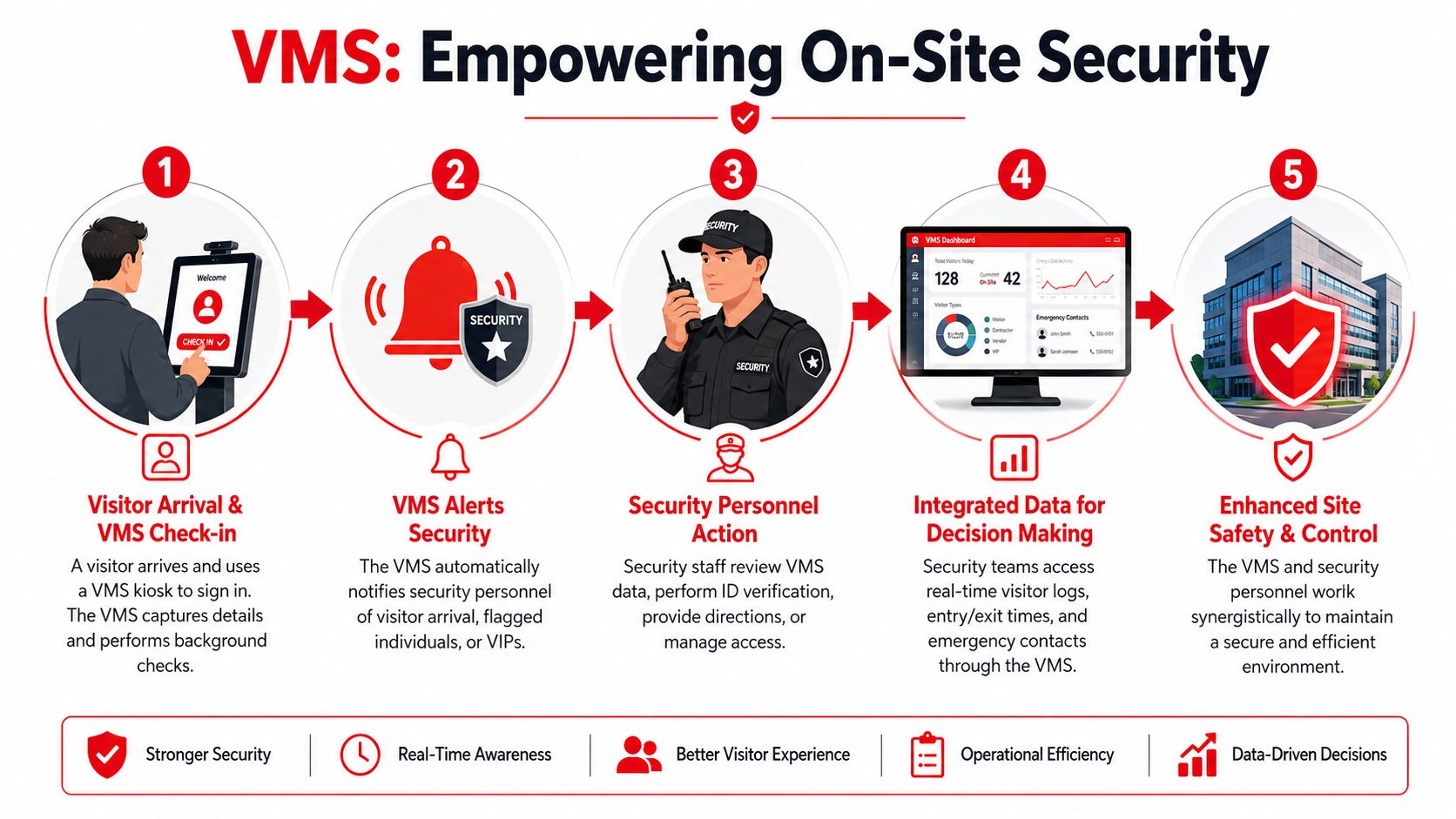
That distinction matters because the biggest gap in many deployments isn't check-in technology. It's the handoff between the digital log and the officers, supervisors, gatehouse staff, K9 handlers, and response teams working on the ground.
Where most sites still lose control
A visitor can be properly registered and still create risk if the field team never sees the relevant information. That's the operational failure point.
A critical gap exists here. Seventy-eight per cent of Australian event venues reported emergency response delays due to disconnected visitor logs and guard dispatch systems, highlighting the need for VMS platforms that integrate directly with on-the-ground security teams.
For event organisers, that means the digital record must travel beyond the front desk. Guards at gates, patrol supervisors, and command staff need alerts they can use immediately.
A visitor log has limited value if the people at the perimeter can't act on it.
How the joined-up model works in practice
Consider a construction gatehouse. A contractor arrives for a restricted work zone. The VMS checks the record against the approved visit and flags a missing requirement. Gatehouse control receives the alert before the person enters. Security staff can verify identity, hold access, and escalate to the site supervisor without a guessing game at the gate.
At a festival, the same principle applies differently. A VIP arrival can trigger a directed response. The relevant security detail gets the arrival notice, correct entry point, and timing in one stream, instead of relying on radio chatter and last-minute calls. If a person attempts to enter via the wrong lane, the team can redirect quickly without causing a scene at public screening points.
The systems around the system
The strongest deployments treat VMS as one layer in a broader operating environment. That often includes access permissions, radios, incident reporting, CCTV review, and asset workflows. In industrial settings, teams already thinking about connected operations may find it useful to review how industrial asset management software approaches visibility, maintenance records, and controlled workflows across physical environments. The lesson is similar. Data becomes useful when it reaches the people making decisions on site.
What integrated security teams need from a VMS
- Live alerts that reach the right person, not just reception
- Clear visitor categories so staff can distinguish guests, contractors, media, and VIPs immediately
- Photo or identity reference where the site requires confirmation
- Zone-based instructions that tell officers where a person may go
- A shared operational log so post-incident reviews aren't stitched together from separate systems
Visitor management systems are an element of a robust security strategy. They don't replace guards, K9 teams, or gatehouse control. They make those teams faster, more accurate, and easier to coordinate.
Frequently Asked Questions on Visitor Management Systems
Do visitor management systems replace access control?
No. They solve related problems, but not the same one.
A visitor management system handles registration, approvals, records, and notifications. Access control handles the physical permission to open a door, gate, or turnstile. The strongest setups connect both, so an approved visitor gets access only to authorised zones.
Are visitor management systems suitable for temporary sites?
Yes, if the system is flexible enough.
Pop-up venues, festivals, project compounds, and temporary site offices need lightweight hardware, fast setup, and simple user flows. The main mistake is choosing a platform that assumes a permanent corporate reception environment.
What should visitors be told about data collection?
Tell them what you collect, why you collect it, and how it will be handled.
That usually includes identity details, time on site, consent acknowledgements, and any access-related information needed for safety or compliance. The explanation should be clear at check-in, not buried in back-office policy documents.
Can a VMS help during evacuations?
Yes, provided the records are current and staff can access them immediately.
The software is most useful when entry and exit discipline is strong, multiple access points feed the same system, and wardens know where to retrieve the live list during an incident.
How should businesses think about pricing?
Start with workflow, not subscription cost.
The cheapest option often creates hidden labour costs if staff have to manually fix records, chase approvals, or maintain side spreadsheets. Assess the total operating fit, including hardware, support, integration, training, and whether the system can be used by both admin and security teams.
If you're reviewing site security more broadly, GM GROUP Services supports Australian venues, events, construction sites, and businesses with integrated protection that includes guards, K9 units, gatehouse control, emergency response, and risk-based on-site security planning. For organisations that want visitor management systems to work in operational settings, not just at reception, that kind of operational alignment matters.
Discover more from GM Group Services
Subscribe to get the latest posts sent to your email.