
Risk management software comparison is often presented as a search for the platform with the longest feature list. That advice is convenient, but it's wrong for Australian security operations. A board-level GRC system may produce excellent audit reports and still be awkward to use when a supervisor is logging a medical incident in a crowded festival site, a venue manager is checking RSA-related actions, or a construction supervisor is documenting a contractor breach from a mobile phone.
The better question is operational: what must the system help your people do during a normal shift, a compliance review, and a serious incident? Events, hospitality, construction, retail, corporate offices, and security providers have different workflows, different users, and different evidence requirements. A useful comparison therefore weighs mobile reporting, guard and K9 coordination, integrations, supervision, compliance automation, and multi-site visibility alongside conventional GRC functions.
Australia's enterprise GRC market was estimated at USD 996.2 million in 2024 and is projected to reach USD 2,915.2 million by 2033, with a projected 12.7% CAGR from 2025 to 2033, according to IMARC's Australia enterprise GRC market analysis. That growth gives buyers more choice, but it also makes fit-for-purpose evaluation more important. The strongest platform in an office may not be the strongest platform at a venue gate.
Why Most Risk Management Software Comparisons Miss the Mark
The popular comparison model lines up risk registers, dashboards, audit trails, integrations, and subscription prices, then treats every buyer as if they were running the same operation. That model misses the point. A festival promoter, hotel group, construction manager, and shopping centre security team may all use the term “risk management”, but they won't collect evidence, escalate incidents, or assign work in the same way.
A risk manager in a corporate office might prioritise risk appetite, control libraries, board reporting, and scheduled assessments. A festival operations manager needs a guard to submit a report quickly, attach photos, identify the location, notify the right supervisor, and keep the record usable after the crowd has moved on. A construction supervisor needs contractor checks, site access records, safety observations, and evidence that can be tied to a project location or subcontractor.
The difference becomes obvious during a live shift:
- Events: temporary teams, changing zones, crowd incidents, lost children, medical escalations, and rapid handovers.
- Hospitality: patron incidents, ejections, RSA-linked processes, staff rosters, CCTV references, and recurring venue risks.
- Construction: induction records, contractor compliance, plant and equipment hazards, access control, and site inspections.
- Retail: loss prevention, suspicious behaviour, shoplifting incidents, staff safety, centre-wide trends, and multi-site reporting.
Australia-focused comparison content has often emphasised broad platform features and prices instead of these operational contexts. That leaves buyers asking the wrong question, namely which system has the most functions, rather than which system reduces friction for the people who must use it. The gap matters as Australian enterprise security and risk management spending is forecast to reach almost AU$6.2 billion in 2025, up 14.4% year over year, as reported in IntelliPermit's Australian risk management software review.
Field test: If a guard can't complete a useful incident report with one hand, in poor reception, under time pressure, the feature may exist on paper but not in your operation.
A platform that excels at governance reporting can still fail frontline teams if forms are too long, permissions are confusing, or supervisors must reconcile data manually. Guard scheduling, K9 deployment records, patrol checks, site instructions, and incident escalation need to work as connected activities. They shouldn't sit in separate spreadsheets while the GRC platform stores only the final summary.
The Australian patient safety and risk management software market shows the same movement towards integration. It generated USD 21.7 million in 2024 and is forecast to reach USD 47.4 million by 2030, with a projected 14% CAGR from 2025 to 2030. Risk management and safety solutions represented 74.65% of 2024 revenue, while GRC solutions were identified as the fastest-growing segment, according to Grand View Research's Australia outlook. Buyers are moving beyond standalone risk registers, but operational fit still determines whether that integration creates value.
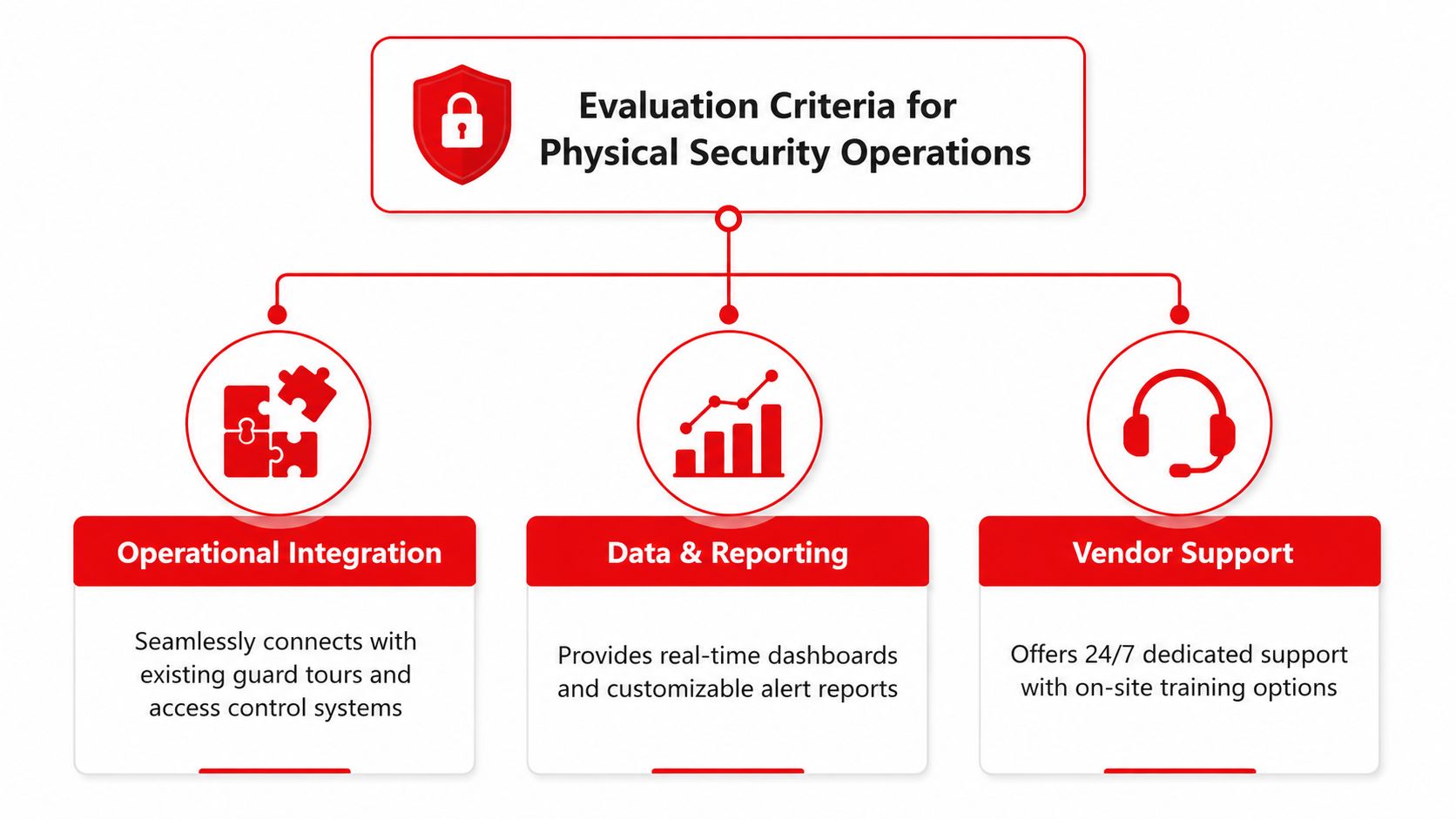
Evaluation Criteria That Matter for Physical Security Operations
A credible risk management software comparison starts with the work performed outside the office. Score each platform against actual shifts, actual forms, and actual escalation paths. A polished demo is useful only when the vendor can show how the system behaves with your users, locations, permissions, and evidence requirements.
Mobile incident reporting
Mobile reporting should be the first practical test. Ask a guard to create an incident, select a site and zone, classify the event, add notes, attach evidence, identify witnesses, and notify a supervisor. Test the workflow on the devices your team uses, not only on a vendor's tablet in a meeting room.
Good mobile reporting keeps the form short without losing essential context. It should support structured fields, photographs, timestamps, location information where appropriate, follow-up actions, and supervisor review. It should also handle weak connectivity sensibly, because venues, construction sites, basements, and temporary event locations can challenge network coverage.
Guard and K9 management
Guard management isn't the same as employee management. Supervisors may need to allocate posts, record patrols, confirm handovers, track qualifications, monitor fatigue concerns, and document changes during a shift. K9 operations add deployment details, handler assignments, animal suitability, rest requirements, and task-specific records.
Many platforms can assign a task. Fewer make it easy to prove that the task was completed at the right location and time. Test whether supervisors can see missed patrols, overdue actions, post coverage, and exceptions without exporting data to another system.
Integrations and operational visibility
CCTV, access control, guard tour systems, rostering, visitor management, HR, payroll, and communications tools may all contain relevant risk evidence. Ask whether the platform offers a usable integration, an API, scheduled imports, or only a manual export process.
A system doesn't need to connect to everything on day one. It does need a clear integration plan. If incident records refer to CCTV footage, the user should be able to capture the relevant camera, time, or reference without creating an isolated note that nobody can reconcile later.
Compliance and multi-site control
Australian deployments often span NSW, VIC, QLD, and ACT. The software should let administrators apply common policies while retaining site, client, state, and role-specific requirements. Check how it handles version control, approvals, evidence retention, audit trails, and access permissions.
Risk scoring should be explainable. For teams using Failure Mode and Effects Analysis, it's useful to understand how Risk Priority Numbers are calculated and where the method fits, so Forge Reliability's explanation of RPN in FMEA provides helpful background before you configure assessment logic.
Finally, assess vendor support. Ask who responds after implementation, whether support understands field operations, how training is delivered, and how configuration changes are governed. A platform with fewer features but responsive operational support may outperform a broader system that leaves supervisors to solve adoption problems alone.
Leading Risk Management Platforms Compared
No single platform should be declared the universal winner. Enterprise ERM products are usually stronger at structured risk, controls, audit evidence, resilience, and executive reporting, while specialist workplace systems may offer a more direct route to training, compliance, and connected operational workflows.
The Australian comparison published by Sentrient positions Protecht as a strong fit for configurable enterprise risk with integrations, with a listed price of about A$45,000 per year, while positioning Sentrient for connected workplace risk, GRC, and training. That creates a practical trade-off between enterprise configurability and broader compliance-training workflow coverage, as outlined in Sentrient's Australian risk management systems comparison.
| Platform | Mobile Incident Reporting | Guard/K9 Management | CCTV Integration | Compliance Automation | Pricing Model | Best For |
|---|---|---|---|---|---|---|
| Protecht ERM | Configurable workflows, validate field usability in a live demo | Usually requires configuration or connected systems | Confirm available connectors and API scope | Strong enterprise risk and compliance configuration | About A$45,000 per year in the cited comparison | Configurable enterprise risk across complex organisations |
| Sentrient | Suited to connected workplace workflows, test offline and mobile depth | More relevant to training and workforce compliance than specialist K9 control | Confirm integration requirements | Stronger fit where training and compliance workflows are central | Vendor quote | Workplace risk, GRC, and training coverage |
| ServiceNow GRC / IRM | Strong workflow foundation, field experience depends on configuration | Usually requires additional workflow design | Potentially strong where existing enterprise integrations exist | Strong GRC, policy, approval, and regulatory workflows | Module-based, vendor quote | Organisations already invested in ServiceNow |
| Archer | Configurable assessments, incidents, controls, and reporting | Requires operational configuration or adjacent tools | Confirm integration architecture | Broad enterprise GRC and audit capability | Vendor quote | Large, complex, multi-domain GRC programs |
| MetricStream | Enterprise workflows can support incidents and assessments | Requires validation for roster and K9-specific operations | Confirm connectors and implementation effort | Strong compliance, regulatory, and third-party oversight | Vendor quote | Highly regulated organisations |
| IBM OpenPages | Structured operational risk workflows, mobile experience needs testing | Typically requires configuration and integration | Confirm API and integration scope | Strong operational risk, financial controls, and audit support | Vendor quote | Large enterprises using IBM data and analytics |
| Diligent ERM / HighBond | Strong governance and audit workflows, test frontline usability | Not a specialist guard management platform | Confirm integration options | Strong board, audit, and compliance reporting | Vendor quote | Board-focused ERM and consolidated reporting |
Protecht ERM stands out when the buyer needs configurable enterprise risk, controls, incidents, KRIs, resilience, vendors, and cyber risk in one environment. Australian directory data lists Protecht ERM at 4.6 out of 5 on Capterra, and the related integrated risk management listing highlights this breadth, according to Capterra's Australian integrated risk management directory. That doesn't prove it will work for a festival control room. It does indicate why larger buyers often shortlist it for broad risk coverage.
ServiceNow makes most sense when ITSM, asset data, approvals, and enterprise workflow already sit there. Archer, MetricStream, IBM OpenPages, and Diligent can support substantial governance programs, but field teams should insist on a real mobile and operational demonstration. The same applies to LogicGate Risk Cloud, which can be attractive when teams need no-code workflow design and rapid iteration.
For a broader view of vendor selection themes, Logical Commander Software Ltd. insights can help buyers think beyond a simple feature count. The important question remains whether the chosen platform can connect risk ownership and evidence to the work performed by guards, supervisors, contractors, venue managers, and compliance teams.
Matching Software to Your Industry Use Case
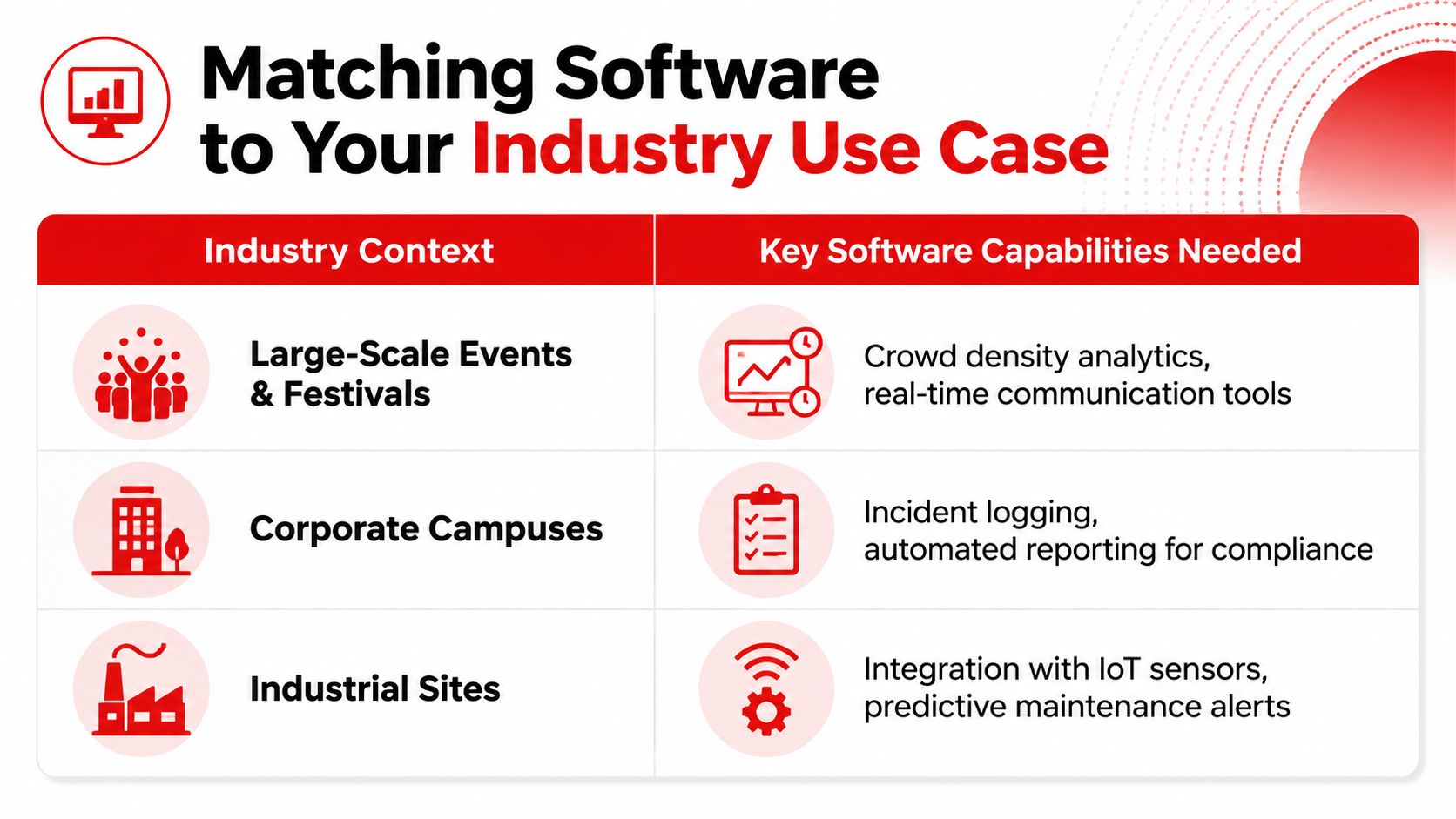
The right product changes with the operating environment. A venue needs rapid patron incident capture and supervisor visibility. A construction project needs contractor evidence and access control. A retailer needs repeatable loss prevention workflows across locations. Treating these as one buyer category creates avoidable implementation compromises.
Events and festivals
Festival teams need temporary deployment without temporary standards. The system should support site maps, zones, posts, shift handovers, incident escalation, medical and welfare records, lost property, crowd concerns, and client reporting. Mobile forms matter more than elaborate office dashboards during the event itself.
A configurable platform such as Protecht may suit an organiser that needs enterprise reporting across multiple events, but it must be tested with temporary users and rapid site changes. A security provider may also need guard tour, roster, radio, and escalation processes outside the core GRC platform. The platform should receive structured evidence from those workflows rather than forcing supervisors to re-enter it later.
Hospitality venues
Bars, pubs, clubs, hotels, and restaurants need a blend of patron safety, staff safety, incident documentation, RSA-related compliance, and rostering. A report about refusal of service, an aggressive patron, an injury, or a removal should carry enough detail for management review without encouraging staff to write long, inconsistent narratives.
Sentrient may be relevant where workplace compliance and training are central. Protecht or another enterprise GRC platform may be more suitable for a group that needs consistent controls and reporting across venues. Neither choice should be made from a brochure. Ask the vendor to demonstrate a real patron incident, manager approval, follow-up task, and report export.
Construction and industrial sites
Construction managers need contractor onboarding, induction evidence, site access, hazard reporting, inspections, corrective actions, and project-level accountability. Mobile access must work for supervisors moving between active areas, and permissions must separate client, principal contractor, subcontractor, and internal users.
ServiceNow can suit organisations with established enterprise workflows and IT or asset integrations. A configurable ERM platform may suit groups that need a consistent risk taxonomy across projects. Specialist safety and contractor systems may still be required if the proposed GRC platform can't handle practical field evidence, site access, or worker participation.
Retail and shopping centres
Retail security teams need loss prevention records, suspicious behaviour reporting, staff incident workflows, CCTV references, patrol checks, and trend analysis across stores or centres. The system should make recurring issues visible without exposing sensitive information to users who don't need it.
Multi-site permissions are critical. A centre manager should see relevant local records, while a regional security manager needs aggregated patterns and overdue actions. Test both views in the same demonstration, because a platform that handles one site well may become cumbersome once operating models, clients, and reporting lines multiply.
Your Risk Management Software Buyer Checklist
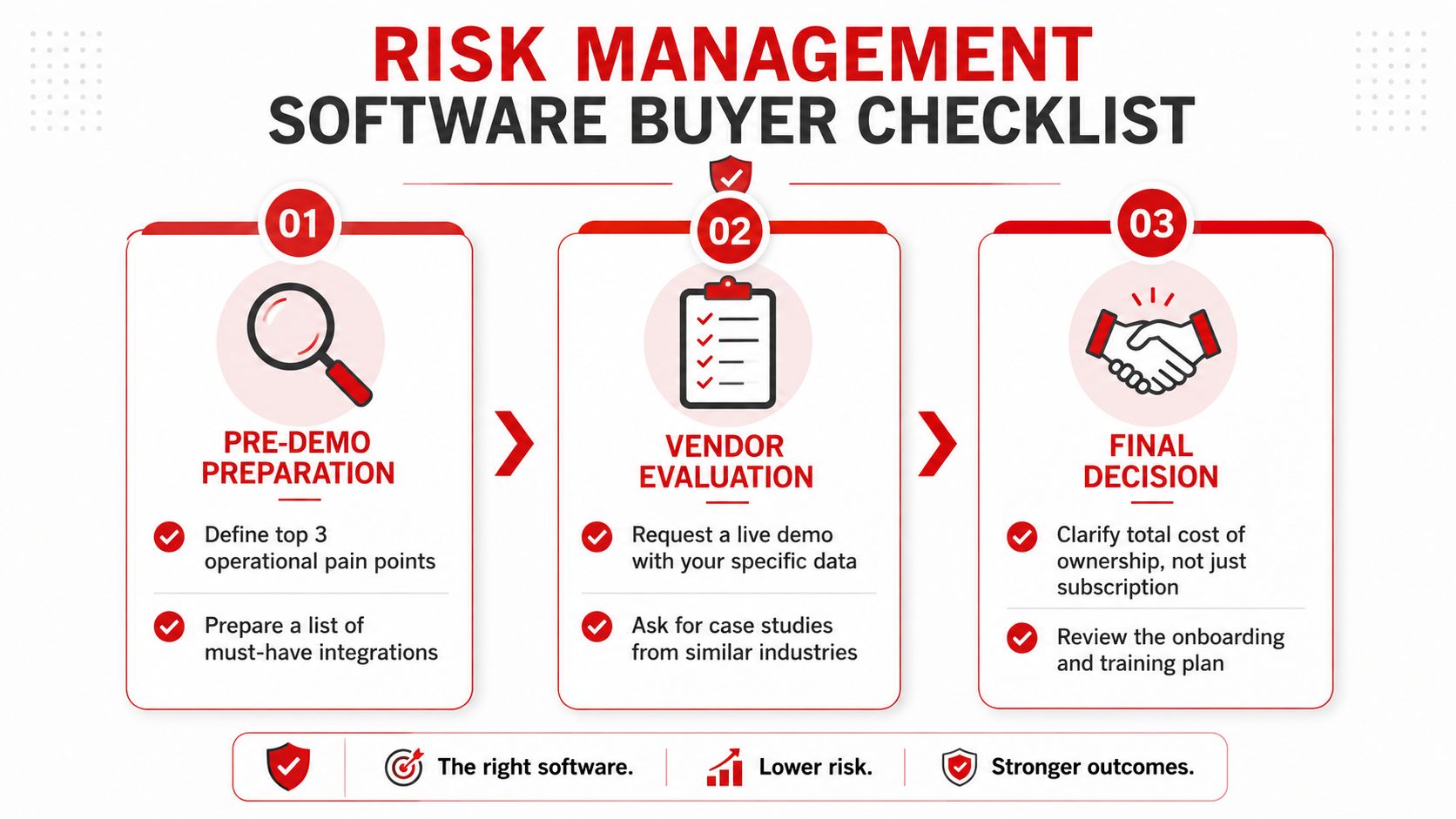
Procurement should begin before the first vendor demonstration. Write down the operational problems that currently create delays, duplicate entry, weak evidence, or missed follow-up. Keep the list short enough to guide decisions, but concrete enough to test.
Before the demo
Define your three most important operational pain points. Examples include slow incident escalation, poor contractor evidence, inconsistent venue reports, or disconnected guard patrol records. Then prepare a list of must-have integrations, including rostering, access control, CCTV references, HR, visitor management, and existing reporting tools.
Bring real, redacted examples of forms and reports. A vendor should demonstrate your incident categories, approval routes, location structure, user permissions, and management dashboard. If the demonstration only follows a prepared happy path, you haven't tested the product.
During evaluation
Ask for a live mobile demonstration using the devices and conditions your team faces. Have the presenter show a supervisor correcting a report, attaching evidence, escalating a serious event, assigning a follow-up, and reviewing an overdue action.
Check these points directly:
- Offline behaviour: Find out what users can do when connectivity is weak and how the system synchronises records.
- Evidence integrity: Confirm how timestamps, edits, attachments, approvals, and audit history are recorded.
- Guard workflows: Ask whether posts, patrols, handovers, qualifications, and K9 assignments need separate products.
- Compliance mapping: Test how state, client, site, and policy requirements are versioned and reported.
- Support ownership: Identify the implementation team, escalation route, training offer, and response expectations.
Before signing
Clarify total cost of ownership, not only the subscription. Include implementation, configuration, integrations, data migration, training, support, additional users, reporting changes, and future site expansion. Request the onboarding plan in writing and name the person responsible for each deliverable.
Red flags include a refusal to use your sample data, vague answers about integrations, excessive customisation before basic workflows work, and pricing that excludes essential modules. A good vendor will also explain what the platform doesn't do and which adjacent system remains necessary.
Implementation Strategy and ROI Expectations
ROI should be measured through operational outcomes, not a dashboard count. The business case should connect cleaner evidence, faster escalation, fewer manual handovers, stronger compliance visibility, and better supervision to the risks your organisation carries.
A practical rollout can follow four phases:
- Discovery and planning, weeks 1 to 2: Finalise requirements, map current workflows, appoint process owners, and agree on the first sites or teams.
- Configuration and training, weeks 3 to 6: Build forms, permissions, escalation rules, dashboards, and integrations. Train core users before asking every casual or temporary user to adopt the system.
- Pilot launch and feedback, weeks 7 to 8: Deploy to a small operational group, gather real records, identify friction, and remove unnecessary fields.
- Full rollout and review, month 3: Expand across the approved operation and conduct the first ROI assessment against the baseline agreed during discovery.
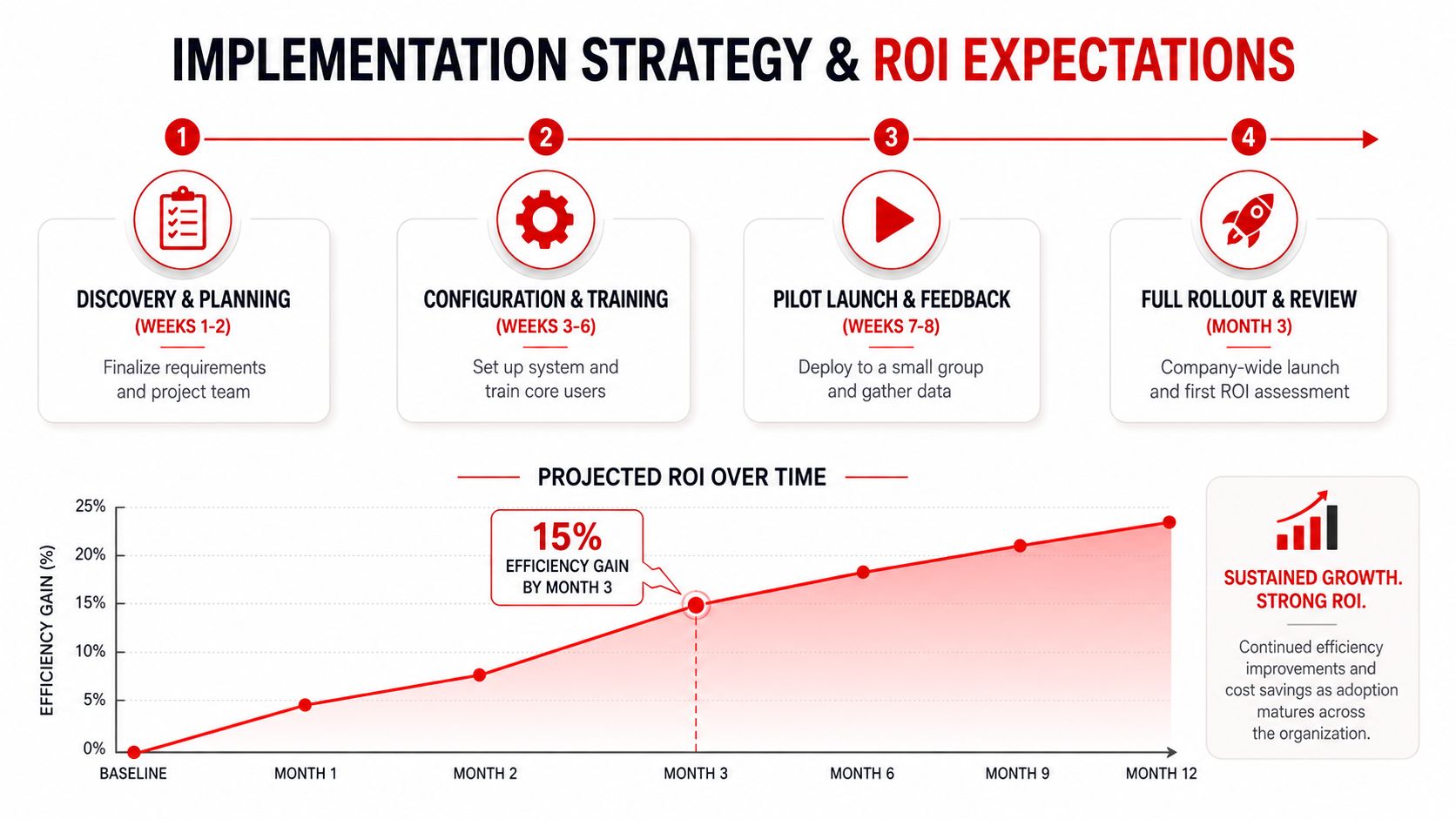
The 15% efficiency gain marker shown in the supplied implementation visual should be treated as a planning illustration, not a promised result. Your team should establish its own baseline and measure whether reporting, review, escalation, and follow-up improve after adoption.
Useful measures include report completion quality, time from incident to supervisor notification, overdue action volume, duplicate data entry, training completion, inspection completion, and time spent preparing client or management reports. Don't claim savings until the calculation includes implementation and support costs.
Implementation fails when the organisation buys a platform before deciding who owns the data. A risk register without accountable owners becomes an archive. A mobile form without a supervisor review process becomes a collection of unverified reports. An integration without data governance creates another source of confusion.
The strongest business case usually starts with one painful workflow, proves adoption, then expands. For a multi-site security operation, that might mean piloting incident reporting at one venue, validating the escalation model, and only then adding contractor compliance, patrol assurance, or group-wide dashboards.
Common Deployment Mistakes and How to Avoid Them
The most common failure is over-customisation before anyone has proved the basic workflow. Teams add every risk category, every approval route, and every exception, then discover that guards and supervisors avoid the system because a simple report takes too long.
Start with the minimum information needed to identify, escalate, investigate, and close an incident. Add complexity only when users can explain why it improves a decision or protects evidence.
Mobile testing is another weak point. A system can look excellent in an office and fail in a noisy venue, a basement, a vehicle, or an active construction zone. Test real devices, realistic connectivity, gloves where relevant, and the actual language used by guards and supervisors.
Integration gaps create silent data silos. Confirm ownership for CCTV references, roster data, access records, contractor information, and reporting exports before the contract is signed. If an integration requires manual reconciliation, document who performs it and how often.
Training also needs more attention than a single launch session. Supervisors require deeper instruction on review, escalation, permissions, and quality control, while frontline users need short, task-based guidance. Review early records for missing evidence and confusing categories, then adjust the workflow quickly.
The best lesson from deployment is simple: choose the system your operation will use correctly, not the platform that looks most impressive in a conference-room demo. For organisations that need both software evaluation and practical security risk planning, GM GROUP Services provides risk assessments and risk management support customised for events, venues, construction, retail, and business sites. Visit GM GROUP Services to discuss how operational risk controls, frontline reporting, guard deployment, K9 services, supervision, and compliance requirements can work together.
Discover more from GM Group Services
Subscribe to get the latest posts sent to your email.