
Commercial security cameras system planning often starts the same way. You're finalising an event layout, signing off on a venue map, or reviewing a construction compound, and someone asks a simple question: “Can we see what matters if something goes wrong?”
That question changes everything. A camera on a wall isn't a security strategy. A commercial security cameras system has to capture usable footage, protect privacy, support incident response, and fit the way people move through the site. If one part fails, poor placement, weak networking, bad retention settings, or non-compliant audio, the whole system can let you down when you need evidence most.
In Australia, adoption is already substantial. The total addressable market for commercial CCTV camera systems in Australia is estimated between AUD 1.2 billion and AUD 1.5 billion in 2026, reflecting widespread use across events, retail, and construction sectors, according to IndexBox market analysis for Australia CCTV camera systems.
Introduction to Commercial Security Cameras System
A festival organiser in Sydney usually notices camera problems too late. The gates are open, contractors are moving equipment, patrons are lining up, and then the operations team realises the loading dock has no proper view, the side bar is washed out by glare, and the temporary fence line can't be monitored clearly after dark.
That's where a commercial security cameras system becomes the backbone of venue safety. It's not just there to record. It helps teams verify incidents, guide guards, review disputes, and protect staff, guests, stock, and infrastructure.
For venue managers, the biggest shift is thinking end to end. A good system links the camera, network, storage, monitoring workflow, and privacy rules into one organised setup. That matters whether you run a bar, a retail strip, a conference hall, or a multi-day outdoor event.
If you're comparing international thinking on privacy-led design, GDPR compliant security solutions offer a useful reference point because they show how system design can start with lawful use and data handling rather than just hardware choice.
Practical rule: If your footage can't help identify what happened, who was involved, and whether staff responded properly, you don't have a working security camera system. You only have recording equipment.
Understanding Key Concepts of a Commercial Security Cameras System
A commercial security cameras system works like a chain of custody for visual evidence. Every link matters. If one part is weak, the footage may still exist, but it may not help your team answer the questions that matter after an incident.
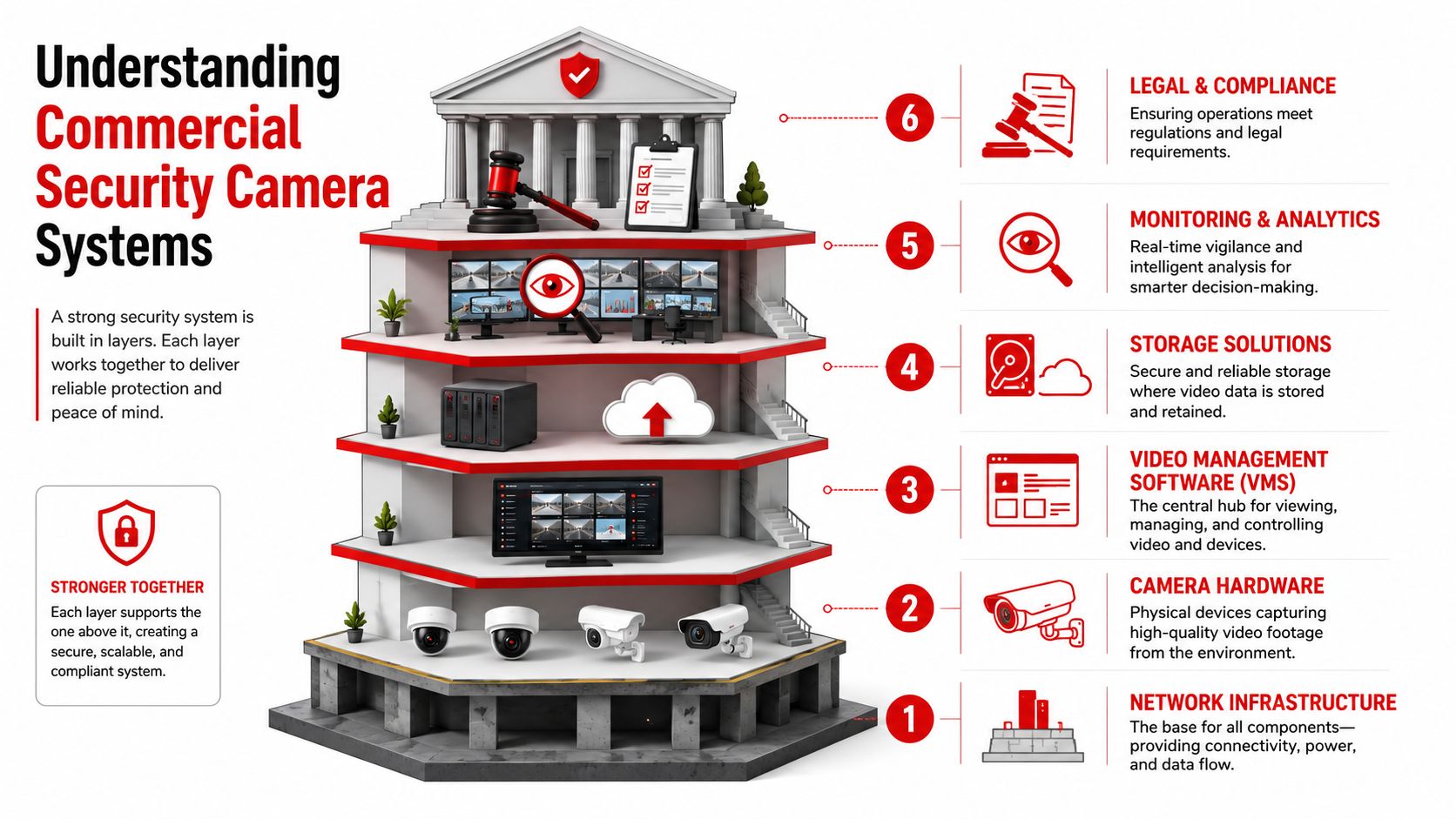
Venue managers often focus on the camera itself first. That is understandable because the camera is the visible part. In practice, the system is made up of six connected parts: network, cameras, storage, video management software, monitoring workflow, and compliance settings. A clear image on screen means little if staff cannot retrieve it quickly, if the recording failed overnight, or if the footage was captured in a way that creates privacy problems under state rules in NSW, VIC, QLD, or the ACT.
The network carries the video
Most modern commercial setups use IP CCTV. That means each camera sends video across your data network, much like other connected devices in the building.
The simple way to read this is that cameras need a reliable road to travel on. If that road is congested, poorly segmented, or exposed to other traffic such as guest Wi-Fi, video can lag, drop out, or become harder to secure. For venues, this matters during busy periods. A hotel hosting a conference, a stadium on event day, or a club on a Friday night can place real pressure on shared infrastructure.
Good network design also supports privacy and incident response. If footage is accessed by authorised staff only, separated from public-facing systems, and logged properly, it is easier to show that your venue treated recorded material with care.
Cameras collect detail, not just coverage
Coverage and usable detail are not the same thing.
A single camera with a very wide field of view can make a control room screen look impressive while leaving faces, transactions, or hand movements too small to review properly. That is why security consultants usually separate cameras by purpose. One camera may watch crowd flow at a gate. Another may be framed tightly to capture who entered, what they carried, and what time they passed through.
This distinction is easy to miss in venues. A pub manager might ask for “full bar coverage,” but the key question is what problem the camera needs to solve. Identifying a patron involved in an assault needs a different view from monitoring queue length or checking whether staff opened a side door.
Storage preserves the evidence
Storage is the memory of the system. If the system records at the wrong quality, keeps footage for too short a period, or overwrites key clips before an investigation begins, the site loses more than video. It loses context.
Retention periods should match the venue's risk profile, incident reporting timelines, and insurer or operational requirements. A small office and a licensed entertainment venue rarely need the same storage plan. The same applies to temporary event sites, where footage may need to be reviewed quickly because contractors, patrons, and suppliers all move through the same space in a short window.
VMS is the operator's working tool
Your video management software, or VMS, is where the system becomes usable for people. Staff use it to view live feeds, search by time and camera, export clips, confirm whether a device is offline, and share footage with the right decision-makers.
A good VMS reduces delay during an incident. Picture a guard supervisor receiving a report about an altercation near a side entrance. If the software lets them find the camera, rewind quickly, check adjoining views, and send the clip to management, the system is helping operations. If staff need to click through confusing menus or cannot locate the right camera name, the delay affects response quality.
Monitoring turns footage into action
Recorded video alone does not protect a venue. People and process do that.
Monitoring can be handled by in-house staff, a control room, or a security provider supporting guards on site. The important concept is workflow. Who checks alerts. Who verifies whether a situation is genuine. Who contacts the duty manager or dispatches guards. Who documents the response. At this stage, camera technology meets physical security services, and it is often the point that separates a passive recording setup from a system that supports safety on the ground.
Compliance sits across every layer
Compliance is not a final box to tick after installation. It affects camera purpose, placement, access permissions, retention settings, signage, and how footage is shared.
This matters especially for venues because public areas, staff-only zones, licensed spaces, gaming areas, back-of-house corridors, and temporary event perimeters all raise different privacy questions. A camera aimed too broadly may capture neighbouring property, public footpaths beyond your operational need, or staff break areas where monitoring expectations are different. Those decisions are not only technical. They affect whether your system is proportionate, defensible, and easier to manage under Australian privacy and surveillance expectations.
A practical way to remember the system is:
- Network: moves the video reliably and securely
- Cameras and lenses: capture the right level of detail
- Storage: keeps footage available when incidents are reviewed
- VMS: helps staff find and use the footage quickly
- Monitoring workflow: connects footage to guard action and incident response
- Compliance controls: shape lawful, proportionate use in real venues
A strong camera system is built as an operating system for safety, evidence, and accountability. The camera is only one part of it.
Types and Key Features of Commercial Security Cameras System
Choosing a commercial security cameras system is really about matching camera type to risk, environment, and operating style. The wrong camera can still record. It just won't solve the problem you bought it for.
Fixed dome and bullet cameras
These are the workhorses of most commercial installations. A fixed camera watches a defined area all day, every day. That consistency makes it reliable for entries, exits, bars, corridors, gaming zones, loading docks, and perimeter gates.
Dome cameras suit indoor public areas because they're compact and harder for patrons to read at a glance. Bullet cameras suit longer outdoor views where you want the camera's direction to be obvious as a deterrent.
Use them when you need stable evidence, not operator-controlled movement.
Low-light cameras
Bars, clubs, laneways, car parks, and festival edges often look bright to the human eye but remain difficult for cameras because the light is patchy. Low-light cameras help preserve detail where shadows, signage, and headlights would otherwise flatten the image.
They're a strong fit where your busiest security incidents happen after sunset.
Thermal cameras
Thermal cameras don't give you the same kind of facial detail as standard visual cameras. They detect heat differences, which makes them useful in dust, darkness, and large outdoor boundaries.
Construction compounds, rear service corridors, and broad perimeter edges can benefit from thermal units when the main problem is spotting movement early rather than identifying a person close-up.
PTZ cameras
PTZ means pan, tilt, and zoom. These cameras can move and zoom under operator control. They're useful in larger spaces such as event grounds, stadium edges, forecourts, and oversized car parks.
Their strength is flexibility. Their weakness is also flexibility. While an operator zooms in on one incident, the camera stops watching the wider scene. That's why PTZs work best as a supplement to fixed coverage, not a replacement for it.
Software features that matter
Hardware gets the attention, but software often determines whether the system is easy or frustrating to use.
Look for features that help with daily operations:
- Searchable playback: Staff should be able to find incidents quickly.
- Role-based access: Managers, operators, and investigators shouldn't all have the same permissions.
- Remote viewing: Useful for supervisors and after-hours checks.
- Event tagging: Helps organise footage around alarms, incidents, or reported times.
- Monitoring integration: Lets operators and response teams work from the same picture.
Cost has to match the job
In Australia, commercial IP CCTV systems currently incur installation costs ranging from $700 to $1,500 per camera in 2026, with back-to-base monitoring services costing between $40 and $120 per month depending on system grade, according to What's The Damage on commercial security costs in Australia.
That cost range is why camera selection needs discipline. A venue doesn't need every area covered by the most advanced unit available. It needs the right mix. For example:
| Area | Better fit | Why |
|---|---|---|
| Main entry | Fixed high-detail camera | Consistent identification view |
| Beer garden | Low-light fixed camera | Handles uneven evening lighting |
| Large festival bowl | PTZ plus fixed overview cameras | Wide supervision plus detail when needed |
| Site perimeter | Thermal plus standard visual camera | Early detection plus visual verification |
Decision shortcut: Buy your highest-detail coverage for places where incidents start, money changes hands, or people must be identified later.
Design and Placement Guidance by Use Case
A Friday night crowd starts building outside a venue. Security is on the door, music is up, and one argument near the entry turns into a complaint twenty minutes later. The camera was recording the whole time, but it only caught the backs of heads and a patch of glare from the street. That is the common placement failure. The system exists, yet the useful view does not.
Good camera design starts with behaviour. Walls, ceilings, and poles matter, but people create the risk points. A strong placement plan maps where people slow down, change direction, hand over money, challenge staff, enter restricted areas, or try to leave quickly. That approach is especially helpful for venues and event sites because the problem area is often the approach to an incident, not the final spot where it finishes.
Events and festivals
Temporary sites need flexible thinking. Gates move. Queues stretch. Lighting towers create bright patches and dark pockets. A camera plan drawn only from a site map can fail on day one.
Start by walking the patron journey from arrival to exit. Treat each camera like a witness with a job. One watches ticket scanning. Another watches the queue merge point. Another covers the lane behind food vendors where staff and contractors move in and out.
A practical event layout often gives priority to:
- Entry and exit lanes: Capture faces while patrons pause for screening or ticket checks.
- Bag check and screening points: Record staff interactions and disputed refusals.
- Bars and payment points: Help review service issues, theft, and crowding.
- Crowd corridors: Watch places where movement compresses near toilets, gates, or merch stands.
- Back-of-house access: Track suppliers, contractors, and restricted access attempts.
For larger venues, use fixed cameras for constant coverage and add PTZ cameras only where someone can actively control them. A PTZ on its own is like a torch beam in a large car park. It shows detail where it is pointed, but it cannot watch the whole area at once.
Hospitality venues
Hospitality sites need a different balance. Guests expect safety, but they also expect privacy and a normal social setting. Managers need footage that helps with incidents without creating unnecessary privacy risk.
Focus on entries, bars, tills, stairwells, host points, external approaches, and any corridor leading to staff-only areas. Place cameras to catch people approaching those zones rather than relying on a wide shot of the whole room. In practice, a clear doorway view often gives better evidence than a ceiling corner view covering every table.
This matters for privacy as much as security. Venue operators in NSW, VIC, QLD, and the ACT should be careful about sightlines near toilets, parenting rooms, first aid spaces, hotel room entries, or staff break areas. A camera can be legally installed in a general area and still create a complaint if the angle reaches further than intended.
In bars and clubs, the useful footage often starts before the confrontation. Capture the lead-up path, not only the final incident location.
Retail storefronts
Retail placement should follow the path a customer takes. Entry. Browse. Pause. Select. Queue. Exit.
That means front doors, service counters, high-value displays, self-checkout zones, and the routes connecting them usually deserve the clearest coverage. Glass is a frequent problem. Daylight reflections can wash out faces, especially in shopfronts facing west. Test views at the same trading hours the store is busiest so the camera is judged under real conditions, not under ideal ones.
If the site sits inside a larger centre or mixed-use venue, confirm who controls adjoining common-area cameras. A store camera might show someone leaving the tenancy, while centre management or contract security may hold the next useful view.
Construction sites
Construction sites change shape constantly. Access points shift. Fencing gets repositioned. Temporary offices appear, then disappear. A design that worked in week one may be weak by week six.
Place cameras around site entry points, plant storage, fuel areas, tool containers, temporary amenities, and fence lines with poor natural visibility. Then review those positions as the build progresses. Dust, vibration, and weather affect image quality, but so do practical site issues such as a stack of materials slowly blocking the frame over time.
Construction projects also benefit from aligning camera placement with guard patrol routes and alarm response access points. If a camera identifies movement near a laydown area, the responding team should be able to reach that area quickly and safely.
Placement also depends on infrastructure
A camera location can look perfect on paper and still be wrong once power, cabling, switching, and recording paths are considered. For IP systems, placement and network design are tied together. Long cable runs, overloaded switches, and poorly planned cabinet locations create avoidable weak points.
As noted earlier, commercial CCTV design guidance in Australia commonly points to isolated network segments for security devices, suitable structured cabling, and practical distance limits for copper runs. The lesson for venue managers is simple. Do not approve camera positions before checking how each device will be powered, connected, protected, and maintained.
If you are coordinating cameras with phones, data, and other site services, Hosted Telecommunications' system checklist is a useful planning reference because it reinforces the habit of confirming infrastructure requirements before installation day.
A simple placement checklist
- Walk the site during operating conditions: Check the area when crowds, vehicles, lighting, and staff movement are real.
- Set one job for each camera: Overview, detection, identification, or process monitoring.
- Check the full frame: Look for private or sensitive areas that should not be captured.
- Test approach angles: Faces are clearer when people move toward the lens instead of across it.
- Review the plan with operations and security staff: They know where incidents start, where queues spill, and where responders can get to fast.
Integrating Cameras with Monitoring and Physical Security Services
A camera system on its own is passive. It records. It stores. It waits. Real security value appears when people use that video in real time and pair it with a response plan.
That's why integration matters. A monitored commercial security cameras system can support static guards at entries, roving patrols across car parks, alarm response teams after hours, and venue supervisors managing incidents on busy nights.
What integration looks like in practice
Take a hospitality venue with repeated issues around a rear access lane. A standalone camera might help with later review, but it won't stop someone entering a restricted area in the moment. If the feed is linked to monitoring and on-site staff, an operator can verify the activity, alert the venue team, and direct a guard to the exact location.
The same logic works at events. If a camera picks up crowd build-up at a gate, security managers can reposition staff before frustration becomes confrontation.
Why venue managers benefit from linked response
Integration improves three parts of a security operation:
- Verification: Teams can tell whether an alert is genuine or a false trigger.
- Direction: Guards don't waste time searching blind. They're sent to a precise area.
- Documentation: Video and guard reporting together create a stronger incident record.
That combination is especially useful in environments where multiple contractors, staff groups, and patrons share the same space.
Build one operating picture
The most practical setup is one where cameras, monitoring staff, and physical responders work from the same operating picture. When everyone sees the same timeline, response becomes calmer and more organised.
A venue manager reviewing a dispute, a patrol officer approaching a gate, and a control room operator watching the feed should all be dealing with the same known facts. That reduces confusion and improves post-incident reporting.
Good integration doesn't replace guards. It gives guards better information, earlier.
Compliance and Privacy Considerations in NSW VIC QLD ACT
A venue can have sharp footage, good coverage, and reliable recording, then still create legal trouble because one camera sees too much or one microphone captures more than the operator realised. Compliance often fails at the edges of the frame.
For venue managers in NSW, Victoria, Queensland, and the ACT, the practical question is simple. Are you recording only what the site needs for safety, and are you handling that footage in a way the local rules allow? A good commercial security cameras system should answer both questions before installation, not after a complaint.
Start with privacy boundaries, not hardware
Camera placement works like drawing a map with no-go zones marked first. Before choosing lenses, retention periods, or monitoring rules, identify areas where people reasonably expect privacy.
In commercial venues, that usually means toilet facilities, change rooms, and private balconies. The Australian-focused guidance discussed by Great White Security's CCTV placement guide for Perth treats those spaces as prohibited areas for recording.
The harder part is often the space beside them. A camera aimed at a corridor outside a restroom may be appropriate. A camera that catches the inside of the doorway is not. The same issue appears near staff break areas, apartment-facing loading docks, and mixed-use sites where a venue shares boundaries with residential premises. Good framing protects the entrance, queue, or corridor while cutting out private interiors and neighbouring windows.
State rules change the settings
The compliance framework is not identical across these jurisdictions, especially once audio enters the picture. That matters for venues because the same camera model can be lawful in one location and poorly configured in another.
| State | Audio Recording | Minimum Retention | Prohibited Zones |
|---|---|---|---|
| NSW | Audio rules vary by circumstances and setup | No specific minimum cited here | Toilet facilities, change rooms, private balconies |
| VIC | Audio may be required in some transport contexts | For unbooked commercial passenger vehicles, recordings must be retained for at least 14 days from 1 July 2026 under Safe Transport Victoria's implementation guide | Toilet facilities, change rooms, private balconies |
| QLD | All-party consent is required for audio, so businesses often use video-only surveillance, according to The Security Camera Kings business CCTV installation checklist | No specific minimum cited here | Toilet facilities, change rooms, private balconies |
| ACT | Audio rules vary by circumstances and setup | No specific minimum cited here | Toilet facilities, change rooms, private balconies |
Victoria shows why site type matters as much as state. In ordinary venue settings, managers still need state-appropriate privacy controls. In the transport setting covered above, unbooked commercial passenger vehicles from 1 July 2026 must record both audio and video and keep recordings for at least 14 days unless police or the regulator requires longer.
Queensland shows the opposite pattern. Audio creates a higher compliance burden, so many businesses avoid that risk by running video-only systems unless they have clear legal advice and a specific reason to record sound.
Venue managers should document the reason for every camera
This step is often skipped. It should not be.
If a regulator, insurer, or legal adviser asks why Camera 7 covers a side gate, "for general security" is weak. "To monitor after-hours access to the keg delivery entrance and verify incidents involving contractors" is much stronger. A camera purpose statement helps with placement, privacy review, retention decisions, and staff permissions.
It also helps when venues use third-party monitoring or on-site guards. The monitoring provider should know which views are for patron safety, which support cash handling controls, and which exist only for perimeter review. That shared understanding reduces accidental misuse of footage.
Practical compliance habits that prevent common mistakes
A lawful setup usually comes from repeatable operating habits.
- Document purpose by camera: Record why each device exists, what area it covers, and who needs access.
- Review the field of view after installation: A camera can become non-compliant after a zoom change, a mount adjustment, or a venue fit-out.
- Limit access to footage: Only authorised staff should view, export, or share recordings.
- Set state-appropriate audio and retention rules: Do not copy one template across NSW, VIC, QLD, and ACT sites without checking local requirements.
- Test recording quality: Footage that is blurry, offline, or not stored correctly can fail both operationally and during an inspection.
Some venue categories also have expectations around where coverage should exist. Entry and exit points, bar service areas, gaming rooms where applicable, and associated car parks are commonly treated as priority zones, and footage needs to be usable for identifying individuals. Guidance from The Security Camera Kings commercial video surveillance installation guidance also notes that cameras offline or producing degraded footage during inspection may be treated as though they are not there at all.
That is the compliance trap many operators miss. Privacy failures come from recording too much. Evidence failures come from recording too little, or recording poorly. A well-planned commercial security cameras system has to avoid both.
Cost Maintenance Expectations and Actionable Next Steps
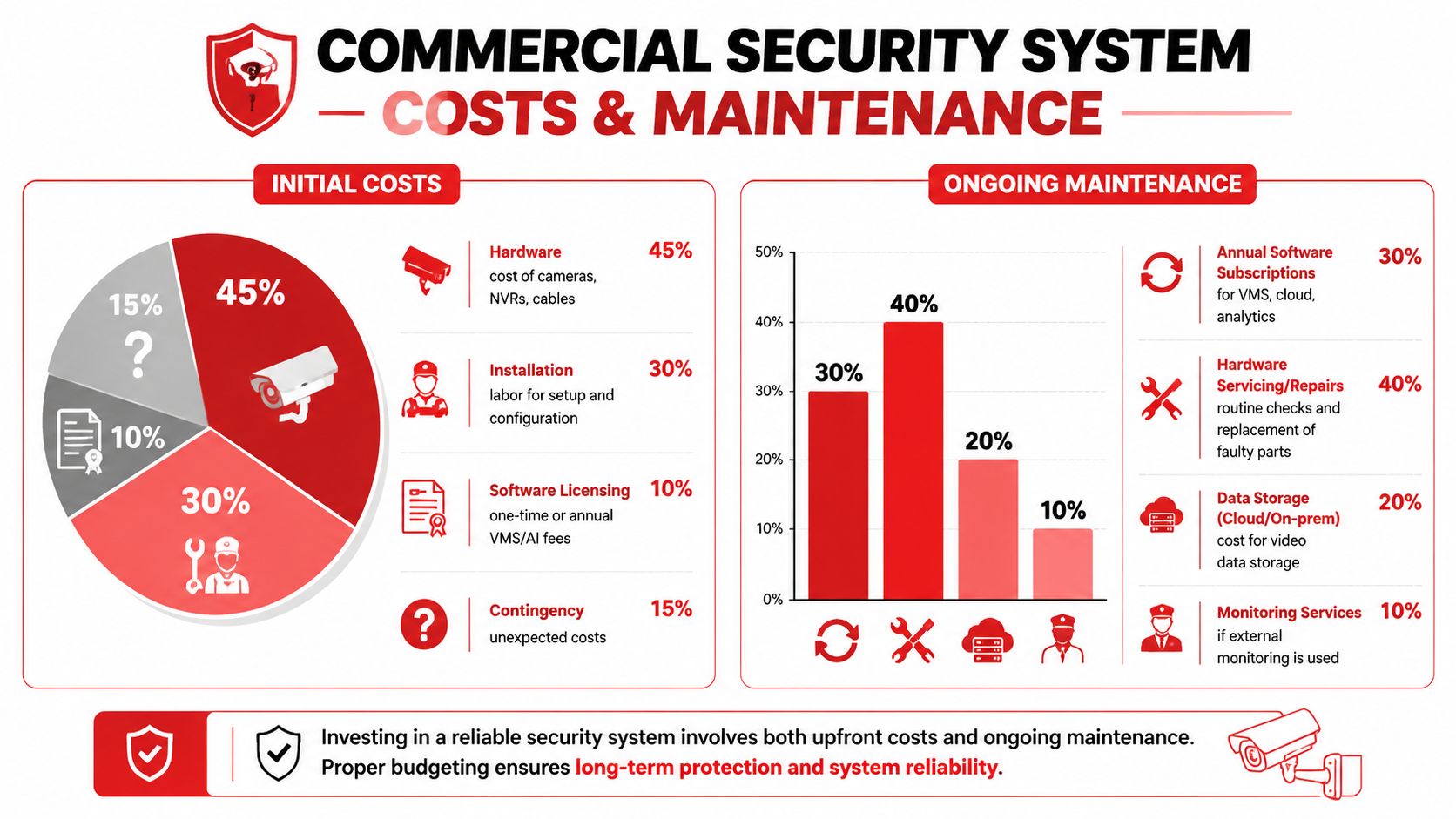
Budgeting for a commercial security cameras system gets easier when you split the project into three buckets. First, installation and hardware. Second, monitoring and storage. Third, ongoing maintenance.
What good upkeep actually involves
Many sites treat maintenance as a once-something-breaks task. That's a mistake. Cameras slowly lose value when lenses get dirty, timestamps drift, storage fills, or settings no longer match the risks on site.
A sensible maintenance routine includes:
- Lens cleaning: Dust, rain residue, grease, and spider webs can ruin night footage.
- Health checks: Confirm each camera is online and recording correctly.
- Playback testing: Make sure exports work before an incident forces the issue.
- Firmware management: Keep systems stable and secure.
- Scene review: Check whether recent layout changes have created blind spots.
Buy for evidence, not just coverage
Footage has to be usable. To achieve individual identification in a commercial security field of view in Australian environments, systems must record at a minimum resolution of 4CIF (704 x 576) at 10 to 25 fps to meet legal and forensic standards, according to Matryx Consulting's CCTV technical advice document.
That standard matters during procurement. If a system only gives you vague movement but not usable identification in critical zones, it may satisfy a checklist on paper while failing the actual purpose of the install.
Don't ask only “How many cameras do we need?” Ask “Which views must identify a person clearly?”
A practical five-step rollout
Survey the site properly
Walk the venue or facility during real operating conditions, not just during a quiet daytime visit.Map risk points
Prioritise entries, exits, cash or stock areas, conflict zones, service lanes, and restricted access points.Define compliance settings
Set audio, privacy masking, user permissions, and retention rules for the state and use case.Test the live system
Review image quality, night views, playback speed, and export workflow before sign-off.Assign ownership
Someone in the organisation should own checks, faults, and review schedules so the system doesn't drift.
FAQs
What's the best camera type for a venue entrance
A fixed high-detail camera is usually the safest choice because it gives a consistent view of faces as people approach and enter.
Should hospitality venues use audio recording
That depends on the state and the use case. Queensland needs particular caution because all-party consent is required for audio recording through security cameras.
Is cloud storage always better than on-site storage
Not always. The better option depends on retrieval needs, internet reliability, privacy controls, and how the site is managed.
How often should a system be checked
Check live status routinely and carry out fuller inspections on a planned basis, especially after layout changes, weather events, or busy trading periods.
Can one PTZ camera replace several fixed cameras
Usually not by itself. PTZ cameras are useful, but they stop watching the wider area when they zoom in on one incident.
What's the most common design mistake
Overly wide camera views. Managers often try to cover too much with one unit, then discover faces and actions are too small to use.
If you're reviewing venue security, planning a new fit-out, or upgrading an ageing camera estate, GM GROUP Services can help you align surveillance, monitoring, guard deployment, and compliance into one practical security plan for events, hospitality venues, retail sites, construction projects, and commercial facilities across NSW, VIC, QLD, and the ACT.
Discover more from GM Group Services
Subscribe to get the latest posts sent to your email.