
SEO Title: 7 Essential Event Security Communication Protocols for 2026
SEO Meta Description: Communication protocols are the backbone of safe, organised event security. Learn how to choose, implement, secure, and future-proof communication protocols for Australian venues and events in 2026.
URL: /communication-protocols-event-security-guide
Communication protocols decide whether your team handles a small incident discreetly or lets it turn into a crowd problem.
If you're running an event, venue, construction site, or busy hospitality floor in NSW, VIC, QLD, or the ACT, you already know the pattern. A spill happens near an entry point. A guest slips. A guard calls it in late because the channel is congested. The supervisor gets half the story. Cleaning arrives without first aid. CCTV has the right angle, but nobody relays it to the floor team quickly enough. Nothing dramatic on its own. Together, it becomes operational friction, guest frustration, and preventable risk.
In practice, communication protocols are the rules that stop that chain reaction. They tell your team what channel to use, what words to use, who responds first, what gets escalated, what gets logged, and which system carries the message when the primary one fails.
For Australian event security, the challenge isn't only radios versus apps. It's getting frontline guards, supervisors, control rooms, K9 teams, gatehouse staff, venue managers, and legacy systems to work as one organised unit.
Why Strong Communication Protocols Are Non-Negotiable
A security operation without clear communication protocols looks organised until the first fast-moving incident. Then the weak points show up immediately. People double-handle tasks, repeat calls, miss critical detail, or wait for direction that should already be documented.
At events, most communication failures aren't caused by dramatic technology breakdowns. They're caused by unclear procedures. One guard says "need assistance". Another says "urgent". A supervisor hears noise, not priority. The team loses time sorting the message before solving the problem.
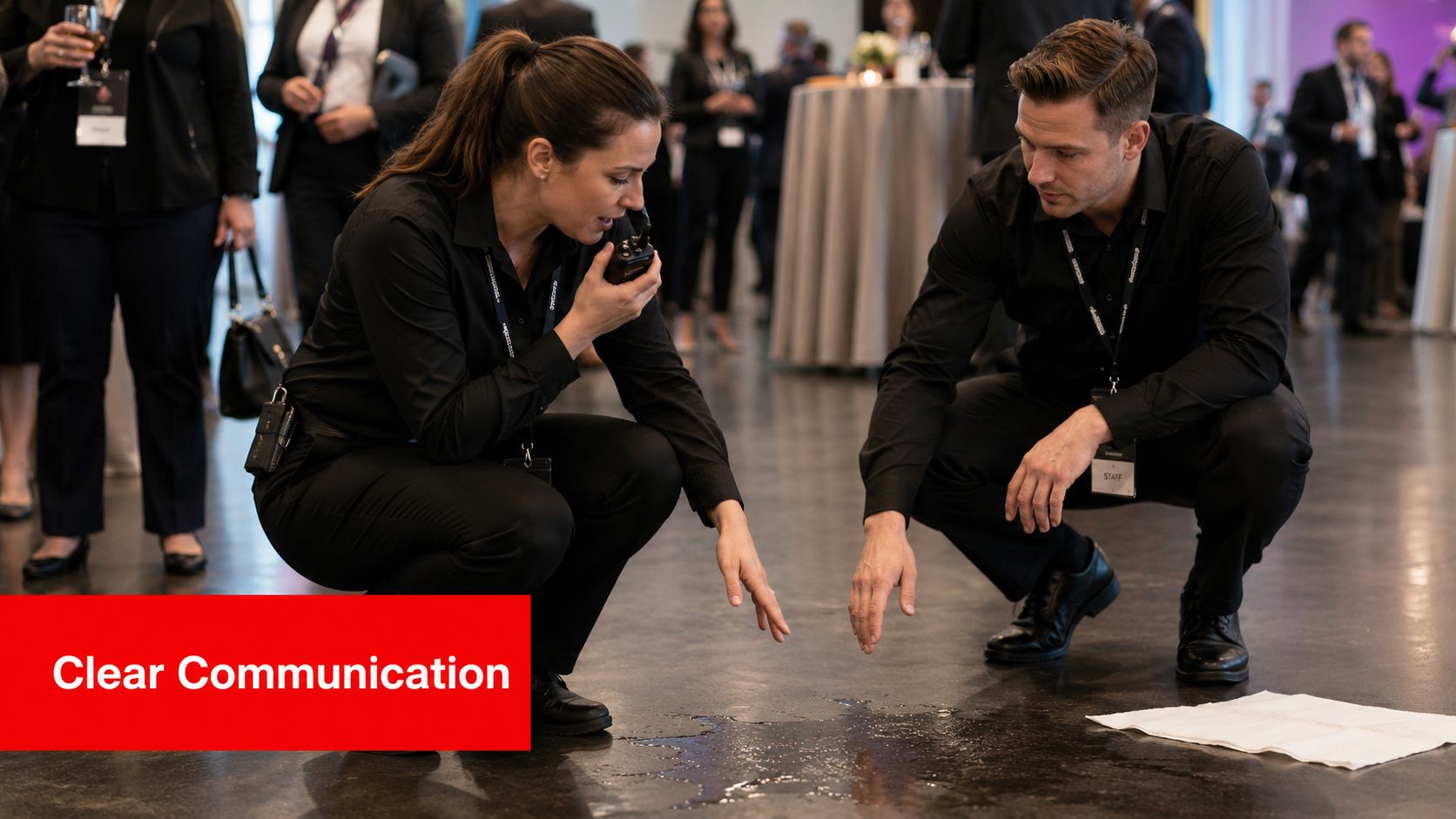
Communication Protocols Protect More Than Radio Traffic
Good communication protocols do four jobs at once:
- They protect people: Staff can report hazards, aggression, medical issues, and crowd pressure clearly.
- They protect operations: Supervisors can allocate the right resource without guessing.
- They protect evidence: Logs, timestamps, and handovers stay cleaner when language is standardised.
- They protect reputation: Guests notice when staff respond quickly, calmly, and consistently.
That matters because your security team now depends on the same broader digital foundations that the rest of Australia relies on. Australia has over 32 million mobile connections, showing how standardised systems such as WiFi, IP, and HTTP underpin daily operations and the digital tools security teams increasingly use, according to Statista's overview of mobile communications in Australia.
Practical rule: If an instruction can't be passed clearly between a floor guard, a supervisor, and a control point in one attempt, the protocol isn't strong enough yet.
What Fails on the Ground
Clients often assume communication protocols mean buying better hardware. Sometimes that helps. Often it doesn't.
What usually fails first is simpler:
- Too many channels: Staff don't know where urgent traffic belongs.
- Loose language: People describe instead of classify.
- No escalation path: Reports stall with the first receiver.
- No fallback method: When one tool drops out, the team improvises.
A workable protocol gives every message a path. That's what keeps a minor issue minor.
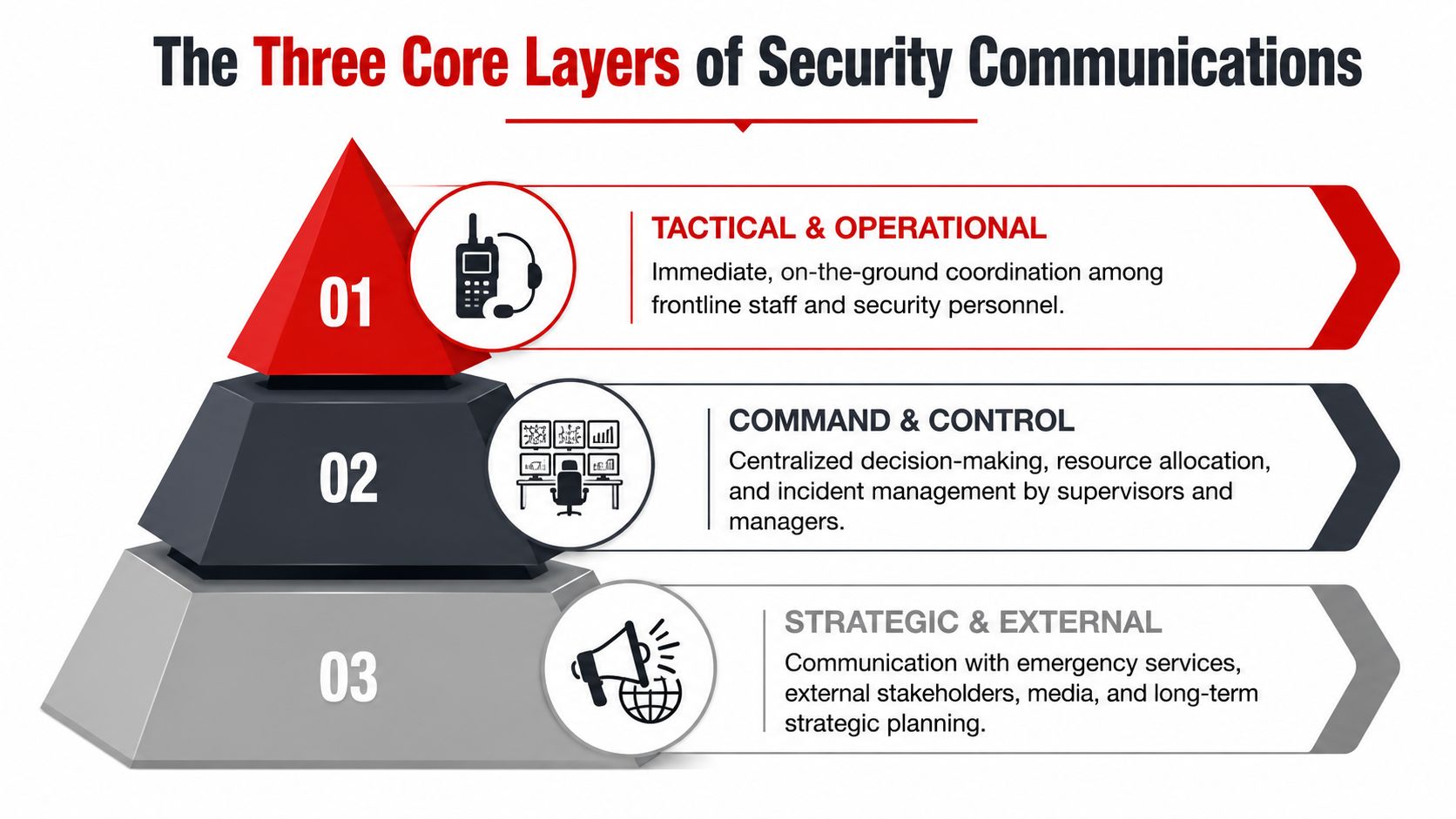
The Three Core Layers of Security Communications
Security communications work best when you treat them as three connected layers, not one tool. If one layer is weak, the others can't compensate for long.
Procedural Communication Protocols
This is your written playbook. It covers incident categories, reporting thresholds, channel allocation, chain of command, and escalation triggers.
If a patron becomes aggressive at a bar, the procedure should already answer these questions:
- Which role responds first?
- Does the floor guard stay on observation or engage?
- When is supervisor attendance mandatory?
- When does venue management get notified?
- When does the incident move from operational to emergency status?
Without this layer, staff create their own process during live operations. That leads to inconsistency between shifts and sites.
Human Communication Protocols
The human layer is where many operations subtly break down. A radio can be technically perfect and still carry poor communication.
This layer includes call signs, phonetic clarity, acknowledgement rules, message order, and tone under pressure. It also includes the simple discipline of brevity. The best operators don't sound clever. They sound unmistakable.
Australia's communication culture also matters here. The ARDC notes a broader Australian tendency to use first names in 90% of cases to reduce hierarchy within communication settings, alongside the role of standardised communication practices in reliable information exchange, as outlined in ARDC's resource on standardised communications protocols. In security operations, that directness helps, but only if it's backed by disciplined wording.
Clear language beats impressive language. "North gate, one intoxicated male refusing direction, supervisor attend" is useful. "We've got a situation up here" isn't.
Technical Communication Protocols
This is the equipment and software layer. Radios, push-to-talk over cellular, WiFi, incident apps, control room dashboards, gatehouse intercoms, monitoring systems, and any connected device that carries or supports operational messages all sit here.
The common mistake is treating every technical system as standalone. In live security work, those systems need defined roles:
| Layer need | Best-fit technical example | What it should handle |
|---|---|---|
| Immediate voice traffic | Two-way radio | Fast tactical coordination |
| Quiet supervisor traffic | Encrypted app or PoC | Low-profile updates and tasking |
| Audit trail | Incident reporting platform | Notes, time stamps, attachments |
| External escalation | Phone or dedicated emergency channel | Ambulance, police, venue executive |
For teams reviewing WiFi security for app-based comms, this guide to WPA3 and IPSK is a useful technical reference because it explains practical wireless access controls in plain language.
Why the Layers Must Match
A modern venue can have good radios, decent coverage, and competent people, yet still fail because the layers don't match. If the procedure says "report all ejections to control" but the human layer uses vague language and the technical layer has no dedicated supervisor channel, the process collapses under noise.
The fix isn't adding more tech. It's aligning the three layers so every common incident has one clear path.
Choosing Your Key Event Communication Protocols
Most venues don't need one communication method. They need a mix of communication protocols matched to noise level, team size, discretion, coverage, and legal risk.
Four Protocol Types That Matter Most
The practical mix usually comes down to four protocol families.
Two-way radio protocols are still the fastest option for immediate, shared awareness. They're strong for entries, perimeters, crowd movement, and fast escalation. They struggle when channels get cluttered or when staff discuss sensitive details that shouldn't be broadcast widely.
Digital or app-based protocols work well for discreet tasking, supervisor coordination, image sharing, and incident records. Push-to-talk over cellular can reduce hardware burden for some teams, but it depends on network reliability, battery discipline, and secure connectivity.
SOP-based protocols are the documented communication rules for repeat scenarios. These aren't optional paperwork. They're what stop each supervisor from inventing a different response to intoxication, trespass, lost children, or medical alerts.
Escalation path protocols define who gets informed, in what order, under which threshold. This is what separates a contained operational issue from a reporting failure.
Comparison of Radio vs. Digital Communication Protocols
| Feature | Two-Way Radio | Digital/App-Based (PoC) |
|---|---|---|
| Speed of group broadcast | Excellent | Good |
| Performance in high-noise operations | Strong | Varies by device and headset setup |
| Discretion | Limited | Strong |
| Ease of creating audit trail | Limited unless paired with logs | Strong |
| Dependence on mobile or WiFi infrastructure | Lower | Higher |
| Best use case | Frontline, immediate coordination | Supervisors, records, quieter escalation |
| Main weakness | Channel congestion and overheard traffic | Network dependence and device management |
What Works Best in Different Environments
A festival with roaming patrols, bag checks, vehicle movement, and crowd pinch points usually needs radio-led communication protocols. Voice traffic has to move instantly, and teams can't rely on staff pulling out phones mid-incident.
A corporate conference or premium hospitality venue often benefits from a blended model. Frontline staff use radios for urgent calls, while supervisors use secure app-based updates for sensitive guest matters, staff reallocations, and reporting.
Construction and industrial sites often sit in the middle. Radios remain the operational backbone, but digital systems become valuable for gatehouse coordination, contractor movement, and documented incident flow.
Security Rules for Digital Protocols
If you're using WiFi-backed or networked communication tools, treat security as part of the protocol, not an IT add-on. The Australian Cyber Security Centre's ISM guidance recommends WPA3, prefers IPv6, and requires credentials between authenticators and RADIUS servers to be protected with RADIUS over IP Security or RADIUS over TLS to reduce interception risk, according to the ACSC networking guidelines.
That has direct consequences for event and venue operations in NSW, VIC, QLD, and ACT. If a digital comms app runs over weak WiFi security, the convenience isn't worth the exposure.
The right protocol stack is the one your team will still use correctly at peak pressure, not the one that looks best in a proposal.
A Practical Selection Method
Use this decision filter before you buy or deploy anything:
- Noise profile: Will staff hear and transmit clearly in the actual operating environment?
- Discretion need: Does the job involve private guest issues, covert work, or sensitive supervisor traffic?
- Coverage reality: Are you relying on WiFi or mobile where building layout, concrete, or temporary infrastructure may interfere?
- Audit requirement: Do you need a strong written or digital record after the event?
- Fallback path: If the app fails, what carries the message next?
If you can't answer the fallback question clearly, the protocol mix isn't ready.
A Practical Checklist for Protocol Implementation
Most communication failures happen before the event opens. They start in planning, procurement, or briefing. A workable implementation process removes ambiguity before staff hit the floor.
Build the Plan Around the Site
Start with the environment, not the equipment list.
Walk the actual site and mark:
- Dead spots: loading docks, stairwells, basements, service corridors, metal-heavy plant areas
- Noise zones: bars, stages, plant rooms, roadside interfaces
- Control points: entries, exits, command posts, first aid, CCTV room, gatehouse
- Escalation nodes: where incidents are handed upward or outward
Australia's lack of practical implementation guidance for real-time interoperability between mixed systems, including combinations such as modern guard dispatch platforms and older K9 tracking tools, makes a unified site plan critical, as noted in this paper on real-time protocol interoperability for heterogeneous security agent systems.
Eight Practical Implementation Steps
- Assess the operating risks: Crowd issues, alcohol service, plant movement, VIP presence, overnight access, public interface, and medical response all change communication load.
- Assign primary and backup channels: One for frontline operations, one for supervisors, one fallback. Keep the structure simple.
- Define message formats: Staff should know the order. Location first, incident type second, support required third.
- Issue role-based call signs: Use names only where appropriate. Roles reduce confusion when staff rotate.
- Write incident-specific SOPs: Cover lost child, intoxication, ejection, trespass, suspicious package, first aid, and evacuation support.
- Test every device on site: Don't assume because it charged, paired, or connected in the office that it works in the venue.
- Brief before opening: Confirm channels, fallback, command structure, and escalation triggers.
- Debrief after the shift: Capture bottlenecks while they're still fresh.
Copy and Adapt These Templates
Radio SOP template
Channel use: Channel 1 frontline, Channel 2 supervisors, fallback by direct phone if radio traffic fails.
Call format: "[Call sign], [location], [incident type], [assistance required]."
Acknowledgement rule: Receiver repeats location and action.
Priority rule: Urgent safety traffic overrides routine traffic.
Logging rule: Supervisor records time, location, responding staff, and outcome.
Emergency escalation path template
| Trigger | First response | Second notification | External escalation |
|---|---|---|---|
| Medical incident | Nearest trained staff and supervisor | Control point or venue lead | Ambulance if required |
| Aggressive patron | Nearest guard and supervisor | Venue duty manager | Police if threat persists |
| Suspicious item | Isolate area and supervisor attend | Control and venue lead | Emergency services if threshold met |
| Evacuation issue | Area warden and supervisor | Command point | Emergency services as needed |
What Doesn't Work
Avoid these setup mistakes:
- Over-coded language: Staff forget it under pressure.
- One channel for everything: Urgent calls get buried.
- Unclear ownership: Everyone hears the call, nobody owns the action.
- No interoperability plan: Legacy tools, contractor systems, and digital platforms stay isolated.
A short, disciplined implementation always beats a complex protocol binder nobody uses.
Ensuring Staff Training and Regulatory Compliance
A protocol on paper means very little if staff haven't practised it under pressure. Training has to build behaviour, not just awareness.
Train for Real Conditions
Classroom briefings are useful for baseline alignment. They don't prove performance.
Run short drills that mirror actual operating stress:
- entry refusal with escalating aggression
- first aid request during peak noise
- lost child report during queue congestion
- supervisor handover across changing shifts
- app outage requiring radio fallback
These exercises expose the weak spots fast. Usually it's message order, acknowledgement discipline, or staff hesitating to escalate early enough.
Teams don't rise to the protocol document. They fall back to the level they've rehearsed.
Monitor Adherence During Live Operations
Good supervisors listen for protocol drift in real time.
Watch for:
- repeated open-ended calls
- people skipping location details
- staff using the wrong channel
- private matters broadcast too widely
- unanswered acknowledgements
When you hear drift, correct it quickly and efficiently. Don't wait for the post-event debrief if the same mistake is affecting live response.
Compliance Is Part of the Communication Chain
Logs, incident notes, and message discipline all matter when a matter becomes reportable.
In Australia, since 2018, businesses with annual turnover of at least $3 million must report data breaches to the OAIC, regardless of Essential Eight adoption, as summarised by UpGuard's overview of Australian cybersecurity frameworks. For event organisers, hospitality operators, and larger venues handling personal information, that means digital communication systems can't be treated casually.
If your team uses SMS for alerts or customer messaging, deliverability and compliance settings matter as well. Teams reviewing outbound text workflows may find this resource on Effective A2P SMS deliverability useful for understanding message governance and sender reliability considerations.
Check Every Connected Device for 2026 Readiness
If your security operation uses smart cameras, intercoms, IoT sensors, or connected access devices, procurement now needs to account for upcoming rules. Under Australia's mandatory security standards for smart devices, effective 4 March 2026, devices must not have universal default passwords, must provide a way to report security issues with status updates, and must disclose the exact end date for device support, according to the Department of Home Affairs smart device security standards.
That changes buying decisions. A device that can't show support lifecycle information or still relies on universal default credentials is a poor fit for any long-term security communications environment.
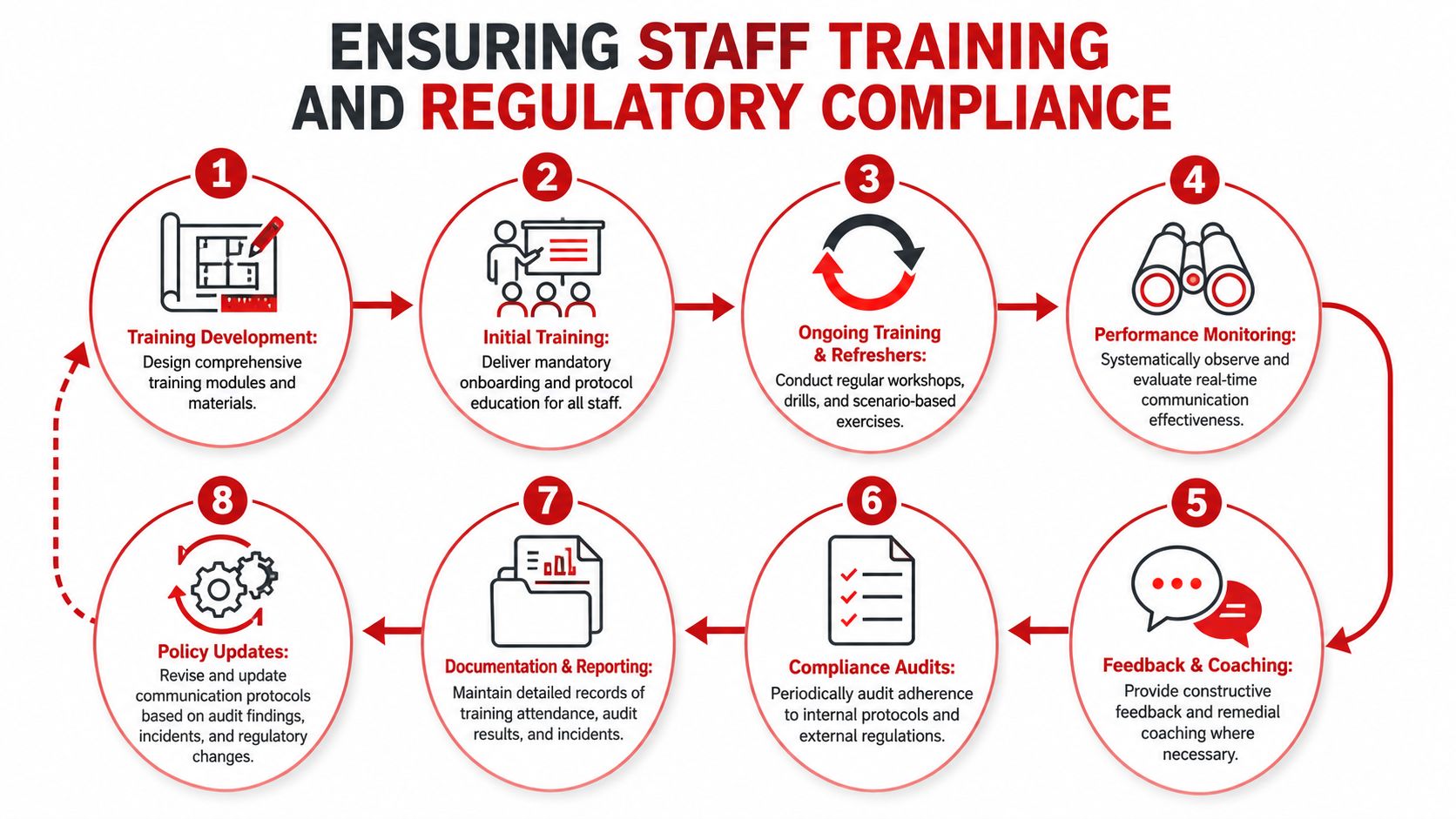
A Simple Training Rhythm
Use a repeatable cycle:
- Onboarding: Teach channels, language rules, escalation path, and reporting standard.
- Scenario drills: Rehearse likely incidents in an operational environment.
- Live monitoring: Supervisors check adherence during shifts.
- Remedial coaching: Fix recurring mistakes one behaviour at a time.
- Policy update: Adjust the protocol when the operation changes.
That's how communication protocols stay usable instead of becoming binder content.
Integrating and Future-Proofing Your Security Communications
Most sites don't run one clean, modern stack. They run a patchwork. Analogue radios, digital push-to-talk, CCTV, access systems, monitoring tools, gatehouse controls, and old devices that still do one job well.
The practical question isn't whether that mix is elegant. It's whether it can be coordinated without creating blind spots.
Bridge Old and New Carefully
For physical security operations, legacy equipment often remains in service longer than anyone likes. Gatehouse controllers, older panic alarm interfaces, and back-to-base components may still be operationally critical.
Where full replacement isn't realistic, use a bridging strategy:
- Protocol gateways to connect older devices to newer management layers
- Micro-segmentation so legacy equipment isn't exposed broadly
- ACL-based restrictions around who and what can reach those assets
- Jump-host or brokered access models for controlled vendor support
In industrial and energy-adjacent environments, Modbus remains widely implemented because it's open, simple, and compatible with legacy systems, while OPC UA is gaining ground for secure, platform-independent integration and richer data handling, as described in Advantech's guide to industrial communication protocols. The lesson for security operations is clear. Choose integration methods that respect what legacy gear can realistically support.
Buy for Interoperability, Not Feature Lists
When you review new systems, ask harder questions:
- Can it integrate with your incident logging workflow?
- Can supervisors extract a clean record after an incident?
- Does it support secure transport and modern authentication?
- Can it coexist with legacy infrastructure during a staged rollout?
- What happens if the vendor changes the platform or ends support?
That last point matters more than many buyers realise. A flashy feature set doesn't help if the system becomes another silo.
For teams comparing identity and integration approaches in broader platform environments, this article on MEDIAL integration with LMS is a useful example of how modern integration decisions should be framed around compatibility and lifecycle, not just immediate convenience.
Buy the system that fits your command structure and can exchange information cleanly. Don't buy the one with the longest demo.
Keep Future Tools on a Tight Leash
AI analytics, drone feeds, smart sensors, and newer agent-style software may become part of security operations over time. That's fine, but each new tool should enter through the same discipline as any radio or app.
It needs a clear operational role, a secure communication path, a fallback method, and an owner. If it can't fit those requirements, it isn't improving your communication protocols. It's adding another channel for confusion.
Frequently Asked Questions About Communication Protocols
How do we secure legacy security devices without replacing everything
Use containment before replacement. Segment the device from the rest of the network, restrict access with ACLs, and use protocol gateways or controlled jump paths where needed. This is a common but poorly answered issue in Australian security environments, and while Cyber.gov.au's secure connectivity principles for OT environments recommend measures such as protocol gateways and micro-segmentation, there aren't local case studies that quantify the benefit for security firms. That means you should base the decision on risk reduction, operational necessity, and supportability rather than waiting for perfect benchmarks.
What's the best on-the-day radio etiquette for busy events
Keep messages short and structured. Start with location, then incident type, then what you need. Wait for acknowledgement. Don't use the operational channel for long explanations, background chat, or sensitive guest detail that should move to a supervisor channel or secure app.
Should we choose radios or app-based communication protocols
Usually both. Radios handle immediate coordination well. Apps and digital tools help with discretion, reporting, and supervisor oversight. The right answer depends on your site layout, noise level, privacy needs, and fallback planning.
How often should communication protocols be reviewed
Review them after every major event, after any serious incident, when site conditions change, and when you introduce new hardware or software. Small updates done regularly are far better than infrequent full rewrites.
What's the biggest mistake event organisers make
They assume communication protocols are mostly about devices. In reality, the biggest problems come from poor message discipline, unclear escalation paths, and no fallback plan when one system fails.
For event organisers, venue operators, and site managers who need communication protocols that hold up under real operating pressure, GM GROUP Services provides specialized security support across NSW, VIC, QLD, and the ACT. Their teams cover events, venues, hospitality, retail, construction, gatehouse control, K9 operations, patrols, monitoring, emergency response, and risk assessments, with a strong focus on clear reporting, supervision, and fit-for-purpose deployment.
Discover more from GM Group Services
Subscribe to get the latest posts sent to your email.