


Security Camera Systems Wireless look simple on the box, then a venue manager gets the call everyone dreads, the temporary gate needs coverage tonight, the hardwired run is impossible, and the site still needs footage that can help a guard or control room act. That's the use case in NSW, VIC, QLD and the ACT, not a neat brochure shot.
Wireless systems work when they're treated as part of a broader security setup, not as stand-alone gadgets. They can cut cabling, speed up retrofits, and support back-to-base monitoring, but they still depend on the right radio band, power plan, storage choice and privacy controls. If you're planning for a festival, a pub, a retail back room or a construction perimeter, that distinction matters.
Why Wireless Security Camera Systems Are the Practical Choice for Australian Sites
A lot of buyers first meet wireless security camera systems when a job turns awkward. The heritage pub can't take fresh cabling without upsetting the tenancy. The festival organiser needs a gate watched before doors open. The site manager is staring at a concrete wall, a tight deadline and no appetite for trenching.
That's where wireless earns its place. It reduces the physical work of installation, which matters in temporary sites, retrofit jobs and dispersed premises. It also fits the way Australian security teams already operate, because cameras are rarely useful on their own, they feed into monitoring, guard dispatch and evidence capture.
The broader market supports that reality. The Australian video surveillance market was valued at USD 1.48 billion in 2023 and is forecast to reach USD 2.66 billion by 2030, implying an 8.6% CAGR from 2024 to 2030 (market reference). That doesn't make wireless cameras magic. It does show they sit inside a mature surveillance environment, not a niche consumer corner.
Practical rule: if the site can't tolerate long cable runs, wireless is worth considering early, not as an afterthought.
The other reason these systems keep showing up in Australian operations is connectivity. Most venues and sites now have the network base needed for app alerts, remote viewing and off-site monitoring. That makes wireless attractive for managers who need eyes on a site without standing beside the recorder all night.

Understanding What Wireless Security Camera Systems Actually Are
Wireless describes how the video travels, not automatically how the camera gets power. That's the first thing buyers need to lock in, because a product can send footage over Wi‑Fi and still need a mains outlet beside the mounting point. In practice, “wireless” often means a wireless transmission layer, not a cordless device.
Think of a walkie-talkie network versus a landline. The camera is the talker, the wireless link is the channel, and the recorder, app or monitoring centre is where the message lands. If the camera still needs power from a socket, it's wireless in transmission, not fully untethered in deployment.
Three transmission models come up again and again. Wi‑Fi cameras are common for retail, hospitality and office retrofits. Dedicated radio links are useful where a site wants a controlled network path. Cellular or 4G cameras suit places where there's no dependable fixed internet, such as a remote compound or a site shed waiting on service.
Power is a separate question. Some models run from mains power, some from battery, and some use solar support with battery backup. That's why product brochures need to be read carefully. A camera on a battery can still be wireless in the networking sense, while a camera plugged into an outlet can still send footage wirelessly to a recorder.
The Australian context matters here. The market is building on an already mature surveillance base, and the country has one of the highest CCTV-camera-per-capita levels in the world, according to the Department of Home Affairs, so wireless units are being added into an existing security fabric rather than introduced from scratch. That's why the better question isn't “Is wireless real?”, it's “What part of the security chain does the wireless link solve?”

Wireless cameras only work cleanly when the transmission method, power method and recording method are chosen separately.
Five Key Features to Evaluate Before You Buy
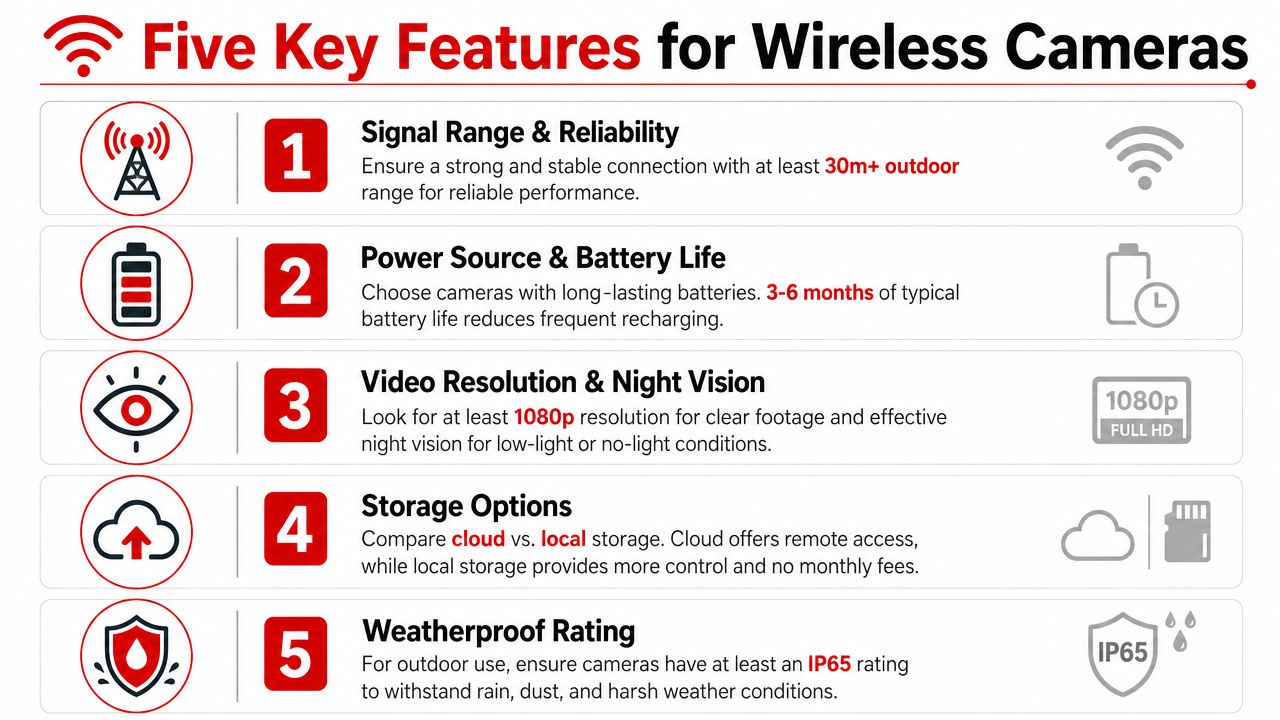
Buyers often start with megapixels and end up with a system that looks good in a datasheet but struggles on site. A better filter is to judge the camera by resolution, connectivity, power, storage and encryption or firmware hygiene. That's the difference between a camera that looks modern and a system that keeps working on a Saturday night.
A current 2.4 GHz Wi‑Fi security camera lists IEEE 802.11b/g/n support, a maximum wireless rate of 150 Mbps, H.264 compression, and an outdoor model capped at 3 MP resolution at 15 fps (camera specification). That's useful because it shows the headline radio speed isn't the same thing as usable video capacity. Once multiple cameras share an access point, real-world performance depends on bandwidth budgeting, channel planning and how much other traffic is already sitting on the network.
The RF choice matters just as much. U.S. DHS guidance notes that wireless surveillance systems commonly use 700 MHz, 900 MHz, 2.4 GHz, 4.9 GHz and 5 GHz bands, and that range depends heavily on frequency and transmission medium (DHS technical note). In a dense venue, lower frequencies usually cope better with structure and obstruction, while 2.4 GHz can get crowded fast.
Wireless Camera Feature Trade-offs at a Glance
| Feature | What to Look For | Common Trade-Off |
|---|---|---|
| Resolution and frame rate | Enough detail for faces, plates or incidents | Higher detail can increase storage and network load |
| Connectivity and RF band | Stable link at the actual site, not just on paper | Higher bands can be more crowded, lower bands can be less flexible |
| Power method | Mains, battery or solar matched to the mount point | Better placement freedom can mean more maintenance |
| Storage | Local recording, SD fallback or recorder integration | Cloud convenience can depend on network continuity |
| Encryption and updates | Current firmware and strong access control | More setup discipline, less exposure later |
For sites that need camera events, access control or gate workflows tied together, a practical resource is the gate access API. It's useful because camera deployment is rarely isolated, it often sits beside gate control, visitor processing and incident response.
Practical rule: don't buy the highest number on the box, buy the combination that survives your worst hour on site.
Deploying Wireless Cameras Across Events Venues Retail and Construction
Deployment needs to match the environment, not the product category. Wireless security camera systems can be fast to position, but only if the site plan reflects how people move, where power exists and where RF congestion is likely. The best installs are the ones that reduce friction without creating blind spots.
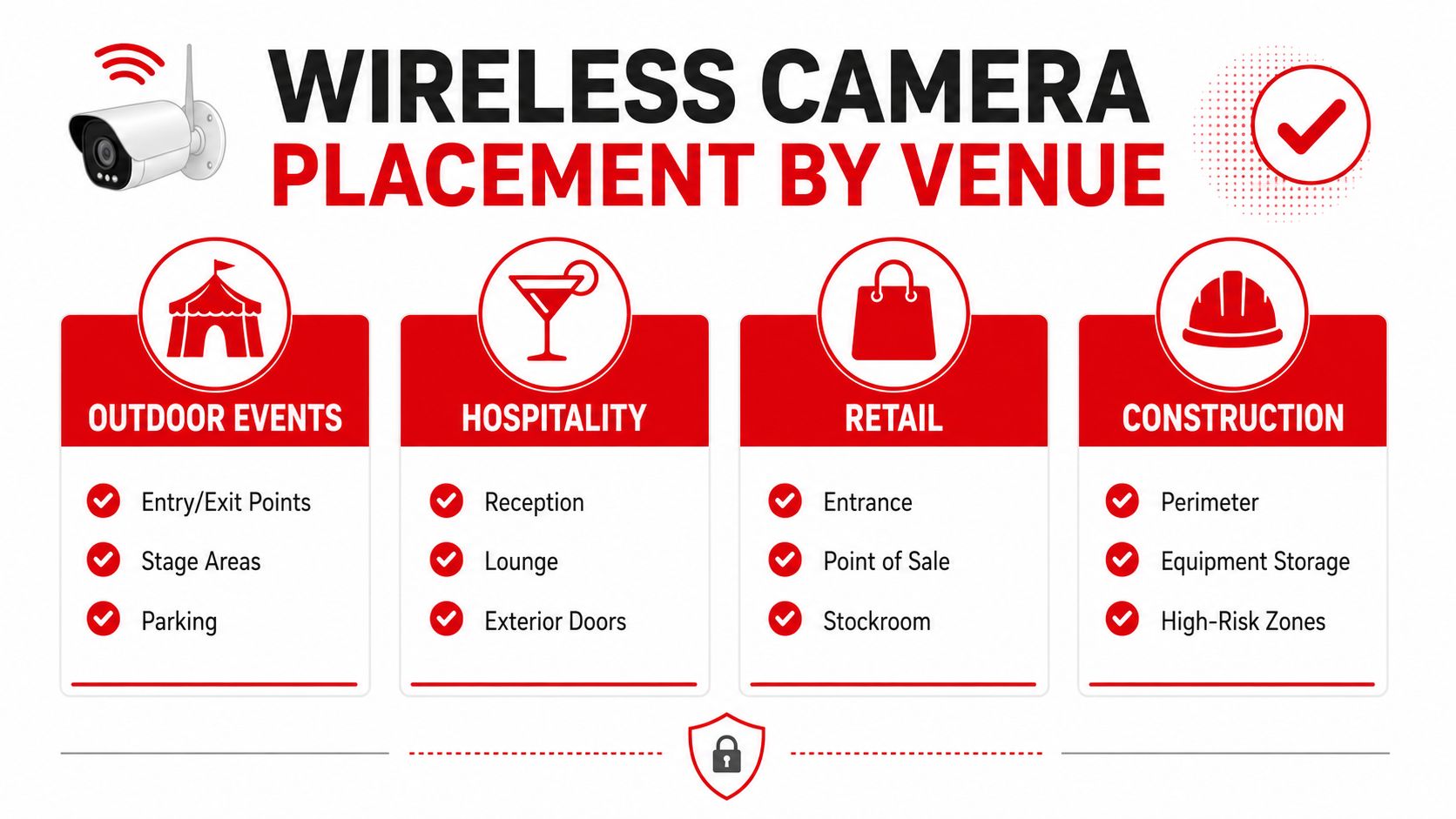
Outdoor events and festivals
Temporary sites reward speed. Wireless units work well at entry points, stage approaches and vehicle gates because the team can mount, test and reposition them without waiting on long cable runs. The Australian connectivity base supports off-site viewing and app alerts in the background, with 96% of households having internet access and 98% of those internet users going online by mobile phone (ABS-based connectivity reference).
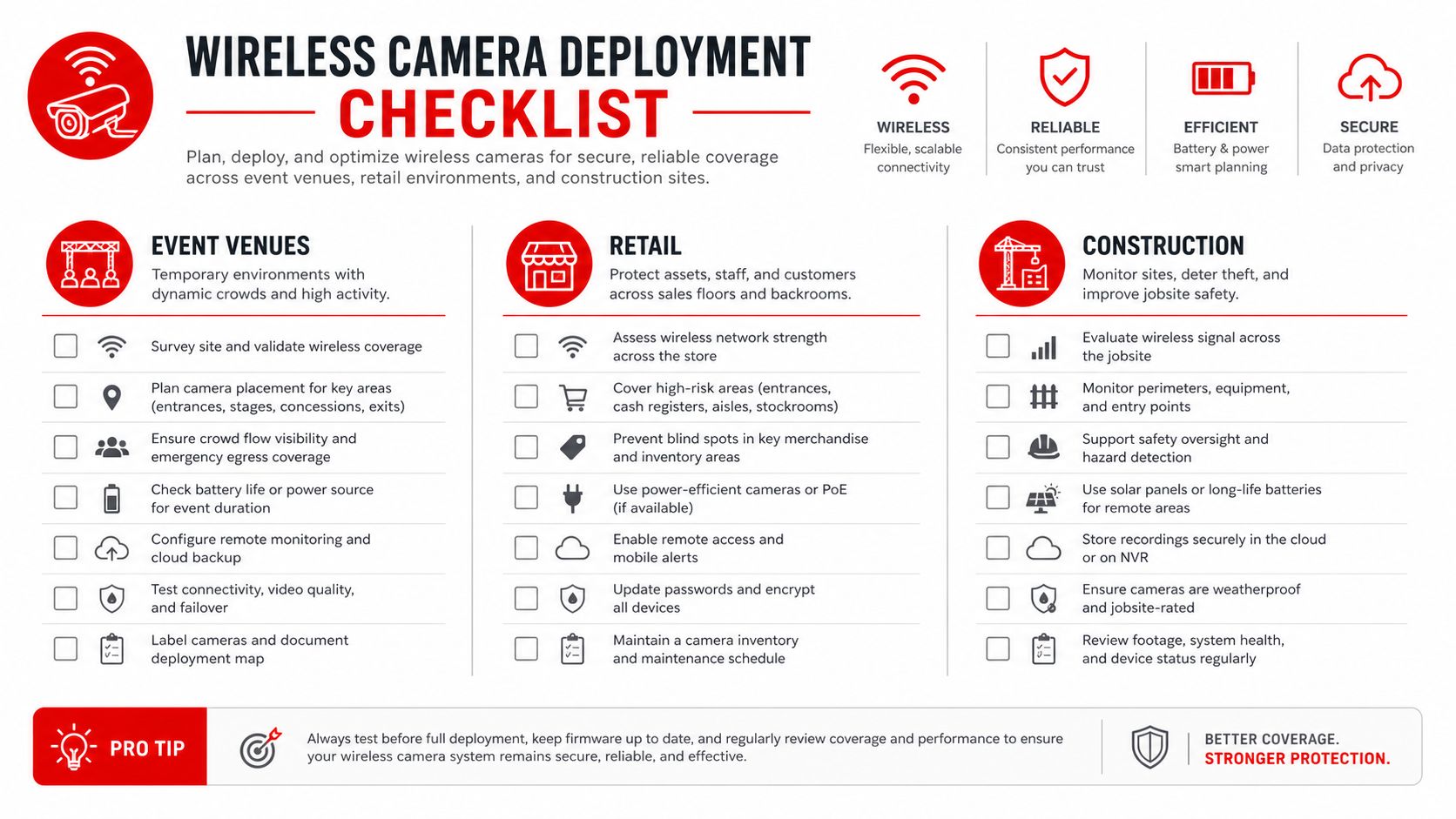
Use a simple field checklist.
- Entry and exit points: aim for clear face capture where queues compress.
- Stage edges and mixed-traffic zones: keep the camera high enough to avoid tampering.
- Parking and perimeter gaps: confirm the view still holds when people crowd the fence line.
Hospitality venues
Retrofits are the main win here. A bar, club or hotel with heritage finishes often can't absorb visible cabling without a fight from the building fabric or the landlord. Wireless cameras let the site manager add coverage to lounge areas, loading doors and cash handling points with less disruption.
Dense public Wi‑Fi is the catch. The more guest devices and in-house systems share the air, the more carefully the access point and channel plan need to be managed. A wireless camera in that environment should be treated like a traffic participant, not a passenger.
Retail and shopping centres
Retailers usually care about loss prevention blind spots, not just broad scene coverage. Wireless cameras help at entrances, point of sale areas, stockrooms and car park approaches where quick installation matters. They also fit short-term refurbishments, tenant churn and fit-out changes.
Use them where cable work would slow the site down, but verify storage and retention before peak periods. If the network is unstable, local recording fallback is safer than relying only on a live feed.
Construction and industrial sites
Construction teams often need coverage before the permanent network exists. That's where solar, battery and cellular cameras become practical. They can watch sheds, tool storage and perimeter breaches while mains power and NBN service are still months away.
Practical rule: if the camera can't stay online when the site sheds go dark, it's not a perimeter solution, it's a convenience device.
Wireless cameras also make more sense when they're tied to access and incident workflows, not left as a standalone feed. Site managers should think in terms of what happens after the alert, who sees it, who responds and how footage is preserved.
Real-World Wireless Camera Setups for Australian Operations
A NSW music festival often needs eyes on temporary gates long before the crowd arrives. Wireless cameras suit that job because crews can mount them quickly, send footage back to a control room and give mobile patrols a live reference point without running cable across a temporary footprint.
A Melbourne bar or club in a heritage tenancy has a different problem. The owner may want better coverage of the entry, till area and rear access point, but visible cabling can damage the building or trigger costly remedial work. Wireless units solve the retrofit problem, provided the site still checks signal quality and power access at the chosen mounting point.
A Brisbane shopping centre usually needs evidence-grade coverage at car park entries and loading docks. Wireless cameras make sense where the landlord wants to cover blind spots quickly, especially during fit-out changes or maintenance windows. The system still has to be planned so the camera angle catches vehicles and people in the movement path, not just the empty driveway.
A Sydney construction site often relies on cellular or solar-backed wireless cameras. The site cannot wait for mains power or fixed internet, but the perimeter still needs monitoring for theft, trespass and after-hours movement. When the network is incomplete, the camera choice should match the site stage, not the ideal future state.
That planning should include the transmission path, power method and what happens if connectivity drops. In NSW, VIC, QLD and the ACT, the operator still has to think about placement, retention and lawful use, because a camera that is easy to move still sits inside a privacy and evidence process. RF band choice matters too, since crowded venue airspace, nearby tenant systems and on-site Wi‑Fi can all affect whether the feed stays usable during peak load.
GM GROUP Services works in that same practical lane, with CCTV and monitoring services that can sit beside guards, patrols and incident response. That matters because cameras are only useful when someone is responsible for the next move.
Australian Privacy Rules ROI and Ongoing Maintenance
A venue manager in NSW can install a wireless camera in an afternoon, then find the real work starts after the mount goes up. CCTV is commonly used to deter crime, detect offenders and provide evidence, but the system still has to respect privacy, signage, retention and lawful use across the venue or worksite. Wireless deployment sits inside that same obligation, because a camera that is easy to reposition still needs clear rules around who can access it, where it points and how footage is handled.
The ROI case is usually practical. Wireless systems can cut the cost and disruption of trenching or major cable runs, which matters in retrofits, temporary sites and places where access is tight. They also reduce deployment time, so a venue can cover an entry point before an event, a retailer can watch a stockroom during a fit-out, or a construction site can bring perimeter visibility online before permanent infrastructure is ready.
Maintenance is where wireless systems are won or lost. They are not set-and-forget. Each site needs routine checks on signal strength, battery status, encryption settings and storage capacity before peak trading periods or major events. If the site depends on local recording, someone has to confirm that storage still has space and that the camera has not slipped into a degraded state. In dense venues across NSW, VIC, QLD and the ACT, I also check whether nearby Wi‑Fi, tenant systems or event traffic are weakening the feed at the actual mounting point.
A pre-event or pre-trade folder should cover the basics.
- Signal check: verify each camera still has a stable link at the actual mount point.
- Power check: confirm battery charge, solar support or mains feed is healthy.
- Access check: review who can view footage, export clips and receive alerts.
- Storage check: confirm local or cloud retention still matches the site's evidence needs.
- Compliance check: make sure signage, retention and lawful-use obligations still line up with the venue plan.
If the system has to keep recording through outages, pair the wireless cameras with local storage fallback or cellular failover. That keeps the recording path alive through a power dip or network interruption, and it gives guards, managers or monitoring staff a usable record when the site is under pressure.
Frequently Asked Questions About Wireless Security Camera Systems
A venue manager commissioning cameras for a concert, a retailer adding coverage after hours, or a builder securing a perimeter usually asks the same questions first. Wireless systems sound simple on paper, but the key issue is how video gets from the camera into the wider surveillance setup, what happens when connectivity drops, and how the site handles power, storage and privacy obligations.
What does wireless mean in product marketing? It usually means the camera sends video without a fixed data cable. It does not always mean the unit is cordless, because many cameras still need mains power, a battery pack, solar support or another power source.
Can wireless cameras keep recording during an internet outage? Yes, if they have local storage such as an SD card or recorder integration. Remote viewing and alerts may drop until the connection comes back, so the recording path and the alert path need to be designed separately.
Are wireless cameras suitable for large venues with dense Wi‑Fi? They can be, but only with proper RF planning and sensible camera placement. Dense public Wi‑Fi, tenant networks and event traffic can reduce link quality, so band choice, channel use and mounting position have to suit the site rather than the brochure.
Can wireless footage work with guard response or monitoring? Yes, and that is where the system becomes operationally useful. The footage needs to reach a person or process that can act on it, whether that is a control room, patrol team or monitoring desk. If the camera cannot get video through reliably, the response team is left guessing, which is a poor outcome on a busy site in NSW, VIC, QLD or the ACT.
How does privacy law affect wireless camera use? The camera type does not change the privacy obligations. Site managers still need clear signage, lawful collection, sensible retention settings and access controls that match the venue plan, especially where public areas, staff areas and neighbouring properties sit close together.
Should wireless cameras be the whole system or part of one? They work best as one layer inside a broader surveillance design. The camera, power method, storage path, connectivity plan and monitoring process all have to line up, otherwise the system may look complete while still failing at the point that matters. That is why we usually match wireless coverage to the site's response plan before anyone signs off on hardware.
GM GROUP Services can help you match wireless cameras to the reality of your site, not just the spec sheet. If you need camera coverage for an event, venue, retail space or construction perimeter, start with the deployment plan and then build the monitoring and response around it. Visit GM GROUP Services to discuss a security setup that fits the way your site operates.