


At 5:40 pm, the gates open, the crowd starts to compress at the main entry, and control needs an answer in seconds, not after three missed calls and two contradictory radio messages. That is the point where mobile communication stops being a gear list and becomes an operational capability.
For Australian events and worksites, the primary task is to set up a system that still functions under load. Devices matter, but devices alone do not fix poor channel discipline, patchy coverage, unclear escalation paths, or contractors turning up with their own habits. Good teams build communications the same way they apply event production best practices. As one operating system for the site, not a pile of disconnected tools.
Australia has high mobile uptake and broad network availability, as reported by the Australian Communications and Media Authority. That helps, but it also creates false confidence. A full signal bar on a handset does not guarantee clear talk paths inside a concrete stadium, reliable data service in a dense crowd, or consistent reporting across security, medical, traffic, and operations.
The difference between a calm response and a messy one usually comes down to integration. Coverage, radios, phones, messaging apps, control room procedures, training, incident logging, and compliance all have to work together. If one part is weak, the whole site feels it. That is why mobile communication should be planned as a capability first, then equipped to match the risk, the venue, and the way the team operates.
SEO Title: Mobile Communication 5 Steps to Flawless Security
SEO Meta Description: Mobile communication for Australian events and worksites. Learn 5 practical steps to plan, secure, train, and back up your comms capability.
Suggested URL: /mobile-communication-event-security
Why Your Event's Success Hinges on Mobile Communication
A lost child at a packed festival should be a fast, controlled response. In weak operations, it turns messy. One guard reports the child on the wrong channel. Another repeats the description with half the details missing. The front gate calls control on a mobile that keeps dropping in the crowd. Ten minutes later, the problem isn't the incident. It's the communication breakdown around it.
That's why mobile communication is the nervous system of an event. Security, medical, logistics, traffic, production, and venue management all depend on the same thing. The right message must reach the right person at the right time, in a format they can act on immediately.


Mobile communication fails in predictable ways
On paper, most events have radios, phones, group chats, and a control point. In practice, those pieces often aren't integrated. Teams use different call signs, contractors bring their own habits, and no one has agreed on escalation rules. That's how a routine patron issue becomes a chain of missed handovers.
A lot of organisers focus on staging, ingress, artist movements, and crowd flow first. They should. But communication design has to sit alongside those decisions. Strong event production best practices always account for how information moves, not just how people and equipment move.
Ground truth: If your team has devices but no common protocol, you don't have a comms system. You have noise.
The commercial side reflects the pressure too. The secure mobile communications market is projected to reach US$ 100.9 billion by 2033, growing from US$ 28.5 billion in 2026 at a 19.8% CAGR, driven by cybersecurity threats, regulation, and remote mobile workforces, according to secure mobile communications market projections.
What actually protects an event
The operations that run cleanly don't rely on one gadget. They build capability across four layers:
- Technology choices: The device must suit the environment.
- Protocol discipline: Teams need short, repeatable message formats.
- Training: Staff must use the system the same way under stress.
- Redundancy: When one path fails, another must already be live.
That's the difference between reaction and control.
Step 1 Foundation Planning and Needs Assessment
Most communication failures are baked in before bump-in starts. They happen when organisers buy equipment first and ask operational questions later.
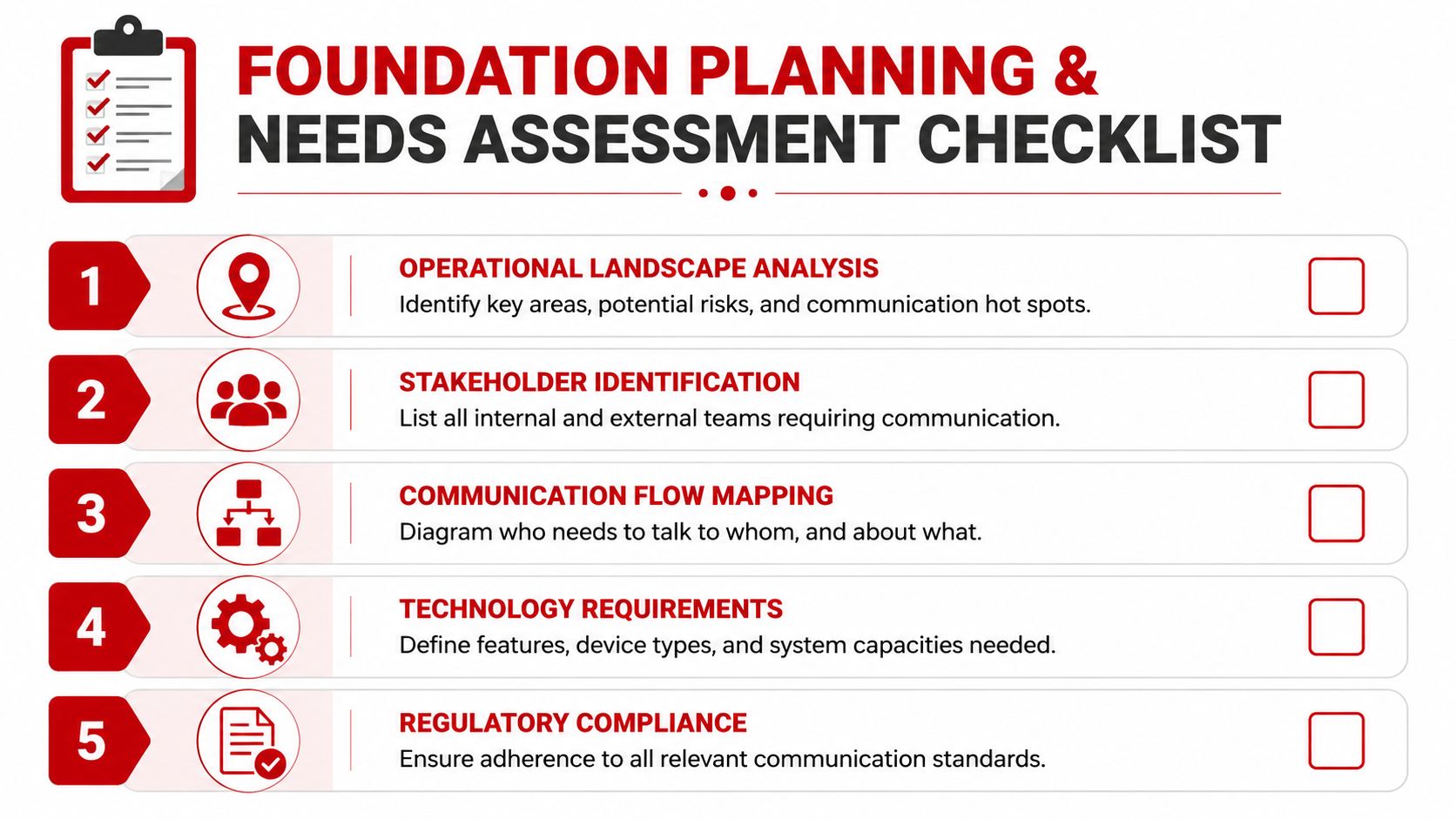
A proper mobile communication plan starts with a site and task assessment. Not a device catalogue. Not a quote comparison. Start with who needs to talk, why they need to talk, how fast the message must move, and what happens if it doesn't.
Map users by function, not by headcount
A 200-person event team does not need one flat communication model. Security supervisors, gate staff, medical responders, stage managers, loading dock marshals, and roaming patrols all communicate differently.
Break the site into user groups such as:
- Incident responders: Security, medical, emergency leads.
- Operational control: Event control, venue operations, duty managers.
- Movement teams: Traffic, parking, ingress, egress, logistics.
- Back-of-house crews: Production runners, technical staff, contractor leads.
- Executive contacts: Promoter rep, client lead, police liaison where relevant.
Then ask practical questions:
- Who speaks most often?
- Who needs one-to-many communication?
- Who needs private escalation paths?
- Which roles need voice only, and which need photos, maps, or written logs?
- Which teams must still communicate if public cellular service is weak?
Survey the site like an operator
A venue map won't show you the actual pain points. Walk the site. Test concrete structures, basements, cool rooms, loading tunnels, rear perimeters, temporary fencing lines, and entry queues. Events in regional areas need extra caution. Australia still has severe mobile communication coverage gaps in regional and remote areas, despite national density exceeding 126 services per 100 people, as noted in IBISWorld's review of mobile telecommunications density.
A strong metro result doesn't guarantee a strong result at your site. Hills, steel, crowds, and temporary infrastructure change everything.
Use a simple pre-deployment checklist:
- Dead zones: Identify where messages drop or become garbled.
- Interference points: Note generators, staging structures, plant equipment, and dense public traffic areas.
- Control locations: Confirm where command can hear, see, and escalate.
- Power access: Know where charging, swap batteries, and spare devices will sit.
- Carrier performance: Check whether different networks behave differently on site.
Lock the protocol before the purchase
Good teams can save money. Once the communication flow is documented, the device choice becomes clearer.
Write down:
- Primary channels: Who uses what for daily operations.
- Emergency channels: What overrides normal traffic.
- Escalation paths: Who can interrupt whom, and when.
- Message format: Location, issue, priority, required action.
- Plain language rules: What terms are approved and what wording creates confusion.
A brief example works well: “Control, North Gate, missing child, red shirt, last seen near food trucks, requesting two staff to sweep exit corridor.”
That level of clarity matters more than brand names at this stage.
Step 2 Selecting the Right Communication Technology
The wrong technology choice usually comes from asking the wrong question. Teams ask, “What's the best device?” A better question is, “What failure can't we afford?”
For a construction site in Victoria, the answer might be missed safety escalation between supervisors and plant operators. For a festival in NSW, it might be overloaded public networks at headline time. For a hotel or stadium, it might be poor indoor penetration and too many user groups sharing one path.
The stakes are not small. Australia's Investigation & Security Services industry is valued at $13.9 billion in 2026, with revenue expected to grow at an annualised 1.6% over the next five years, according to IBISWorld industry data on investigation and security services. That scale means communication decisions affect large workforces, large sites, and real operational risk.
Communication technology comparison for security operations
| Feature | Digital Mobile Radio (DMR) | Push-to-Talk over Cellular (PoC) | Ruggedised Smartphone |
|---|---|---|---|
| Reliability in dense environments | Strong when the radio network is properly designed | Depends on cellular performance and congestion | Depends on cellular or Wi-Fi conditions |
| Capital vs operational cost | Higher upfront infrastructure and device planning | Lower entry point, ongoing service dependence | Device-led cost, plus app and management overhead |
| Battery life | Usually strong for voice-led shifts | Varies by device and usage pattern | Often weaker under constant app, screen, GPS, and data use |
| Data capability | Limited compared with smartphones | Better for mixed voice and basic data workflows | Best for forms, photos, messaging, maps, and incident apps |
| Scalability | Good, but planning matters | Easy to add users across broad areas | Scales well if device management is tight |
| Security control | Strong when professionally configured | Can be strong with proper carrier and platform controls | Strongest only when managed like an enterprise endpoint |
What works well for each model
DMR still earns its place where instant voice, simplicity, and long battery life matter most. It suits gate teams, patrols, traffic control, and fast-moving incident response. Staff can use it with gloves, in rain, and under stress. The downside is limited data handling and the need for careful channel discipline.
PoC works well when teams are geographically spread or when you need broad-area coverage without building radio infrastructure. It can be a smart fit for multi-site contractors or event groups operating across metro areas. If you need a plain explanation of the network layer behind modern cellular voice and data, SnapDial's LTE phone explanation is a useful primer.
Ruggedised smartphones are excellent for supervisors, control room leads, and teams who need incident reports, images, GPS, digital checklists, or access control apps in one device. They are not a magic replacement for every radio. Give a first-response guard too many apps and too many menus, and they'll slow down exactly when speed matters.
A practical selection rule
Use a mixed fleet when the operation justifies it.
- Frontline responders: Prioritise simple voice.
- Supervisors and control: Add data-rich devices.
- Contractor-heavy sites: Choose systems with easy onboarding and clear user permissions.
- High-risk venues: Favour tools that can be centrally managed, locked down, and audited.
Buying one device type for everyone looks tidy in procurement. It often performs badly on the ground.
Step 3 Secure Deployment and System Integration
Plenty of event teams deploy communication equipment that works functionally but fails security basics. That's dangerous for two reasons. First, sensitive traffic can be exposed. Second, poorly integrated systems create blind spots between field teams and control.
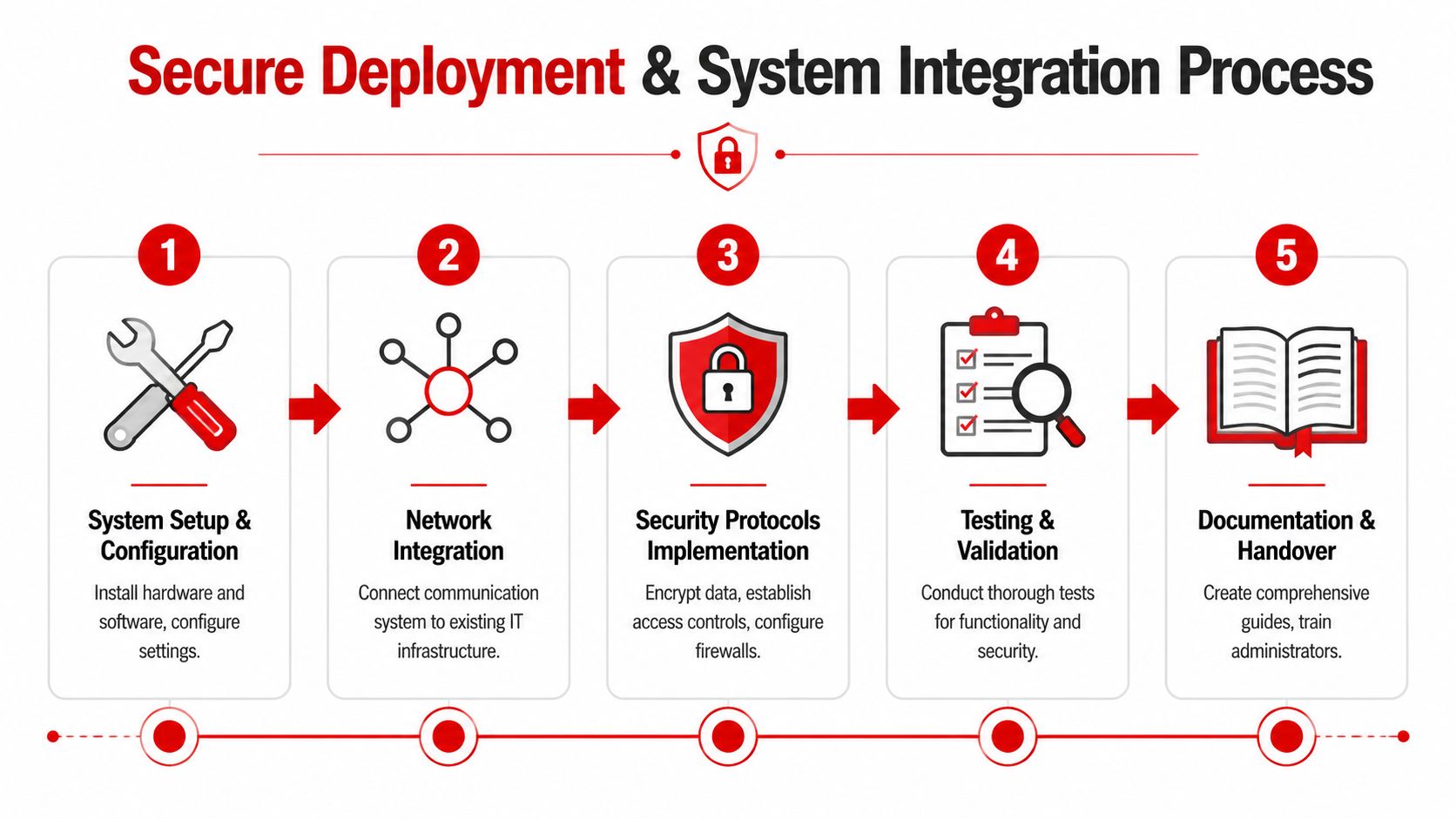
Secure deployment starts with one rule. Every device must be treated as part of an operational system, not a standalone tool.
Harden the transport, not just the handset
If your comms run over LTE or 5G, security cannot stop at device login. In Australian LTE and 5G deployments, mandatory air interface encryption using AES-128, when combined with IPsec VPNs, achieves a 98.5% success rate in preventing adversary-in-the-middle attacks. Separating traffic with MPLS reduced critical vulnerability incidents by 42% between 2024 and 2025, according to the TCCA paper on cybersecurity in critical communications.
For managers, the practical takeaway is straightforward:
- Encrypt over the air: Don't assume carrier transport alone is enough.
- Separate traffic classes: Keep user, control, and management traffic distinct where the system allows.
- Use secure gateways properly: Misconfiguration is a common source of avoidable risk.
- Provision by role: A gate guard does not need the same access as a control room supervisor.
Integrate comms with the rest of the operation
A good mobile communication setup should support the wider security picture. If an incident is called in from a patrol, control should be able to tie that report to CCTV views, access control events, or a digital incident log without relying on memory and handwritten notes.
Many teams get stuck. They deploy radios on one island, phones on another, CCTV in a separate room, and reporting in a different app. Nothing is joined up. That forces operators to repeat the same information across multiple systems.
Use a deployment workflow like this:
- Provision devices by team role
- Apply standard naming, channel plans, and user groups
- Set security controls before field use
- Test handovers between field users and control
- Confirm integration with reporting and surveillance workflows
The cleanest comms systems reduce retelling. A field report should move once, then flow into the rest of the operation.
Test where failure is most likely
Desk testing isn't enough. Run live tests at the noisiest, busiest, and structurally hardest points on site. Include stairwells, underground car parks, service corridors, back-of-house, and crowd pinch points.
Also test degraded conditions. Devices at low battery, users wearing PPE, gloved operation, weak signal, and handover from one supervisor to another. That's where secure deployment becomes operationally real.
Step 4 Effective Operational Protocols and Training
Technology doesn't create discipline. Training does.
That's the difference between a team that sounds calm under pressure and a team that floods the channel with half-finished thoughts. You can hand out quality radios and managed smartphones to every guard on site, but if nobody knows when to speak, what to say, and what channel to use, the system collapses during the first serious incident.
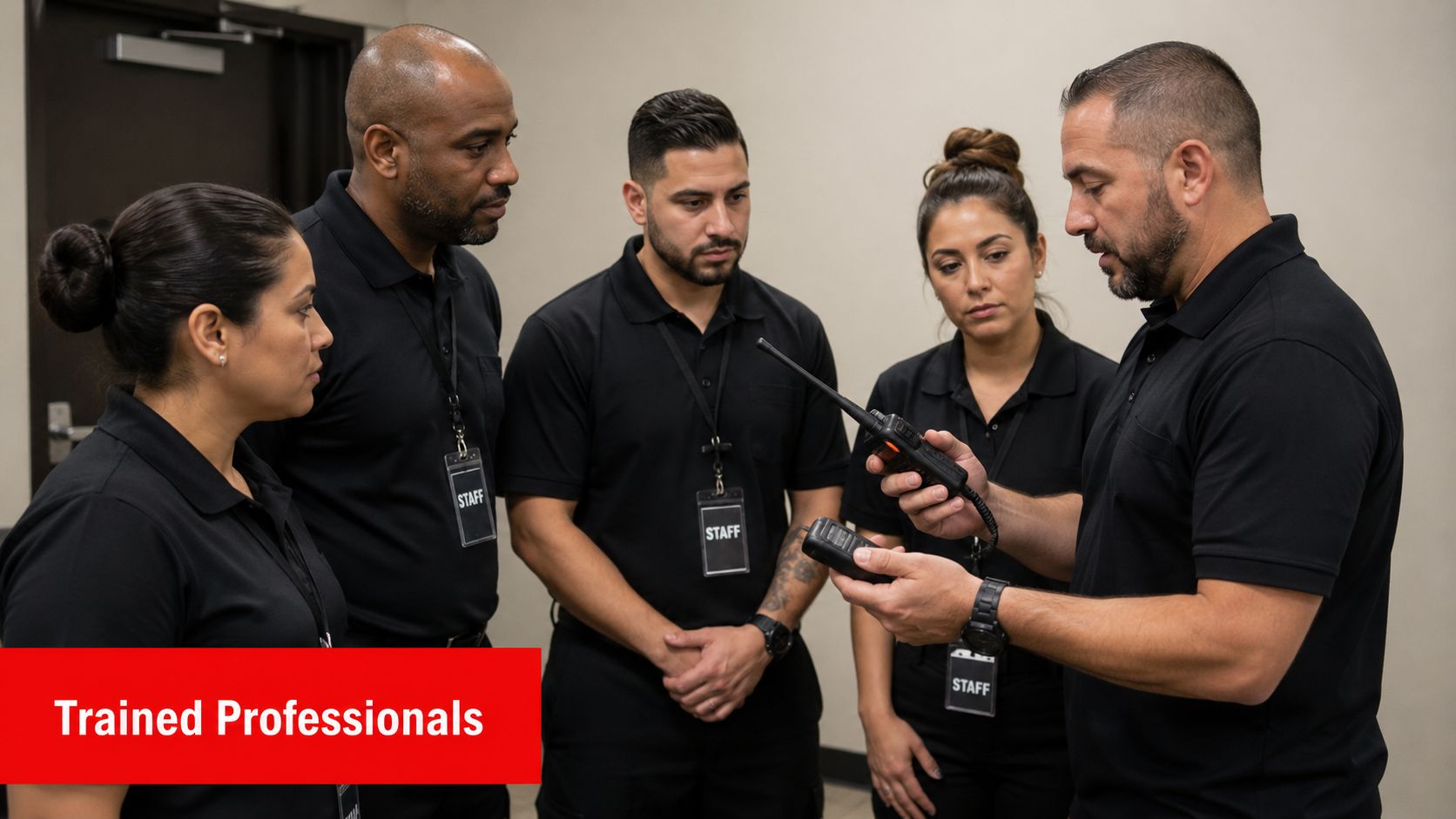
Australia has nearly 150,000 individual security licence holders and over 11,000 security firm licence holders, according to ASIAL industry research and statistics. With a workforce that large moving across events, venues, and contracts, standardised mobile communication training isn't optional. It's the only way to create consistency across mixed teams.
Build simple SOPs that survive stress
The best communication SOPs are short enough to remember and specific enough to use. Staff don't need a communications textbook. They need repeatable rules.
Core SOP elements should include:
- Channel plan: Primary, secondary, emergency, supervisor, and private escalation channels.
- Call sign rules: Consistent naming by role or zone.
- Transmission technique: Press, pause, speak. That small pause prevents clipped first words.
- Message order: Who you're calling, where you are, what's happening, what you need.
- Priority language: Clear wording for urgent traffic versus routine updates.
Train for the incidents you actually get
A lot of teams train only on the ideal workflow. That's a mistake. Train on the messy stuff. An intoxicated patron refusing direction. A child separation. A first aid request during a crowd surge. A contractor entering the wrong zone. A power issue affecting one section of the site.
Use scenario drills such as:
- Medical response: Can security, first aid, and control communicate without stepping on each other?
- Patron removal: Do staff request support early and clearly?
- Lost property versus lost person: Do teams use different response language for different risk levels?
- Site lockdown or partial closure: Can supervisors redirect teams fast without channel overload?
Practical rule: If a message takes more than one breath to understand, it's probably too long for operational traffic.
Don't overlook battery and accountability
Communication discipline also lives in logistics. Multi-day events fail when nobody owns charging, spare batteries, damaged devices, or end-of-shift returns.
Set hard routines:
- Check-out logs: Record user, device, time out, and return status.
- Mid-shift battery checks: Don't wait for low battery alerts during peak periods.
- Spare pool control: Keep reserve units programmed and assigned to a custodian.
- Damage reporting: Tag faults immediately so bad units don't cycle back into service.
Good training makes average equipment perform better. Poor training makes expensive equipment perform worse.
Step 5 Ensuring Redundancy and Streamlining Reports
At 8:10 pm, the gates are full, one side of the site loses power, mobile data slows to a crawl, and supervisors start calling control at the same time. That is the point where a communication setup stops being a kit list and proves whether it is an actual operating capability.
Australian event teams rely heavily on mobile networks and connected devices. As noted earlier, that dependence is exactly why fallback planning has to be built into the system from the start. Phones, radios, apps, chargers, reporting forms, escalation rules, and control room practices all have to support each other. If one layer fails and the others cannot carry the load, the plan was too narrow.
Redundancy requires independent fallback options
Real redundancy comes from separate paths. A second app on the same carrier does not help much if the carrier is the problem. A spare handset does not solve a dead charging process. Backup has to be designed around likely failure points.
Set it up in layers:
- Carrier diversity: Keep a small number of devices active on a different network where the risk profile justifies the cost.
- Radio fallback: Give critical roles a direct voice option that does not depend on the public mobile network.
- Power continuity: Store charged spares, vehicle chargers, and replacement batteries under one owner, with issue records.
- Offline references: Keep printed maps, contact trees, zone names, and emergency procedures available in control and key supervisor positions.
- Control room resilience: Pre-assign replacement devices and keep programming notes so failed units can be swapped fast.
- Remote-site contingency: For isolated sites or spread-out worksites, add a true off-grid option if coverage is uncertain.
The trade-off is cost and complexity. Extra carriers, spare devices, and parallel workflows add overhead. They still cost less than losing command of an incident during peak crowd movement.
Reporting is part of the communication system
A lot of teams handle the live call well, then lose the detail afterwards. That creates avoidable problems with client reviews, insurer questions, regulator scrutiny, and internal lessons learned.
The fix is a reporting chain that matches the way the team communicates on shift:
- Field transmission: Record time, location, unit, and the initial problem.
- Supervisor confirmation: Note what was checked, directed, or escalated.
- Control room log: Match the verbal traffic to a written or digital entry.
- Incident report: Complete the formal record while names, timings, and actions are still clear.
- Review record: Capture delays, equipment failures, handover issues, and protocol gaps.
Use the same location names and identifiers everywhere. If the call comes in as "East Gate 2", the report, control log, and supervisor notes should use "East Gate 2" as well. Small naming differences waste time later, especially when legal or client teams want a clean timeline.
Good reporting turns radio traffic and app messages into evidence you can defend.
Review what failed under pressure
Post-event reviews need hard questions. Where did messages queue up. Which teams kept bypassing protocol. Did control have enough detail to make decisions without calling people back. Which fallback method worked, and which one only existed on paper.
That review should end with operational changes, not vague feedback. Reassign channels if congestion was repeated. Replace devices that dropped out. Simplify report fields if staff kept missing the same information. A communication capability improves when each event leaves the system tighter than it was before.
Frequently Asked Questions About Event Mobile Communication
Can we run an event using consumer messaging apps only
You can, but it's rarely the best choice for frontline security. Consumer apps are fine for low-risk coordination between managers. They become unreliable when you need instant group voice, disciplined escalation, device control, and clear separation between routine traffic and urgent traffic. For serious operations, use professional tools for primary comms and treat messaging apps as secondary support.
Should all staff carry the same device
Usually no. Uniform fleets make ordering easier, but operations improve when devices match roles. Patrol guards often need fast voice. Supervisors may need photos, forms, and reporting apps. Control room staff need oversight, not just a handset.
What's the biggest planning mistake
Skipping the site survey and assuming metro coverage equals on-site performance. Concrete, steel, basements, crowd density, and temporary structures change outcomes fast. Teams also underestimate how much confusion mixed contractors can create if call signs and channel rules aren't standardised.
How often should we train communication protocols
Before every major event cycle, after significant staffing changes, and after any incident that exposed a weakness. Short drills beat one long induction. Staff remember what they practise under realistic pressure.
Do we need written communication logs
Yes. Even a strong verbal response loses value if nobody can reconstruct it later. Logs support incident reporting, handovers, client review, and internal improvement. The best systems make logging easy enough that supervisors do it.
What should we prioritise on a tight budget
Start with operational clarity. Define user groups, channel plans, escalation rules, and fallback methods first. A modest system with strong discipline outperforms a premium setup run loosely.
If your venue, event, or worksite needs a communication setup that's built around real operating conditions, not just equipment lists, GM GROUP Services can help. Their teams support events, venues, retail sites, construction projects, and corporate environments across NSW, VIC, QLD, and the ACT, with licensed security personnel, supervision, reporting, and fit-for-purpose deployment that keeps people informed and sites under control.