


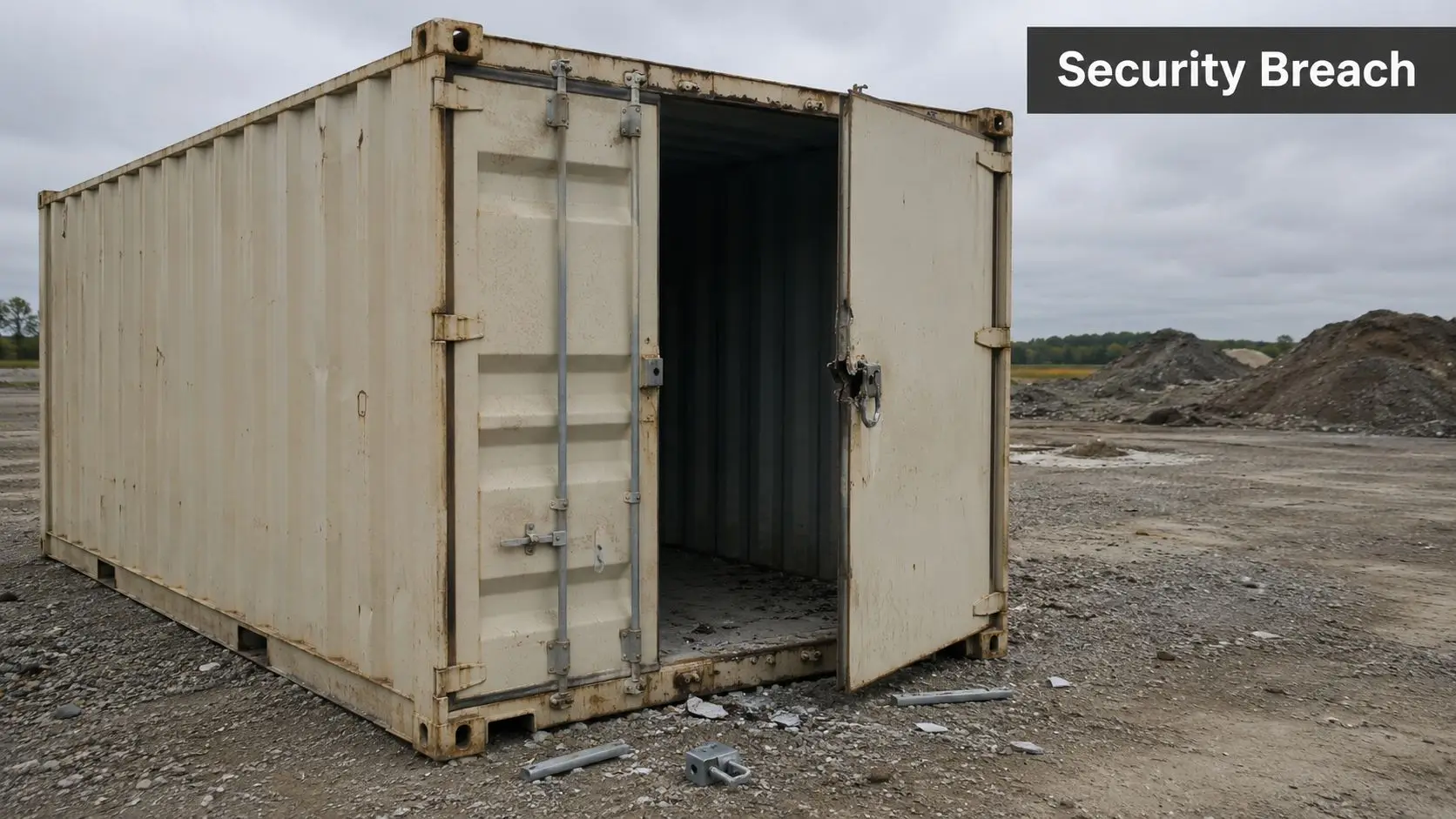
Construction Site Security Plan PDF usually becomes urgent after something has already gone wrong. You arrive on site, the container door is open, the lock has been forced, a few tools are missing, and nobody can tell you exactly who was last there, who had access, or what should happen next. That's the point where most sites realise a fence and a padlock were never a security plan.
A proper plan gives the site manager, builder, principal contractor, and security team one working document. It sets out what needs protection, who controls access, what happens after hours, how incidents are reported, and how digital systems like QR sign-ins, cloud CCTV, and remote access are controlled alongside the physical perimeter. For Australian projects, that document also needs to stand up as part of your broader site management and WHS approach.
Why Your Site Needs More Than a Locked Gate
Monday morning losses rarely start on Monday morning. They start on Friday afternoon, when materials are left where they can be seen from the street, subcontractor access isn't closed off cleanly, and nobody owns the after-hours lock-up routine.
On paper, a locked gate looks adequate. In practice, it usually isn't. A gate only controls one point of entry if the rest of the perimeter, storage, sign-in process, and response chain are also controlled. If they're not, intruders use the easiest gap available. Sometimes that's a fence line. Sometimes it's a side access left open for deliveries. Sometimes it's a copied site code shared too widely.

The sites that hold up better under pressure don't rely on one control. They use a construction site security plan PDF as an operating document. That means the plan is written, dated, assigned to actual people, and updated as the project changes.
What basic site security gets wrong
Most weak plans fail in familiar ways:
- Too much reliance on perimeter only: Fencing matters, but it won't protect tools left in open compounds or keys left in plant.
- No ownership: Everyone assumes someone else locked up, checked the gate, or reviewed the visitor log.
- No after-hours method: If an alarm, trespass report, or camera alert comes through, people don't know who responds first.
- No digital control: QR sign-in systems, remote cameras, and subcontractor portals are added without any documented user management.
Practical rule: If the plan can't tell a new supervisor what to do at 6:30 pm after a break-in alert, it isn't a real plan yet.
A security plan isn't paperwork for the folder. It's how you stop routine site exposure from turning into theft, delay, and a compliance problem.
The Foundation A Thorough Site Risk Assessment
Before you decide on guards, patrols, cameras, or gatehouse procedures, you need a site-specific view of risk. Generic templates fail because they assume every project is exposed in the same way. They're not. A high-rise build in inner Sydney has a different threat profile from a civil project on the edge of Brisbane or a townhouse site in Canberra.
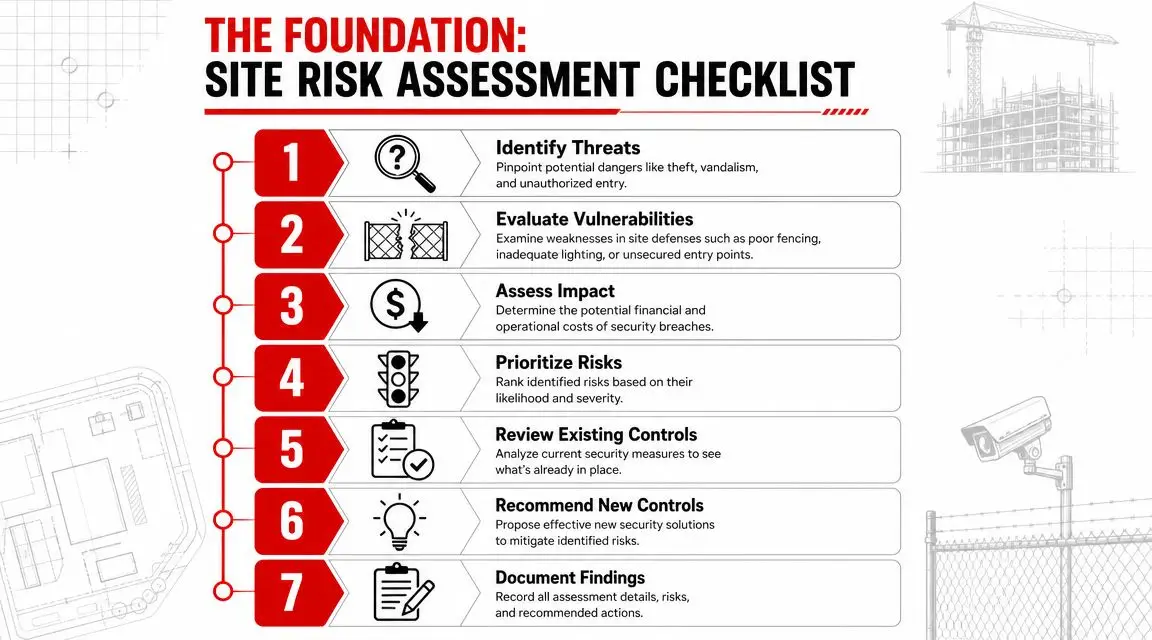
The first job is to identify what would hurt most if it was stolen, damaged, accessed, or shut down. That usually includes portable tools, fuel, copper, switchboards, plant, keys, access credentials, and any temporary site office with records or devices inside.

Start with the site, not the template
A useful risk assessment asks direct questions:
What assets attract theft fastest?
Think beyond major plant. Small tools, fuel cards, batteries, cable, and branded equipment often move quickly.Where can someone enter without being challenged?
Check damaged fence lines, shared driveways, blind corners, neighbouring properties, scaffold edges, and temporary openings for deliveries.When is the site most exposed?
After hours is obvious, but lunch breaks, shift change, and early-morning deliveries can be just as weak.Who needs access, and who currently has it?
A long subcontractor chain creates access sprawl. Old codes, shared keys, and unmanaged credentials are common failures.
Look at real local exposure
In New South Wales, the Bureau of Crime Statistics and Research recorded 2,832 incidents of stealing from motor vehicles in April 2024 alone, which is a practical reminder of how quickly tools, equipment, and plant-related assets can be targeted when access control is weak, as noted in this construction security planning reference.
That figure shouldn't be used lazily as a scare line. It's a cue to assess how easily tools and mobile assets can disappear from utes, laydown areas, and temporary storage when movement on and off site isn't controlled.
Build the risk register properly
A workable risk register doesn't need to be complex. It does need to be honest. For each risk, record:
- The asset or exposure: for example, fuel storage, site office, plant keys, copper, switch room.
- The vulnerability: poor lighting, no line of sight, weak fence section, no sign-in enforcement, shared access code.
- The likely incident type: theft, trespass, vandalism, unauthorised vehicle entry, credential misuse.
- The operational consequence: work stoppage, replacement delay, safety exposure, insurance friction, contractor disruption.
- The current control: fence, lock, camera, guard, induction rule, storage method.
- The gap: no review, no escalation path, no digital access review, inconsistent lock-up.
The strongest risk assessments are specific enough that another supervisor could walk the site and recognise every listed weakness.
Don't assess once and forget it
Construction risk shifts with the programme. Early earthworks, structural stages, fit-out, and commissioning all change what's valuable and where the pressure points sit. A site that was low risk in one phase can become highly exposed once expensive services, finishes, and access systems are installed.
Review the assessment when:
- The layout changes: new gates, hoardings, scaffold, compounds, or site sheds
- The asset profile changes: plant arrives, copper and switchgear are delivered, or fit-out materials start landing
- The workforce changes: more subcontractors, weekend work, or staged handovers
- An incident occurs: even a minor one
A good construction site security plan PDF starts here. If the risk assessment is vague, every control that follows will be either too weak, too expensive, or pointed at the wrong problem.
Choosing the Right Security Measures for Your Site
At 6:15 am, the first crews arrive and find the gate shut, but the site is already compromised. A side fence panel has been lifted, two tool cages are open, and the access control tablet in the site office is offline. That is the point many managers realise the problem was never just perimeter security. It was perimeter security, asset control, credential control, and after-hours monitoring working as separate systems.
The right measures depend on how the site operates. A townhouse build with limited traffic, hand tools, and short programme pressures needs a different setup from a hospital project with multiple entry points, high-value services, staged handovers, and dozens of subcontractors cycling through each day. Good security is matched to site conditions, work stage, and the cost of failure.
Match the measure to the exposure
Start with the risk you are trying to reduce. If the issue is opportunistic theft from a poorly lit materials compound, more sign-in paperwork will not fix it. If the issue is shared credentials, tailgating, or a former subcontractor still holding app access to a smart lock or camera platform, one more patrol car is not the answer either.
On many Australian sites, the best results come from combining physical controls with digital ones. That means treating keys, swipe cards, PINs, intercom apps, remote CCTV logins, and alarm permissions as part of the same security plan. We regularly see solid fencing and cameras undermined by weak digital discipline. Shared access codes, no user audit, and no process for removing access after demobilisation are common failures.
For mobile tools and equipment, practical control comes down to disciplined logging, storage, movement records, and clear responsibility for sign-out. If your team is tightening that part of the operation, these industrial asset management tips are useful for reducing avoidable loss and disputes about who had what, and when.
Security Measure Comparison for Construction Sites
| Security Measure | Best For | Typical Cost | Key Advantage |
|---|---|---|---|
| Static guards | Sites with high public exposure, valuable assets, or continuous access points | Varies by site scope, hours, and licence requirements | Immediate human presence, visitor control, and fast escalation |
| Mobile patrols | After-hours coverage across multiple lower-traffic sites | Varies by patrol frequency and route complexity | Efficient coverage where full-time guarding is hard to justify |
| K9 units | Large perimeters, dark compounds, and high-deterrence requirements | Higher than standard patrol deployment in many cases | Strong deterrence and effective perimeter sweeps |
| Gatehouse access control | Projects with heavy contractor movement and delivery traffic | Varies by staffing model and gate infrastructure | Better control of who enters, exits, and whether credentials are valid |
| CCTV and remote monitoring | Sites needing evidence, oversight, and off-site visibility | Varies by equipment, coverage, and monitoring setup | Extends visibility after hours and supports incident review |
| Lighting upgrades | Perimeters, compounds, and blind zones with poor visibility | Depends on temporary or fixed setup | Improves sightlines for workers, patrols, and cameras |
| Electronic access control | Sites using smart locks, card access, or app-based entry | Varies by door, gate, software, and admin model | Lets managers issue, revoke, and review access with a clear audit trail |
What performs well on real sites
Some control sets are consistently more reliable because each measure supports the others:
- Gatehouse control plus verified sign-in: Effective on busy sites with frequent subcontractor and delivery movement
- Lighting plus monitored CCTV: Stronger than cameras alone where compounds are dark or shielded from the street
- Static guard plus clear post orders: Better accountability than placing a guard on site without defined tasks, patrol points, or escalation rules
- Patrols plus lock-up checklist: Good for projects that need after-hours coverage without full-time guarding
- Electronic access control plus monthly permission review: Reduces credential misuse, especially during labour turnover and staged handover periods
State requirements also affect the mix. In NSW and ACT, projects with higher public interface or government oversight often need tighter visitor control and cleaner documentation of who accessed the site and when. In VIC, sites in dense metro areas usually need stronger perimeter management, lighting design, and incident records because public exposure is constant. In QLD, spread-out sites and weather disruption can make perimeter integrity, remote monitoring continuity, and temporary barrier checks more important than a template would suggest.
Common mistakes that waste money
A visible guard with no brief, poor lighting, and no authority to challenge entrants adds cost without fixing the gap. The same applies to a camera system that records footage nobody reviews, or an app-based access system that still uses one shared code for every trade.
Use a blunt test. Name the risk, name the control, then name the person checking that the control is working.
If that chain is unclear, the measure is probably there for appearance rather than control.
The best package is rarely the biggest one. It is the one that closes the known gaps, holds up during labour turnover, and gives the site team a clear way to detect, respond to, and document both physical breaches and digital access failures.
Drafting Your Construction Site Security Plan PDF
A solid construction site security plan PDF should read like an operational document, not a generic checklist pasted into a folder. If someone else had to take over the site tomorrow, they should be able to open the plan and understand the layout, main risks, controls, contacts, escalation path, and review method without chasing half the information by phone.
That matters for theft prevention, but it also matters for compliance. Safe Work Australia's model work health and safety framework places responsibility on the PCBU to provide a work environment free from risks, including controlling site access. A documented security plan helps show WHS diligence by replacing ad hoc guarding with formal, auditable procedures, as outlined in this work health and safety and construction security reference.
The core sections that need to be in the PDF
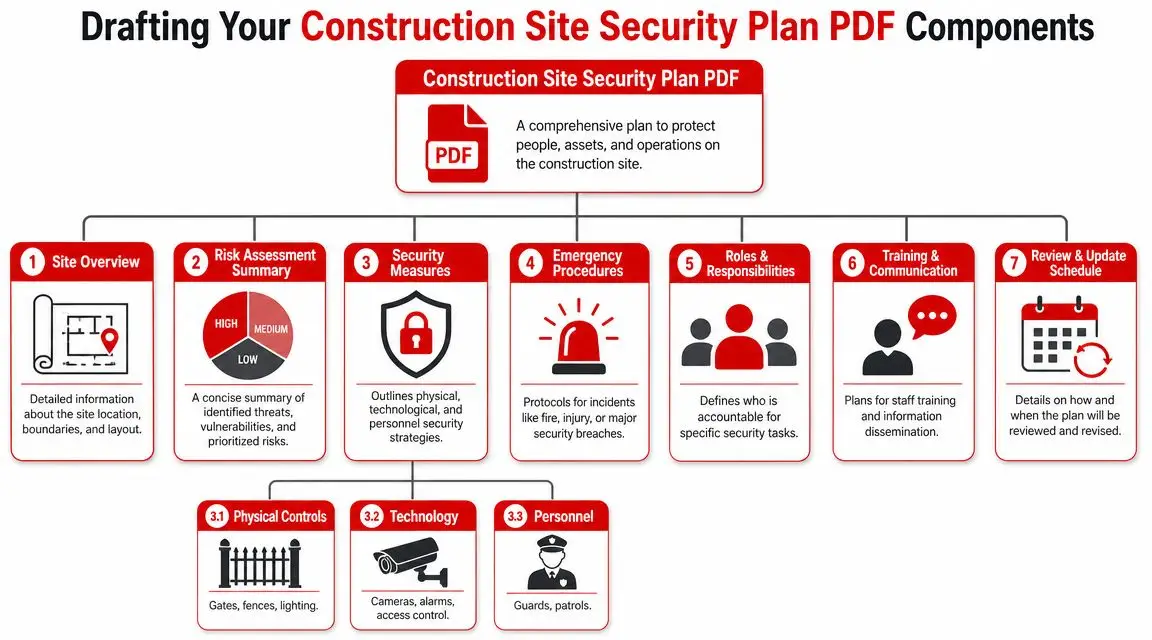
Every plan should identify the basics clearly:
- Site overview: address, boundaries, neighbouring properties, public interfaces, working hours, after-hours status
- Key contacts: site manager, project manager, client contact, security supervisor, emergency contacts, escalation order
- Risk summary: the top site-specific exposures from your risk assessment
- Physical controls: fencing, gates, locks, lighting, storage compounds, key control
- Access rules: inductions, sign-in methods, visitor handling, contractor movement, delivery protocols
- Monitoring and response: alarms, CCTV oversight, patrol routines, who gets called and in what order
- Record requirements: visitor logs, incident reports, maintenance checks, lock-up records, review dates
A strong document also includes a simple site map. Mark gates, restricted areas, camera positions, compounds, hazardous zones, and preferred patrol routes. If a plan doesn't include a map on a complex site, people improvise. Improvisation is where mistakes start.
Write procedures people can actually follow
Most weak plans fail because the procedures are too vague. “Secure all assets after hours” sounds fine until you ask who does it, by what time, using what checklist, and where that record is kept.
Write procedures with enough detail to be usable:
- Lock-up standard: who checks gates, compounds, plant, offices, and containers
- Key and code control: who can issue, revoke, or change credentials
- Visitor control: how non-inducted persons are handled
- After-hours entry: approval method, verification steps, log requirement
- Incident escalation: who is called first for trespass, forced entry, vandalism, or digital access misuse
A plan should remove ambiguity, not decorate it.
Add the digital layer most templates miss
Many construction site security plan PDF templates fall short. They cover fences, gates, and cameras, but ignore the systems now controlling access and oversight. Construction sites increasingly rely on QR sign-ins, cloud CCTV, mobile devices, subcontractor portals, and remote access tools.
Australian cyber risk guidance matters here. The ACSC Annual Cyber Threat Report 2023-24 notes 87,400 cybercrime reports, roughly one every 6 minutes, and highlights identity compromise and unauthorised access as ongoing risks, as discussed in this construction and cyber-physical security guidance.
For site managers, that means the plan should document:
Digital controls to include
- User access ownership: who creates and removes accounts for cameras, sign-in platforms, and subcontractor portals
- Device control: which phones, tablets, laptops, and monitoring terminals are approved
- Credential handover: what happens when a supervisor, contractor, or vendor leaves the job
- Remote viewing permissions: who can access live or recorded footage off-site
- Cyber incident escalation: what happens if logins are shared, accounts are compromised, or devices go missing
Physical and digital overlap points
- QR or app-based sign-in: useful, but only if old users are removed promptly
- Cloud CCTV: effective, but only if permissions are limited and reviewed
- Remote gate or intercom systems: convenient, but vulnerable if multiple people use shared credentials
- Subcontractor portals: efficient, but often poorly governed during fast-moving phases
A modern plan should treat physical and digital security as one operating system. If the gate is locked but old users still have access to the camera platform or remote entry tools, the perimeter isn't as controlled as it looks.
Defining Roles Responsibilities and Incident Response
A construction site security plan PDF only works when the people named in it know what they own. If roles are blurred, incidents slow down, evidence goes missing, and workers make decisions based on guesswork. That's why responsibility needs to be assigned before the first incident, not during it.
The simplest fix is a responsibility matrix. It doesn't need fancy software. A one-page table is often enough if it makes accountability unmistakable.
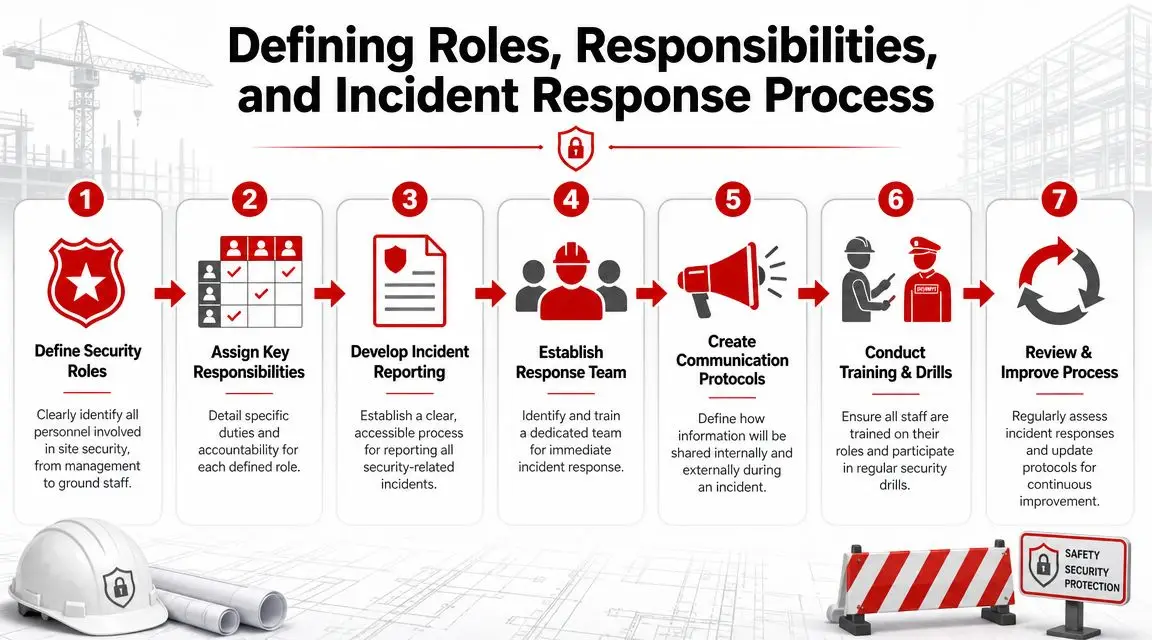
Who should own what
On most sites, roles break down along these lines:
- Site manager: owns implementation of the plan, daily compliance, lock-up confirmation, and contractor adherence.
- Project manager or principal contractor representative: approves policy changes, major escalations, and coordination with the client.
- Security supervisor or provider contact: manages guard instructions, patrol coverage, reporting quality, and incident notification.
- Gatehouse or access controller: verifies entry, sign-in compliance, deliveries, and restricted access.
- All workers and subcontractors: report suspicious activity, follow access rules, and protect issued credentials.
That last line matters. Security fails when workers treat it as someone else's job.
Keep incident response short and clear
When a break-in, trespass, or vandalism event happens, nobody wants to read a long policy. The response process should be short enough to act on under pressure.
A practical incident flow looks like this:
Make the area safe
Confirm whether there is any immediate risk to people. Don't send workers into an active or uncertain situation casually.Secure the scene
Stop unnecessary movement through the area. Protect potential evidence and prevent secondary loss.Notify the right person fast
Use the contact chain in the plan. The first call should never be a guessing exercise.Record the facts
Time, location, people present, visible damage, missing items, and any camera or access log relevance.Escalate as required
Depending on the event, notify management, police, the client, and the security provider according to the plan.Reset controls
Change codes, replace locks, revoke accounts, or increase coverage if the incident exposed a gap.
Fast response matters, but clean reporting matters nearly as much. Poor records turn manageable incidents into long arguments later.
Train for likely incidents, not just the worst-case one
Many sites only talk about catastrophic scenarios. In reality, common security events are more routine: unauthorised persons on site, damaged fencing, missing tools, tailgating through gates, ex-contractors still holding access, or suspicious after-hours movement.
Use toolbox talks and supervisor briefings to rehearse:
- Unauthorised person response
- Forced entry to container or office
- Vehicle attempting unauthorised access
- Lost key, fob, or login credential
- Camera outage or access-control failure
Two rules that improve response immediately
- One owner per action: If “the team” is responsible, nobody is.
- One reporting path: If workers can report incidents five different ways, critical details get lost.
Clear roles don't slow a site down. They stop confusion from spreading once something has already gone wrong.
Audits Record-Keeping and State-Specific Guidance
The best construction site security plan PDF is a live control document. Once it's written, it needs checking, updating, and evidence behind it. If an incident occurs and the logs are incomplete, access records are patchy, and review dates are months old, the plan won't carry much weight operationally or from a compliance perspective.
What records are worth keeping
Keep records that help you prove what happened, what was controlled, and what changed after review:
- Visitor and contractor sign-in records
- After-hours access approvals
- Lock-up checklists
- Incident reports and follow-up actions
- Patrol reports or guard occurrence books
- Maintenance records for lighting, gates, locks, and CCTV
- Credential issue and removal logs
These records don't need to be elaborate. They do need to be consistent. Sites often over-document minor things and under-document the controls that matter after an incident.
A practical audit rhythm
Use a simple review cycle that matches how fast the project changes.
| Audit Timing | What to Check |
|---|---|
| Weekly | Gates, fencing, lighting, storage security, sign-in compliance |
| After layout change | New access points, blind spots, changed patrol routes, updated maps |
| After incident | Cause, response speed, reporting quality, corrective action |
| At major project phase change | Asset profile, contractor volume, after-hours exposure, digital access list |
Review the plan whenever the site changes shape. Construction security falls behind fastest when the document stays static and the site doesn't.
State-specific checkpoints for NSW VIC QLD and the ACT
Across NSW, VIC, QLD, and the ACT, the practical test is similar. Can the plan show controlled access, clear responsibilities, incident documentation, and alignment with site safety management?
For NSW, pay close attention to urban interface, delivery congestion, and subcontractor turnover. High movement means sign-in discipline and gate control need to be tight.
For VIC, focus on keeping the plan integrated with broader site rules, especially where mixed-use environments, neighbouring occupancy, or public-facing boundaries create regular interaction risks.
For QLD, public guidance on construction safety emphasises integrating site security with broader site management, particularly where public access, after-hours exposure, and high-value plant increase the chance of theft or trespass. The practical takeaway is simple: don't separate security from traffic management, perimeter control, and daily site operations.
For the ACT, government, commercial, and civic projects often require a more formal audit trail. Keep procedures dated, assigned, and easy to evidence.
The pattern across all four jurisdictions is the same. Security planning works best when it's treated as part of site management, not a separate add-on.
Construction Security Plan FAQs
How often should a construction site security plan PDF be updated
Update it whenever the site materially changes. That usually means new stages, new access points, changed working hours, new high-value materials, revised subcontractor arrangements, or any incident that exposes a control gap. If the project is moving quickly, review the plan more often rather than waiting for a calendar date.
What's the biggest mistake site managers make
Treating the plan like a startup form that gets filed and forgotten. The second mistake is writing controls that sound good but don't assign responsibility. “Site to be secured after hours” is not enough. Name the role, the process, and the record.
Is a simple plan enough for a small residential site
Sometimes, yes. But simple doesn't mean casual. Even a smaller site needs basic perimeter control, key and code management, storage rules, sign-in expectations, and an incident contact chain. The document may be shorter, but it still has to be usable.
Should digital systems really be included in the plan
Yes. If the site uses app sign-ins, cloud cameras, remote monitoring, shared tablets, or subcontractor portals, those systems affect access and security. Ignoring them leaves a major gap between what the site thinks is controlled and what is controlled.
What should be attached to the plan
Useful attachments include the site map, emergency contacts, risk register, post orders for guards, lock-up checklist, access procedure, incident report form, and any credential issue register. Keep attachments practical. If nobody on site uses them, they don't belong there.
Do guards replace the need for a written plan
No. Guards are one control. They still need post instructions, escalation contacts, patrol expectations, and reporting requirements. Without a written plan, performance becomes inconsistent from shift to shift.
What makes a plan audit-ready
Three things usually tell the story quickly:
- It's current: dated, version-controlled, and updated for the actual phase of work.
- It's assigned: named roles, clear accountabilities, live contact details.
- It's evidenced: logs, incident records, maintenance checks, and review notes exist and can be produced.
Can one template work across NSW VIC QLD and ACT
One core template can work, but it needs state-aware adjustments. Traffic management, public interface, contractor movement, and site-specific WHS procedures should be adapted to the jurisdiction, site type, and programme rather than copied over unchanged.
A strong construction site security plan PDF doesn't try to cover every possible threat in abstract language. It defines the actual risks on your site, matches controls to those risks, and gives your team a clear method for access, monitoring, response, and review.
If your project needs a practical security plan that works on the ground, GM GROUP Services can help map site risks, define guard coverage, tighten access procedures, and turn a generic template into a working construction security document for sites across NSW, VIC, QLD, and the ACT.