



CCTV system integration usually lands on your desk when something has already become difficult. A venue is expanding. A promoter wants tighter gate control. A site manager is tired of reviewing footage after the damage is done. Or an existing camera setup works in isolation, but it doesn't talk properly to access control, alarms, radio dispatch, or incident reporting.
That's where most projects go wrong. People buy cameras first and ask operational questions later.
In large events and venues, CCTV system integration isn't about adding more lenses to more walls. It's about building one security environment where cameras, operators, access decisions, alerts, storage, privacy controls, and reporting all work together under Australian compliance settings. If that foundation is weak, the system becomes expensive, slow to manage, and difficult to defend when something goes wrong.
SEO Title: 7 Smart CCTV System Integration Moves for Australian Venues
SEO Meta Description: CCTV system integration for Australian venues, events and sites. Learn how to plan, connect, secure and maintain compliant systems that work in real operations.
URL: /cctv-system-integration-australia
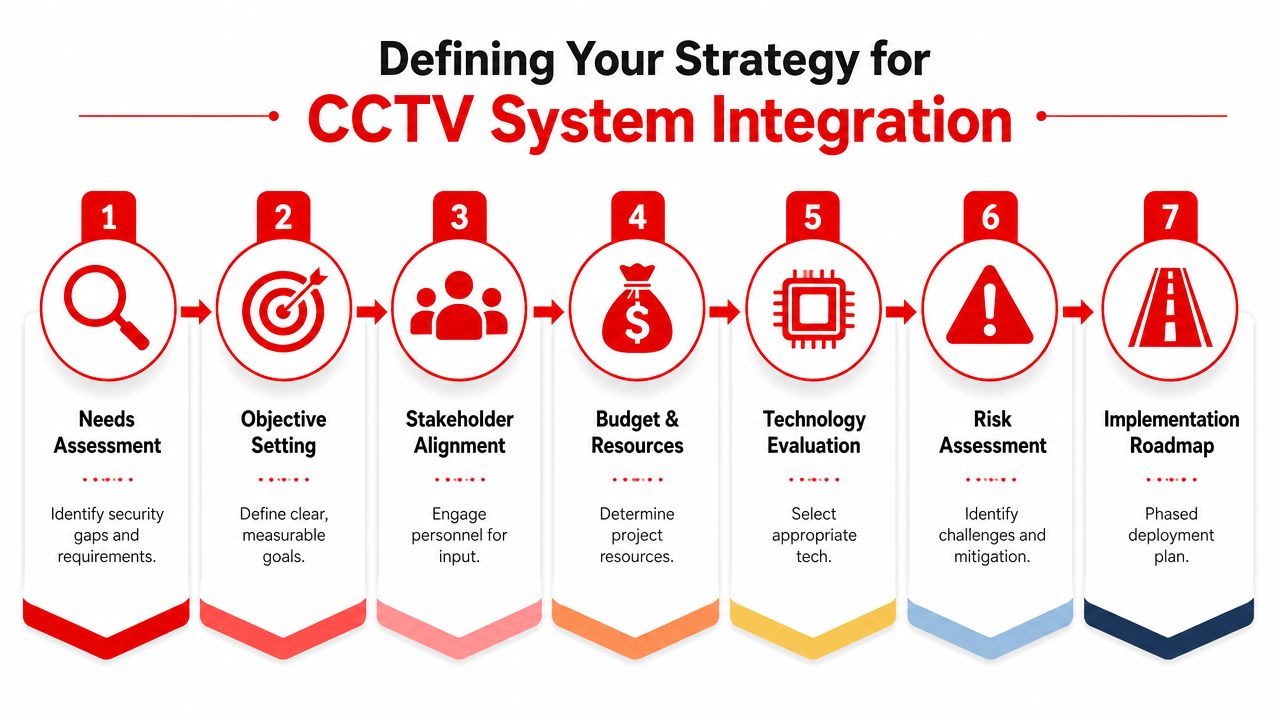
Defining Your Strategy for CCTV System Integration
The most expensive mistake in CCTV projects is treating integration like an install. It's a security design exercise first.
In practice, the right starting point is a site analysis that looks at movement patterns, incident history, choke points, service corridors, queueing zones, loading docks, cash handling areas, and any place where staff lose visibility under pressure. The Australian Institute of Criminology outlines a rigorous seven-phase approach that starts with detailed crime and spatial site analysis, and systems that fail this initial phase have a 40% higher likelihood of operational redundancy within the first two years according to the Australian Institute of Criminology methodology.

Start with operational reality
A festival has different priorities from a hotel. A construction site has different risk windows from a nightclub. Good CCTV system integration reflects that.
Set objectives that operators can act on. “Improve security” is too vague. Better targets sound like this:
- Entry control: Link gate cameras to access events so supervisors can review tailgating or forced entry attempts immediately.
- Crowd pressure management: Cover bars, queue lanes, stage fronts, stairwells, and egress routes where density changes fast.
- After-hours protection: Prioritise perimeter lines, plant yards, delivery points, and blind corners where intrusion detection matters more than customer flow.
- Incident verification: Make sure control room staff can match alarms, camera views, and site maps without switching between disconnected systems.
Build around decisions, not devices
Many venues already own cameras, intercoms, boom gates, duress buttons, and alarm inputs. The integration question is simple. What decision should the system help a person make, and how quickly?
That usually means mapping event triggers to actions:
- A door alarm triggers. The relevant camera pops in the VMS.
- A staff member presses duress. Nearby views pin to the operator wall.
- A restricted gate opens outside schedule. Access logs and video align for immediate review.
- An incident starts in a queue. Operators can hand the exact live view to mobile teams.
Practical rule: If an operator has to hunt through multiple screens to understand one incident, the system isn't integrated well enough.
Scope all costs before approval
A lot of budgets only cover hardware and cabling. That's incomplete. Real ownership cost includes installation, testing, storage, maintenance, software licensing, operator workflow changes, and the staff time needed to manage footage requests, privacy controls, and system health.
A strong strategy also names governance early. Decide who can review footage, who can export it, who signs off retention, who handles police requests, and who owns vendor escalations. Without that, even technically sound systems become operationally messy.
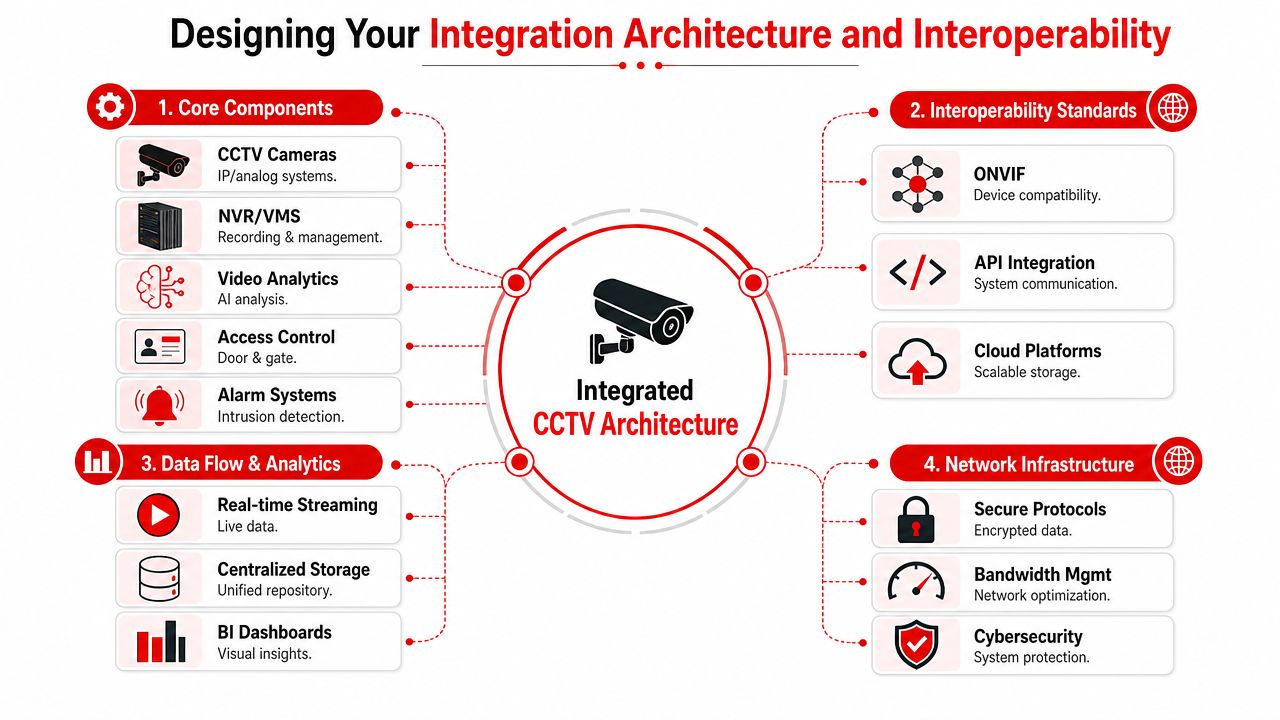
Designing Your Integration Architecture and Interoperability
Once the strategy is clear, architecture decides whether the system stays flexible or turns into a locked box.
At the centre is usually the Video Management System, or VMS. That's the layer that brings together live view, recording, camera health, user permissions, events, and integrations with outside systems. In well-run environments, the VMS isn't just a recorder interface. It's the control point for response.
Why interoperability matters
If you run venues across multiple sites, or you inherit legacy hardware during refurbishments, single-vendor design can become restrictive fast. Interoperability standards such as ONVIF help cameras, recorders, and management platforms communicate across manufacturers. RTSP remains useful for stream delivery, but it won't solve broader event handling, device management, or permissions on its own.
That's why architecture deserves more attention than product brochures. A good primer on the critical role of systems architecture is useful here because it frames the issue clearly. The structure behind the system determines what you can connect, automate, scale, and secure later.
What to check before you approve a design
Not every “integrated” system achieves true interoperability. In practice, I'd check these points before sign-off:
- Open standard support: Confirm the camera, recorder, and VMS all support the same profiles and the specific functions you need, not just basic streaming.
- API access: If you want CCTV linked to access control, POS exception reporting, visitor management, or building systems, verify API capability early.
- Event mapping: Make sure the platform can trigger camera bookmarks, pop-ups, recording rules, and notifications from external events.
- User roles: Permissions should be granular. Supervisors, venue managers, IT, and contracted operators shouldn't all have the same visibility or export rights.
Don't spec resolution in isolation
Sharp images matter, but image quality without bandwidth and storage planning causes other failures. Successful integration requires 4MP minimum sensors paired with H.265+ compression, and systems meeting these benchmarks, aligned with AS 4806.2 clarity standards, achieve a 92% success rate in identifying security breaches at high-density venues according to this Australian CCTV integration benchmark.
That matters in venues where operators need useful footage from busy entrances, dancefloors, concourses, and loading bays. Higher clarity helps only if the network, retention settings, and VMS rules are set up to preserve that quality under load.
Better architecture usually beats bigger camera counts. Fewer well-placed cameras, tied into a capable VMS with clean event logic, outperform bloated systems that no one can manage properly.
A practical integration example
For a major function venue, a workable architecture might look like this:
| Component | Role in the system |
|---|---|
| IP cameras | Coverage of entries, bars, back-of-house, egress, perimeter |
| VMS | Live monitoring, playback, event rules, user control |
| Access control platform | Door states, schedules, credential activity |
| Alarm inputs | Intrusion, plant room alerts, duress events |
| Analytics layer | Behaviour rules, line crossing, loitering, density alerts |
| Mobile response workflow | Dispatch information for supervisors and roaming teams |
That layout gives operators context, not just vision.
Choosing Your Network and Storage Solution
Storage decisions shape performance, cost control, investigation workflow, and cyber exposure. The choice usually comes down to on-premise recording versus cloud-based video services. Neither is automatically right.
On-premise suits organisations that want direct control over recording hardware and local network performance. Cloud suits organisations that value remote access, simpler multi-site oversight, and easier scaling. Many event and venue operators land on a hybrid model, especially when temporary overlays are added to permanent infrastructure.
What changes in day-to-day use
On-premise recording can feel straightforward. The recorder is on site, footage stays local, and operators don't rely as heavily on internet performance for review. The trade-off is maintenance. Someone has to own hardware health, redundancy, patching, and physical protection of the recording environment.
Cloud platforms shift more of that burden to the provider, but they place pressure on uplink quality, user governance, and subscription discipline. If your operations team exports a lot of clips, reviews incidents from mobile devices, or oversees several venues, cloud can be efficient. If connectivity is inconsistent or site policies require tighter direct control, local recording may fit better.
On-Premise vs. Cloud Storage for CCTV
| Factor | On-Premise Storage (NVR/Server) | Cloud Storage (VSaaS) |
|---|---|---|
| Upfront cost | Higher hardware and installation commitment | Lower hardware burden, service-based setup |
| Ongoing costs | Maintenance, support, replacement planning | Recurring platform and storage fees |
| Data control | Direct local control of footage environment | Control depends on platform settings and contract terms |
| Access for mobile teams | Possible, but often needs more configuration | Usually simpler for authorised remote access |
| Maintenance burden | Internal team or contractor must manage it | More responsibility sits with the provider |
| Scalability | Expansion may require hardware upgrades | Expansion is generally easier across sites |
| Internet dependence | Lower for local recording and playback | Higher for upload, access, and review workflows |
A sensible selection method
Use practical questions, not brand preference:
- How often do supervisors need off-site access?
- Who owns maintenance response when storage fails?
- Will this venue expand or run temporary overlays during event season?
- How sensitive is the footage and where must it remain?
- How quickly can your team retrieve footage under pressure?
If those answers aren't clear, don't lock in storage yet. In CCTV system integration, the wrong storage model creates friction every day, not just during installation.
Leveraging AI for Advanced Operational Intelligence
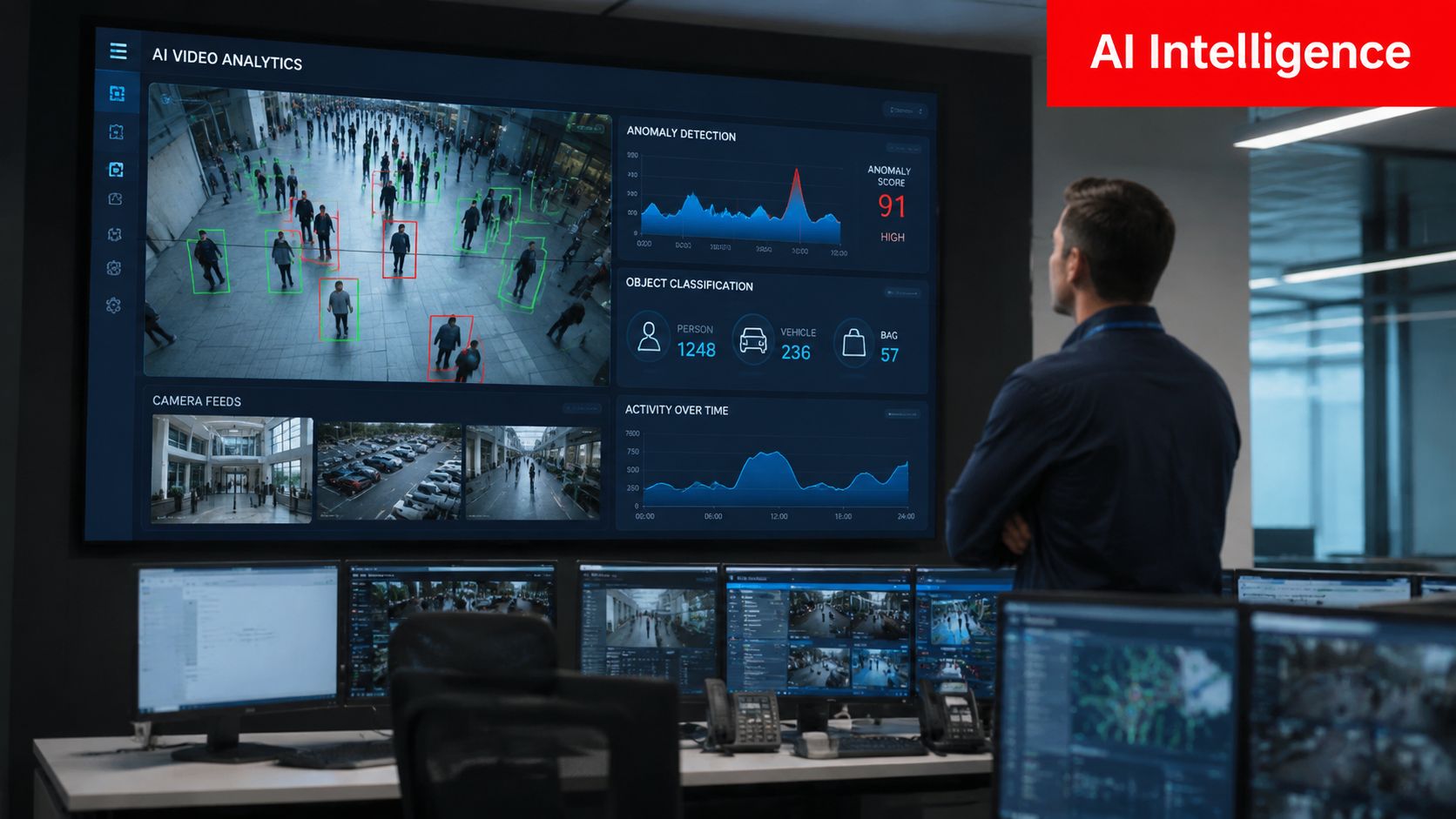
A camera that only records is a witness. A camera linked to analytics and live workflow becomes an operational tool.
That distinction matters in events, hospitality, retail, and public-facing venues where security teams need early warning, not just evidence after the fact. Data from the Australian Institute of Criminology shows 68% of open-street CCTV failures in Australia stem from a lack of real-time alert integration, not poor camera coverage, and passive CCTV alone cannot prevent 42% of post-event security breaches at Australian festivals according to the AIC analysis on CCTV failure and alert integration.

Where AI actually helps
The useful applications aren't science fiction. They're operational.
- Crowd anomaly alerts: At festivals or sports venues, analytics can flag density changes, counterflows, or unusual congregation around bars, entries, and stage approaches.
- Perimeter behaviour rules: Construction and industrial sites can trigger alerts for line crossing, loitering, or movement in restricted corridors after hours.
- Access-linked response: If a forced door event appears at the same moment as a suspicious movement pattern, operators get a faster, better-prioritised picture.
- Queue and service pressure: Hospitality operators can use visual data to support staffing decisions where long dwell times create friction and increase risk.
Passive monitoring misses the point
Human operators are still critical. But in a busy control room, people miss patterns when multiple screens compete for attention. Analytics narrows the field. It tells the team where to look first.
The best AI setup doesn't replace operators. It reduces empty watching and increases timely action.
The most effective deployments connect analytics to practical outcomes. A density alert should notify the control room and the floor supervisor. A restricted area breach should bring up the correct camera and incident template. A staff member shouldn't need to interpret ten disconnected signals before moving.
A venue example
Consider a large licensed venue during a peak trading night. Cameras cover entries, gaming areas, bars, and exits. Without analytics, the team relies on constant visual scanning and radio reports. With analytics integrated properly, the system can surface crowd build-up near a stairwell, link an after-hours back-door opening to the relevant camera, and help supervisors verify whether an issue needs intervention or simple staff redirection.
That's where modern CCTV system integration earns its keep. It shortens the path from detection to action.
Navigating Vendor Selection and Australian Compliance
Vendor choice isn't just a procurement issue. It's a compliance decision, a cyber decision, and a reputation decision.
For Australian venues and event operators, the hardware conversation now includes manufacturer provenance, encryption capability, role-based access control, retention settings, privacy exposure, and how well the vendor supports local standards. If a supplier can't answer those points clearly, the risk sits with the venue, not the salesperson.
What to ask vendors before purchase
A proper vendor review should include:
- Can the platform enforce end-to-end encryption and role-based access control?
- Can it support your operational integrations without custom patchwork?
- Does it align with AS 4806 operation and management requirements?
- Can the vendor document where the hardware sits in your cyber and privacy obligations?
- How are firmware, permissions, and export controls managed over time?
One area many buyers still overlook is Chinese-manufactured CCTV hardware in sensitive or public-facing settings. According to an Australian venue compliance discussion on non-Chinese CCTV cameras, the 2025 to 2026 regulatory shift by ASIO mandates end-to-end encryption and role-based access control for all video security systems in Australian public venues, and 59% of event organisers reported data breaches in 2025 linked to unencrypted Chinese CCTV footage. Because those claims are future-dated in the source context, they should be treated as a regulatory and market shift to plan for, not a detail to leave until refresh time.
AS 4806 and retention discipline
Australian Standard AS 4806.1–2006 matters because it covers operation and management benchmarks for CCTV systems in controlled environments. In practice, that means you should audit existing hardware and software against those requirements before final configuration, especially if the system has been expanded in stages.
A commonly applied requirement in Australian guidance is retention of footage for approximately 30 days before secure deletion, as outlined in this practical guide to CCTV best practice and AS 4806. For venues and construction sites, that isn't just a storage setting. It's part of privacy governance, evidence handling, and defensibility after incidents.
Privacy mistakes that cause avoidable trouble
Camera placement still creates legal exposure when teams focus only on coverage.
Government guidance across states and territories prohibits cameras from deliberately recording private areas such as neighbouring backyards, windows, or pools, and Western Australia's legislation also requires consent for recording private conversations, as explained in this Australian overview of where CCTV cameras are not allowed. That matters for bars, clubs, hotels, and mixed-use developments where residential property sits close to licensed trade areas.
Compliance isn't finished when the installer leaves. It depends on how the venue configures views, permissions, retention, and review practice every day.
A practical compliance checklist
- Procurement: Document hardware origin, encryption support, and access control capability.
- Configuration: Set user roles by function, not convenience.
- Placement: Confirm external views don't intrude on private neighbouring areas.
- Retention: Align footage lifecycle with policy and secure deletion settings.
- Governance: Define who may view, export, share, and approve footage use.
System Testing Maintenance and Cybersecurity
Most CCTV failures don't start with a dramatic outage. They start with neglect. A changed password isn't recorded. A firewall rule is left open after commissioning. A camera is moved during works and no one revalidates its field of view. An alert rule breaks after a software update and operators assume it still works.
That's why testing, maintenance, and cyber hygiene need to sit in one routine, not three separate workstreams.
What to test after installation
Every deployment should have a commissioning checklist that reflects live operations, not just installer sign-off.
- Camera scenes: Verify coverage in daytime, night-time, and event lighting conditions.
- Recording integrity: Confirm footage records at the required quality and can be retrieved quickly.
- Alert handshakes: Test whether alarms, door events, analytics, and pop-up rules fire correctly in the VMS.
- User permissions: Check that each role sees only what it should and can export only where authorised.
- Failover behaviour: Review what happens if a camera, switch, storage layer, or uplink drops.
The biggest cyber weakness is still basic
Industry data indicates 66% of Australian security camera systems are deployed on unsecured networks lacking VLAN segmentation, leading to a 35% increase in unauthorised footage access incidents annually, according to these security camera cyber-safe best practices. The practical lesson is straightforward. A camera network can't be treated like a harmless utility segment.
For systems on public networks, each camera should have a unique, long password. For private networks, segment CCTV traffic onto a separate VLAN and verify firewall settings through qualified IT security review. Password schedules and firmware review also need ownership. If no one owns them, they drift.
Turn maintenance into a schedule
A useful operating rhythm looks like this:
| Task | What the team checks |
|---|---|
| Weekly | Camera health, storage warnings, failed streams, user lockouts |
| Monthly | Spot-check playback, alert logic, export controls, time sync |
| Quarterly | Permission review, firmware planning, firewall verification, scene validation |
| After any event or works change | Camera alignment, temporary blind spots, changed crowd flows, device additions |
Watch external exposure too
Security teams often focus on the camera platform itself and ignore wider account exposure. For organisations managing multiple sites or contractor access, outside monitoring of leaked credentials and threat chatter can add useful context. These MSP dark web security insights are worth reading if your CCTV environment sits inside a broader managed IT or outsourced support model.
If your CCTV network is easy to administer but hard to audit, it isn't secure enough for a serious venue or event operation.
Strong CCTV system integration stays reliable because someone keeps proving it works.
Frequently Asked Questions about CCTV System Integration
Can you integrate new CCTV with older analogue cameras
Yes, in many cases you can. Hybrid approaches often use encoders, hybrid recorders, or staged replacement so older cameras remain in service while the new VMS, network design, and event logic are built around IP infrastructure. The important question isn't whether the old camera still powers on. It's whether it delivers useful image quality, stable connectivity, and the integration features the operation now needs.
What usually gets missed in the total cost of ownership
Labour and governance. Buyers often focus on cameras, recorders, and installation, then underestimate software licensing, storage expansion, firmware support, operator training, privacy administration, footage request handling, and cyber review. If the system supports a venue with changing layouts or seasonal overlays, reconfiguration effort should also be part of budgeting.
How do you scale CCTV system integration without rebuilding everything
Start with open architecture and disciplined naming, permissions, and network segmentation. Choose a VMS and device ecosystem that can absorb new cameras, temporary event zones, access points, and analytics without requiring a full rip-and-replace. Good scaling depends less on camera count and more on whether the system was designed to add sites, users, and workflows cleanly.
Is cloud or on-premise better for event operations
It depends on the operating model. If supervisors need fast remote review across multiple sites, cloud can be practical. If the site needs direct local control and wants less reliance on internet performance for playback, on-premise may fit better. A hybrid design often works well where permanent infrastructure and temporary event overlays need to coexist.
What's the first sign an integrated system was designed badly
Operators work around it instead of using it. They rely on radios, manual logs, screenshots, and memory because alerts don't line up, camera names are confusing, footage retrieval is slow, or user permissions are too broad or too restrictive. If staff avoid the system under pressure, the integration hasn't matched the operation.
If your venue, event, or site needs a CCTV setup that works in real operations, not just on an install diagram, GM GROUP Services can help. Their team supports Australian venues, festivals, construction sites, retail environments, and corporate locations with practical security planning, licensed personnel, and operational insight that connects people, procedures, and technology into one workable security model.