



Best security camera systems Australia are rarely chosen because someone likes the app interface. They're chosen because a site manager has a gate open after dark, a delivery bay with no staff on it, a festival fence line that needs proof of what happened, or a retail store that can't afford to lose time arguing over grainy footage. That's the buying problem in Australia, the system has to work in heat, rain, glare, poor lighting, and under pressure from people who need answers fast.
| System | Type | Resolution | Storage | Price | Weather Rating |
|---|---|---|---|---|---|
| Hikvision 4MP IP Kit | PoE/NVR | 4MP | Local NVR | A$599 | Not stated in the source |
| Dahua TIOC 6MP Kit | PoE/NVR | 6MP | Local NVR | A$749 | Not stated in the source |
| Uniview 8MP Kit | PoE/NVR | 8MP | Local NVR | A$849 | Not stated in the source |
| TP-Link VIGI 8MP 4-cam Kit | Wired value kit | 8MP | NVR | A$350 | IP67 |
| Eufy SoloCam S340 | Wireless battery | 3K | Local or cloud depending on setup | Not stated in the source | IP67 |
For Australian businesses, the decision isn't just about sharp video. It's about retention, coverage, maintenance, privacy, and whether the system can support real operations across one site or many.
Introduction to Best Security Camera Systems Australia
A festival organiser in NSW is on the phone at 6 p.m., the final crowd plan is still being adjusted, and the venue operator needs cameras that cover entries, cash points, and temporary fencing without turning the job into a compliance mess. The shortlist looks straightforward until the details start to matter. Some cameras are easy to install, some give cleaner evidence, and some only hold up until the first rain event or the first dispute over who can view the footage.
That is why the best security camera systems Australia buyers settle on are usually the ones that fit the site, not the ones with the loudest marketing. For a venue, retail chain, construction project, or office portfolio, the right setup usually combines permanent PoE recording, targeted wireless coverage, and clear internal processes for monitoring, access, and maintenance. A system also has to suit the way a business operates across one site or many, because storage health, firmware updates, user permissions, and after-hours support become harder to manage as the footprint grows. The market context matters too, because Australia's surveillance camera market is already substantial, at USD 684.9 million in 2024 and projected to reach USD 1,113.5 million by 2030 at an 8.7% CAGR (Australian surveillance camera market forecast).

Practical rule: if the footage needs to stand up in a complaint, an insurance review, or a police investigation, buy for evidence quality first and convenience second.
Australian business buyers also need to look beyond the camera carton. A system that works at one gate on a calm day can fail across a multi-site portfolio if the vendor cannot support firmware updates, storage health, user permissions, or after-hours response. The test is whether the equipment, the installer, and the ongoing service model can support day-to-day operations without creating extra work for site staff.
Surveillance Market Growth and Business Needs
A camera purchase only makes sense when it fits how the site is used day to day. For an office with one entry point, a modest system may be enough. For a retailer, warehouse, childcare centre, or multi-site operation, the camera plan has to handle access control, staff movement, incident review, and after-hours response without adding noise for the team.
That is why spending patterns matter. Businesses are not just buying lenses and recorders, they are paying for evidence quality, storage management, user control, and the ability to keep the system working after installation. In practice, the higher the operational risk, the more the buyer should focus on retention, low-light performance, remote access, and support arrangements that do not depend on one person remembering to check the app.
Why the spending pattern matters
Australian business losses are not abstract. Guidance that cites ABS business-security data notes that around 15% of businesses experienced at least one break-in, theft or attempted theft in 2023–24, and about 17% experienced customer theft (business-security data cited in Australian guidance). Those events change how cameras should be specified. They are not just a deterrent, they are part of a broader control set that supports investigations, staff safety, and insurance follow-up.
For a low-risk site with light foot traffic, a simple setup with clear coverage and easy access may be enough. A site with stock, loading areas, public access, or multiple shifts needs footage that can identify faces, vehicles, and the sequence of events without gaps. That usually means planning for storage retention, camera placement, and a service model that keeps the system healthy after handover.
What buyers should align the system to
- Public exposure: Use visible cameras where deterrence matters, such as entries, loading bays, and perimeter lines.
- Evidence needs: Use higher-resolution wired systems where identification and retention matter more than convenience.
- Site complexity: Use systems that can scale if the business adds more entries, more staff access, or more branches.
- Operational oversight: Use vendors and installers who can support maintenance, not just sale day handover.
Across multi-site environments, camera buying also sits alongside broader device and access risk. Teams that already compare security controls with best EDR and NGAV solutions usually have the right mindset. The same discipline applies here, choose a system that can be maintained, audited, and supported under operational stress, not just on a spec sheet.
Understanding Camera Types and Key Features
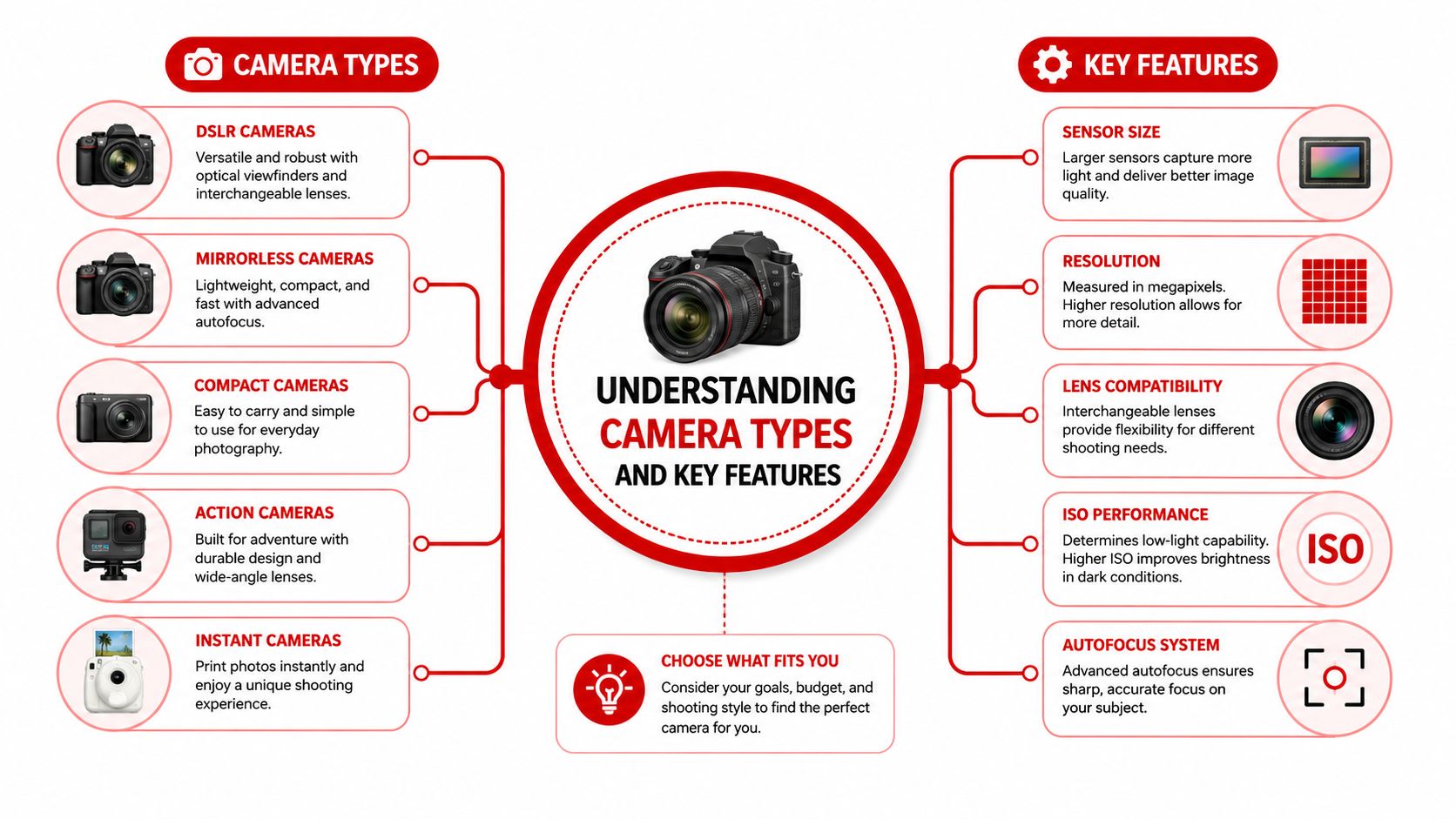
A camera system only works if the hardware matches the site. A buyer who starts with brand names or headline resolution often ends up with a setup that is awkward to maintain, expensive to expand, or weak where it matters. For a fixed retail store or warehouse, a wired system usually makes the most sense. For a temporary event zone, a remote boundary, or a location where cabling is difficult, wireless or hybrid gear can be the better fit.
IP, analogue, PoE and wireless
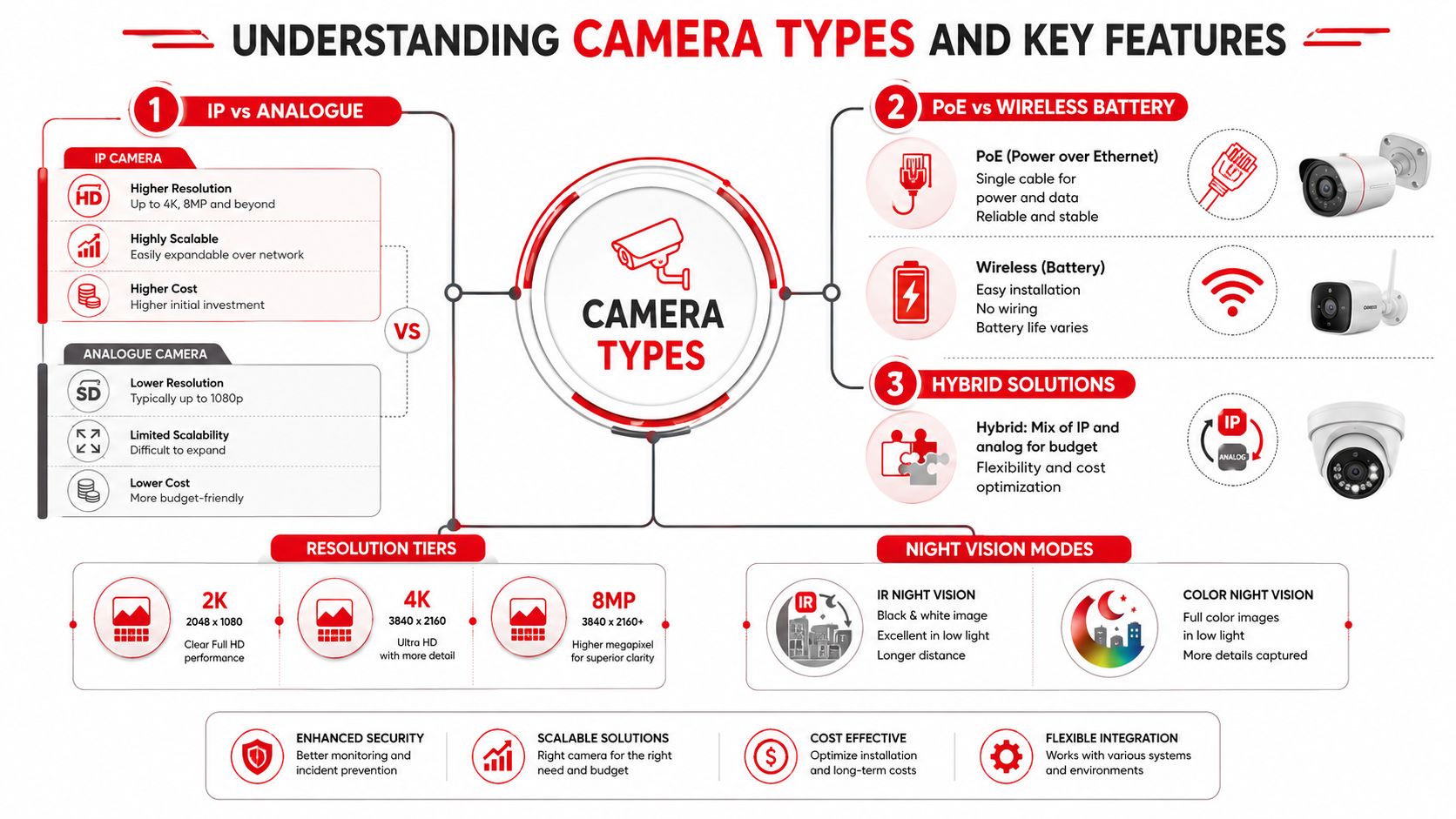
IP cameras send digital footage over a network. They suit sites that need clearer images, easier scaling, and remote access through a recorder or management platform. Analogue still has a role in older upgrades, but for new Australian installs it usually gives up too much on image quality and future flexibility.
PoE, Power over Ethernet, is often the cleanest option for permanent cameras because one cable carries both power and data. In practice, that matters for businesses that need stable recording across multiple entries, loading areas, and car parks, where a camera should keep working without relying on local power points or a patchwork of wireless links. Buyers who compare wired kit options in Australia often end up looking at PoE and NVR bundles first, because that setup is easier to support when the site grows or the footage needs to stand up in a dispute.
Practical rule: battery cameras are fine for quick installs and blind-spot reduction, but if the footage has to hold up across multiple cameras, go wired.
For operational teams, the bigger issue is not whether the camera can be installed quickly. It is whether the system can be maintained by an installer, reviewed by a manager, and supported by a service partner after handover. That same discipline already shows up in buyers who compare security controls with best EDR and NGAV solutions, because they know the value is in day-to-day control, not just the initial purchase.
Resolution, night vision and analytics
Resolution matters because evidence quality depends on detail, not just motion. Australian buyers often compare 2K, 4K and 8MP cameras, with higher resolutions usually preferred for driveways, gates, and vehicle capture. But resolution alone does not fix a poor angle, bad lighting, or a dirty lens.
Night vision changes the result as well. IR footage is useful, but colour night vision often gives better scene interpretation after dark, especially on sites with some ambient light. For outdoor coverage, SafeWise AU's comparison shows how field of view and power model shape the choice, with examples such as the Eufy SoloCam S340 at 3K, IP67, and 360° coverage, the Reolink Argus 3 Pro at 2K, IP65, and 122° horizontal field of view, and the Ring Spotlight Cam Pro at 1080p with 140° and multiple power options (SafeWise AU outdoor comparison).
Storage architecture is the other point that affects day-to-day use. Local NVR storage gives businesses more control and makes retention easier to manage. Cloud storage gives easier remote access, but it also brings subscription risk, vendor dependence, and more questions about who can see footage. Hybrid systems sit between the two and suit buyers who want local recording for the core site, plus remote review where it helps operations.
For multi-camera properties, the choice usually comes down to a few practical trade-offs.
- Choose PoE/NVR when the site needs stable recording, longer retention, and evidence that is easy to retrieve.
- Choose wireless battery when installation has to be fast, non-invasive, or temporary.
- Choose hybrid when the business needs both, such as a permanent core system plus flexible cameras for short-term zones.
What matters more than the spec sheet
Field of view, low-light performance, power stability, and local storage often matter more than headline resolution. A 1080p camera in the wrong spot is still a poor choice. A 4K camera with weak night performance can still miss the detail that matters.
For business buyers with more than one site, the test is how the system behaves after installation. Can your contractor cleanly replace a failed unit, can head office review footage without chasing passwords, and can the system be expanded without redesigning the whole network? Those are the questions that separate a short-term purchase from a system that will work across the business.
Regulatory Privacy and Compliance Considerations
Cameras are not just hardware in Australia, they're data collection tools. That means footage handling, access rights, retention, and vendor terms matter as much as lens quality. Cloud-connected systems can work well, but they also expand the number of people and systems that may touch sensitive video.
The privacy risk is real. Hundreds of Notifiable Data Breaches are reported each half-year under OAIC rules, and that makes cloud-connected cameras a governance issue as well as a hardware choice (OAIC breach context cited in Australian discussion). If your business is using remote viewing, external monitoring, or shared logins, you need to know exactly who can see what, when, and from where.
The practical compliance checklist
A camera system should be selected with a simple set of questions in mind.
- Footage location: Is footage stored locally, in the cloud, or both?
- Access control: Who can view live feeds, export clips, or change settings?
- Vendor terms: Does the supplier explain data handling, retention, and support responsibilities clearly?
- Notice and signage: Have staff, contractors, and visitors been told where cameras operate?
- Workplace use: Does the system fit the rules that apply to staff monitoring in that state or territory?
For venue and workplace buyers, the compliance issue often shows up in the smallest decisions. A cloud account shared across multiple managers can be convenient until someone leaves and the password remains in circulation. A recorder placed in a back office can be fine until the access controls are weak and clips can be exported without oversight.
Infrastructure and electrical readiness
Camera projects also fail when the power and network side is ignored. If you're building a permanent multi-camera layout, an electrical panel upgrade can be part of the conversation when the existing circuit layout won't handle the load cleanly or when the site needs a more structured electrical setup for equipment rooms and recorders.
Practical rule: compliance isn't just a privacy notice, it's a combination of storage design, access permissions, and staff process.
For hospitality, retail, and construction, the safest approach is to document retention, assign a named system owner, and keep a simple rule for exports. If footage is going to be used in incident review, insurance, or law enforcement interaction, someone should know who approves it and how it gets logged.
Comparing Leading Security Camera Systems
For permanent Australian sites, the strongest value usually comes from systems that pair higher resolution with local recording and a clear path for expansion. On that basis, the wired kits that keep coming up in Australian buying guides are the Hikvision 4MP IP Kit, Dahua TIOC 6MP Kit, and Uniview 8MP Kit, because they use PoE with an NVR for retention and better identification on-site. Budget wireless options still have a place, but they solve a different operational problem (AU kit comparison).
Comparison of PoE and Wireless Camera Kits
| System | Type | Resolution | Storage | Price | Weather Rating |
|---|---|---|---|---|---|
| Hikvision 4MP IP Kit (8-ch) | PoE/NVR | 4MP | Local NVR | A$599 | Not stated in the source |
| Dahua TIOC 6MP Kit | PoE/NVR | 6MP | Local NVR | A$749 | Not stated in the source |
| Uniview 8MP Kit | PoE/NVR | 8MP | Local NVR | A$849 | Not stated in the source |
| TP-Link VIGI 8MP 4-cam Kit | Wired value kit | 8MP | NVR | A$350 | IP67 |
| Reolink Argus 3 Pro | Wireless battery | 2K | Local or app-based | Not stated in the source | IP65 |
The Hikvision kit is the conservative choice. It follows the familiar PoE path, gives you 4MP detail, and starts with an 8-channel base that suits gradual expansion across a business site. For operators who want predictable hardware and straightforward maintenance, that matters more than chasing the newest feature set.
The Dahua TIOC kit pushes harder on detail and active deterrence. That makes sense around driveways, loading points, and entrances where visibility matters more than stealth. It is a stronger fit for sites that want the camera system to do some of the deterrence work before an incident escalates.
The Uniview 8MP Kit is the option to watch if the site needs the cleanest evidence trail among the PoE choices. It suits larger perimeters, vehicle capture, and areas where identification quality is a priority. The trade-off is cost, which is easier to justify when footage may be used for incident review, insurance, or handover to a service provider or investigator.
The TP-Link VIGI 8MP 4-cam Kit is the value play. At A$350, with H.265+, IP67, and full-colour 4K-class capture, it gives a lot of coverage for the money (SafeWise AU). It works well when a site needs multiple cameras and usable evidence, but does not need premium-brand positioning or a heavy configuration burden. A recent Australian kit comparison also puts it in the low-cost category for wired deployments, which is useful for businesses trying to cover more than one entry without overbuilding the system (AU kit comparison).
The Reolink Argus 3 Pro is a different sort of tool. It is better for a quick DIY install, a hard-to-cable corner, or a temporary setup where a full wired job does not make sense. Battery systems can close blind spots quickly, but they are still less suited to multi-camera evidence environments than PoE/NVR systems. A separate review of wireless options and entry-level outdoor cameras supports that practical split (SafeWise AU).
For commercial buyers, a useful reference point is a commercial security camera guide that frames camera choice around how the site operates, not just around retail feature lists.
Short answer: if the site has a fence line, cash handling, vehicle access, or more than one entrance, PoE/NVR is usually the safer default.
Use Case Recommendations and System Specs
A festival site, a pub, a construction yard, and a corporate office all need video, but they don't need the same video. That's where many buying lists go wrong, they treat every site as if it were a suburban house. The better way is to match camera specs to the operational problem in front of you.
Events and festivals
Temporary events need flexibility. A mobile PoE van, portable recorder, or short-run wired setup works well where infrastructure is already planned, while cordless backup cameras can fill gaps around entrances, cash points, or temporary structures. The goal isn't just surveillance, it's incident review, crowd movement tracking, and proof of access control breaches.
For these sites, wider fields of view and reliable low-light performance matter more than fancy app features. If the installation has to be removed within days or weeks, battery cameras can be useful as support tools, not usually as the main evidence backbone.
Hospitality, retail and offices
Hospitality venues need discreet indoor cameras, readable entry coverage, and outdoor units that can handle vandal risk. Retail sites usually need better capture at doors, tills, and vehicle access points, which is where higher-resolution PoE systems do the heavy lifting. Corporate offices often do best with a hybrid design, local NVR for core retention and role-based access so managers only see what they need.
A practical site planning benchmark from HomeUpkeep says a typical SE Melbourne home needs 3–4 cameras with A$400–A$800 for cameras plus A$150–A$400 for professional installation if required (HomeUpkeep planning guide). That's a home figure, not a business rule, but it gives a useful sense of how fast hardware and labour add up once the install needs to be done properly.
Construction and remote sites
Construction sites are where rugged housings, remote monitoring, and flexible power models earn their keep. Battery and solar units are useful where trenching isn't practical, and they're often the fastest way to cover a new zone before permanent services are ready. The downside is that these systems need more frequent checking, especially if the site changes shape quickly.
For businesses that operate across mixed environments, service partnerships matter. A good security provider can mix fixed cameras, temporary cameras, and human response around the same risk plan.
- Events: mobile recorder, temporary coverage, short-term retention.
- Retail: entry, exit, till, loading bay, with clear identification.
- Hospitality: discreet indoor cameras, visible outdoor deterrence.
- Construction: rugged outdoor units, remote supervision, rapid redeployment.
- Corporate sites: hybrid storage and role-based access.
Integrating Cameras with Monitoring and Guard Services
Cameras work best when someone is responsible for what happens after the alert. A video feed by itself only shows an incident. A monitoring operator, static guard, or patrol team turns that footage into response.
For multi-site Australian operators, the cleanest setup is usually a simple escalation chain. An AI alert lands with the monitoring desk, the desk checks the feed, then the desk dispatches the right person, whether that's a guard on site, a mobile patrol, or a manager with authority to intervene. That's where response time and communication protocol matter more than brand choice.
What good integration looks like
Good integration uses the camera system as the trigger point, not the endpoint. A back-to-base monitoring team can verify motion, suspicious loitering, perimeter breach, or forced-entry indicators before escalating. Static guards then get a precise location and a concise description, which cuts wasted time and confusion.
For companies already coordinating multiple controls, cameras can also sit alongside access control, alarms, and intercoms. GM GROUP Services, for example, works across events, venues, retail, construction, and business sites with static guards, K9 units, patrols, monitoring, and risk assessment, so the camera output becomes part of a broader operational response rather than a standalone tool.
If the operator can't say who gets called, in what order, and with what evidence, the system is only half built.
Testing before live deployment
Before go-live, test the whole path. Confirm that alerts reach the right person, that the feed opens quickly, that the guard understands the location reference, and that someone can export a clip cleanly if needed. This is especially important for after-hours staffing changes, temporary event crews, and sites where different contractors rotate through the same access points.
A practical SLA should cover who reviews alerts, how fast they must respond, and what happens if the primary contact is off shift. The cameras, the monitoring desk, and the on-ground team need to behave like one service line, not three disconnected systems.
Installation Maintenance Budgeting and Site Checklist
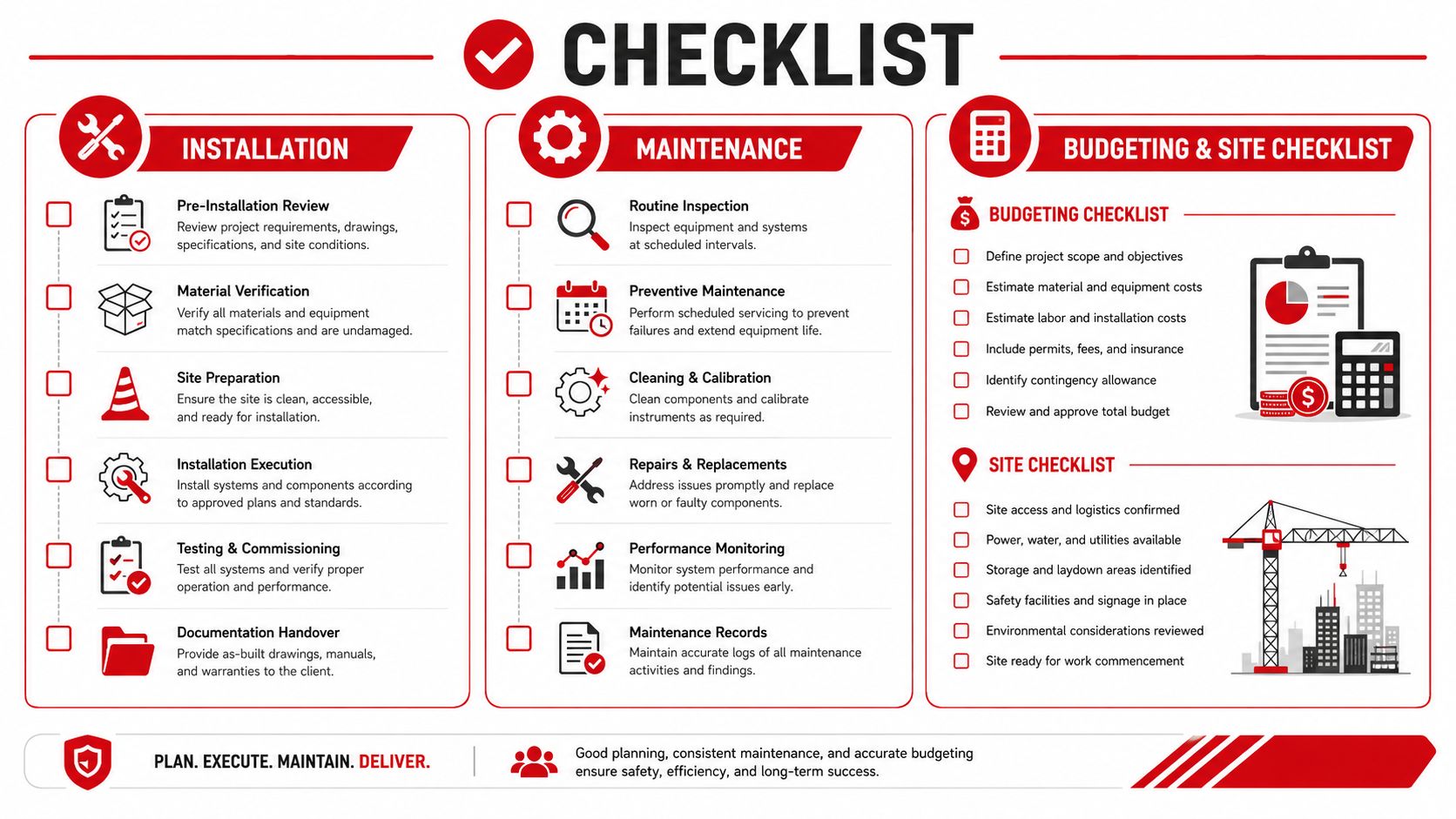
A camera system only pays for itself if it keeps working after install day. Lens cleaning, firmware checks, storage health, and re-aiming after site changes all sit inside the cost of ownership, especially across multiple sites. Many buyers miss those ongoing costs and then wonder why footage is patchy or access is unreliable when they need it most.
Budget and maintenance basics
Professional installation is usually the better call once cabling, mounting height, network setup, or multiple zones are involved. DIY can still suit simple battery cameras or a small wireless layout, but fixed business sites usually need cleaner cable routing, more accurate camera placement, and a proper handover so staff know how to use the system.
The ongoing side is where many business owners get caught. Install, monitor, and maintain the system across each site, not just at go-live. If there is no routine check of retention, storage, alerts, and live access, the cameras become a false sense of security. Industry commentary on business security has also noted that break-ins remain a real issue, which is why service agreements and supervision matter (business-security context).
Site assessment checklist
- Power access: Can each camera and recorder be powered without messy workarounds?
- Network infrastructure: Is the connection stable enough for remote review and alerts?
- Lighting conditions: Are entrances, lanes, and car parks usable after dark?
- Camera angles: Will the chosen placement capture faces, vehicles, and approach paths?
- Weather exposure: Are outdoor units protected from dust, rain, glare, and vandalism?
- Storage and retention: Is footage stored locally, in the cloud, or both?
- Compliance documents: Are notices, access rules, and vendor terms written down?
A final planning point matters for growing businesses. Do not buy only for today's layout. Leave room for one more camera than you think you need, because expansion, tenancy changes, and new risk points often arrive before the replacement cycle does.
If you need a camera plan tied to real site conditions, staffing patterns, and compliance demands, GM GROUP Services can assess the property, match the system to the risk, and coordinate it with guard services and monitoring. For businesses across events, hospitality, retail, construction, and corporate sites, that kind of combined design saves time and helps close avoidable security gaps.