


Access control installation becomes urgent when a busy venue's entrance slows to a crawl, a contractor's credential still grants entry to a restricted door, or a security officer has to verify every visitor manually during a shift change. In Australian mixed-use sites, the problem isn't just an unsecured door. It's the gap between physical hardware, staff workflows, building compliance, visitor movement, audit records and cyber security.
A reliable system should let authorised people move efficiently while giving managers clear control over who can enter, which areas they can access, when permissions apply and what happened afterwards. The installation quality determines whether that promise holds up under pressure. Poor door surveys, unsuitable locks, weak cabling, incomplete testing and unmanaged administrator accounts create expensive rework long after the installer has left.
Why Access Control Installation Matters for Modern Sites
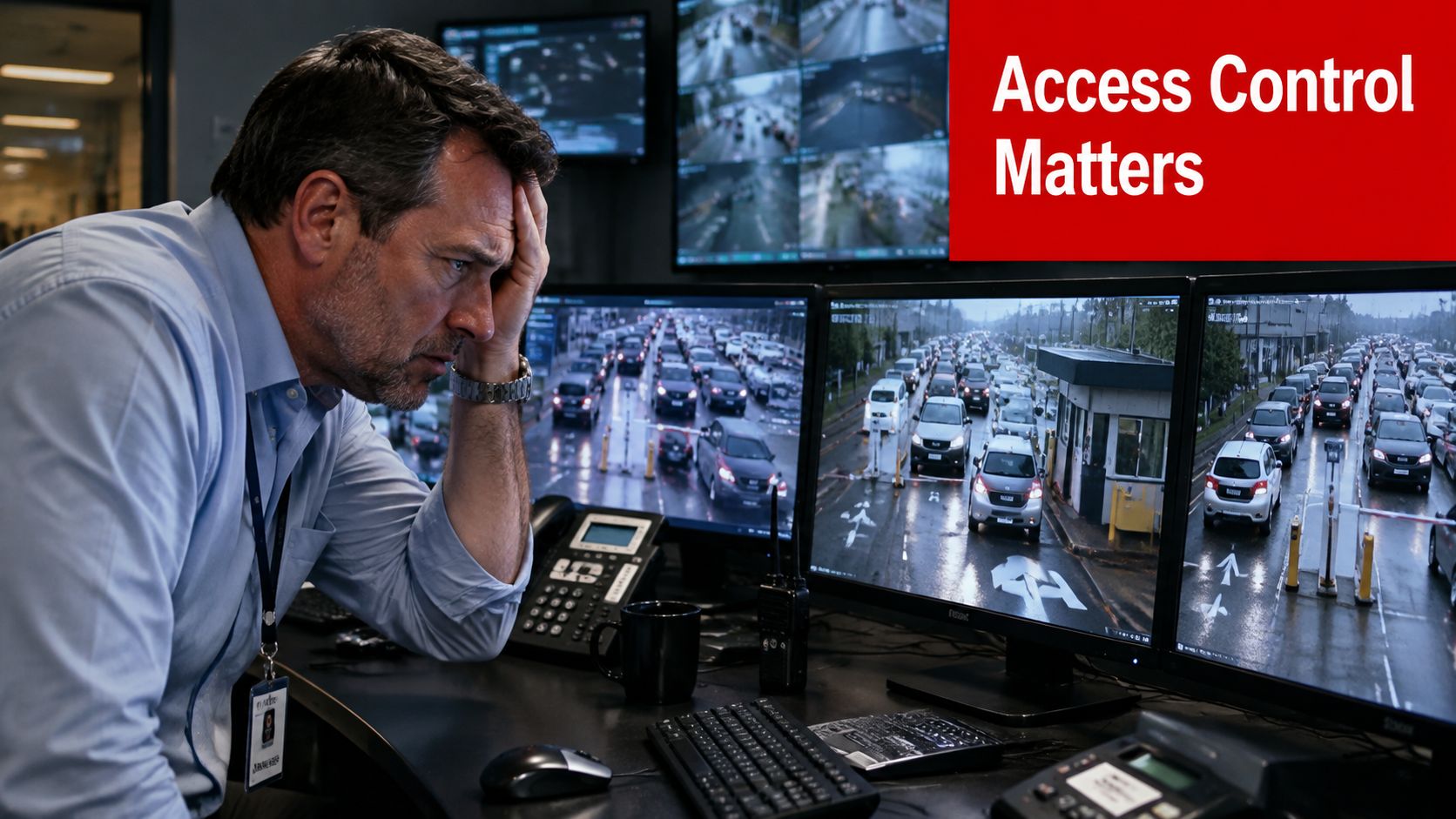
A venue manager sees access weaknesses first at peak activity. Staff are changing shifts, contractors are arriving through a service entrance, guests are queuing at the main doors, and a delivery team needs entry to a back-of-house area. A key cabinet, shared PIN or reception-controlled entrance may cope on a quiet morning, then create delays and poor visibility when several groups arrive together.

Access control installation connects credentials, door hardware, permissions and event logging into one operating process. Staff can use assigned cards, fobs or mobile credentials, while contractors receive access limited to the zones and periods relevant to their work. If a credential is lost or a worker leaves, an administrator can revoke it without changing every lock.
Security and flow must work together
The practical question is how to move authorised people through the correct points while retaining accountability. A well-planned system reduces dependence on shared keys, discourages informal tailgating and gives supervisors a clearer record of access activity. Visitor management can also support separate public entrances, staff routes, loading areas and restricted rooms.
The installation has to fit the building and its operation. A reader positioned where queues spill into an emergency path can create a compliance problem. A lock that does not suit the door frame may fail under regular use, while a controller placed in an exposed cupboard can add physical and cyber security risk. In mixed-use Australian sites, these details often create hidden costs through revised wiring, after-hours work, retesting and changes to staff procedures.
Practical rule: Treat every controlled opening as part of an operating workflow, not as an isolated product sale.
The Australian market includes established demand across commercial, industrial, hospitality and government environments. One estimate values the Australia access control market at USD 320.2 million in 2025 and projects USD 636.9 million by 2034, while another values it at AUD 510.49 million in 2025. The estimates use different methodologies, so they should not be compared as a single measurement. The installation business itself includes 1,763 Australian businesses in 2026, according to IBISWorld data summarised in the Australian market overview. For venue owners, the procurement choice is only part of the decision. Door compatibility, network dependencies, administrator controls, emergency operation and handover documentation can determine whether the system performs reliably after commissioning.
Understanding Access Control System Types and Components
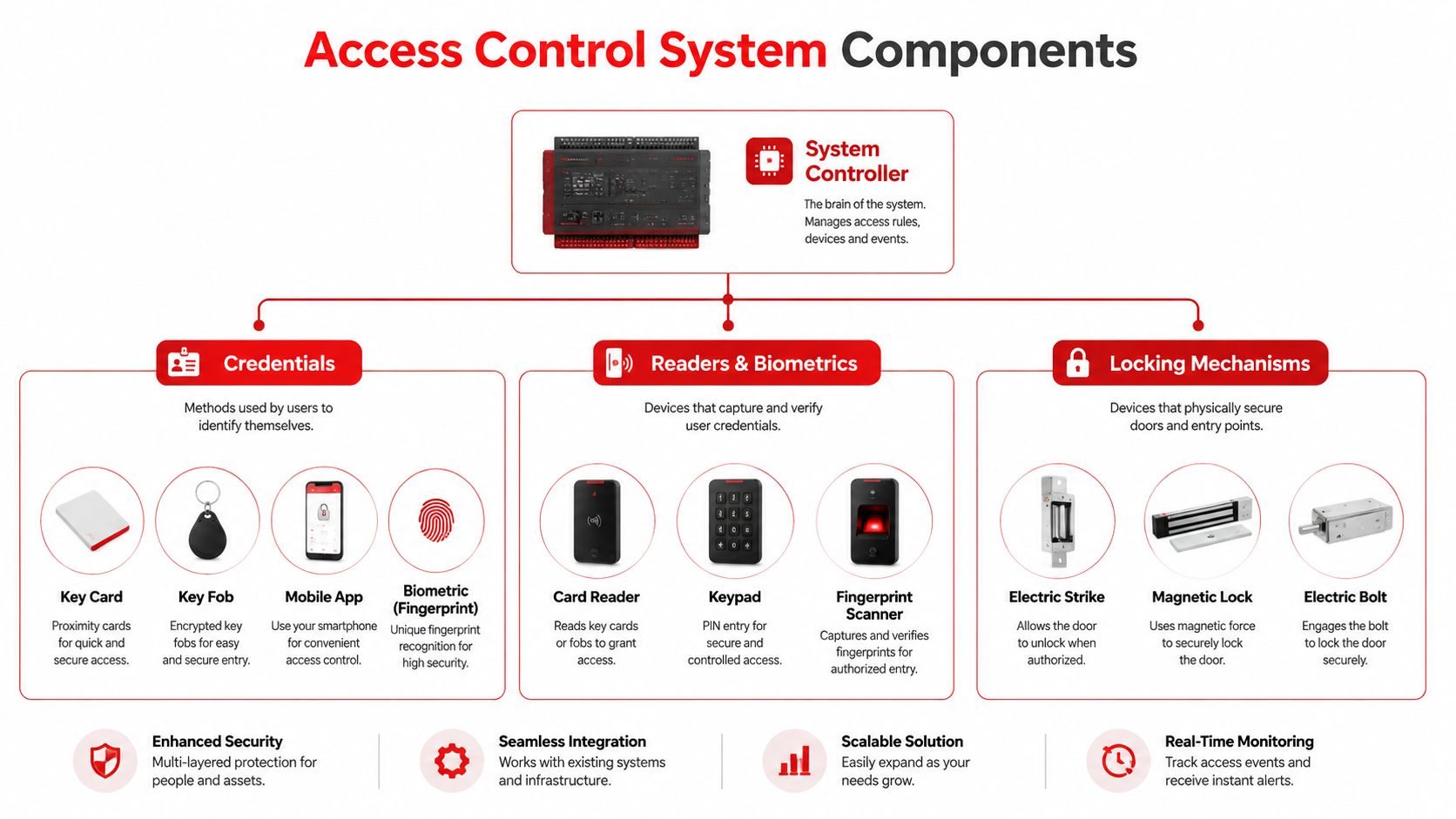
An access control system functions like a nervous system. The credential identifies the user, the reader captures that credential, the controller evaluates permissions, the lock carries out the decision, and the software records and administers the event. A weak choice at any point can undermine the reliability of the complete installation, even when the remaining components perform well.
Start with the credential
Cards and fobs remain practical for staff groups because administrators can issue and revoke them without changing a shared code. Keypads may suit lower-risk internal areas, although shared credentials make individual accountability harder. Mobile credentials reduce physical badge handling, while biometrics can support controlled areas requiring stronger identity assurance, subject to privacy, consent and operating requirements.
Credential selection should follow the site's risks and workflows. A festival contractor may need temporary access to a production zone, while a hotel employee may require scheduled entry to service areas. A finance or server room usually needs tighter permissions and stronger audit controls than a general staff entrance. These differences affect enrolment, support, lost-credential handling and the procedures used during busy events.
Match the reader, controller and lock
Readers pass credential information to the controller. The controller checks permissions and sends an instruction to the locking hardware. Door contacts report whether an opening is closed, while request-to-exit devices help distinguish an authorised exit from a forced or held-open door.
Lock selection depends on the door, frame, exit arrangement, power behaviour and applicable compliance requirements. Electric strikes, magnetic locks, electric bolts and electrified locksets respond differently during power loss or emergency release. A product that appears suitable in a catalogue can be unsuitable once egress, fire-system interfaces and the existing door hardware are assessed.
Choose the architecture deliberately
A standalone system can control a small number of openings independently, but administration remains local and central reporting is limited. A networked system connects controllers to management software, supporting roles, schedules, audit trails and multiple zones. Cloud, on-premises and hybrid designs assign different responsibilities for connectivity, updates, remote administration and data governance. Those responsibilities can create ongoing cyber-physical work for venue operators, not just installation costs.
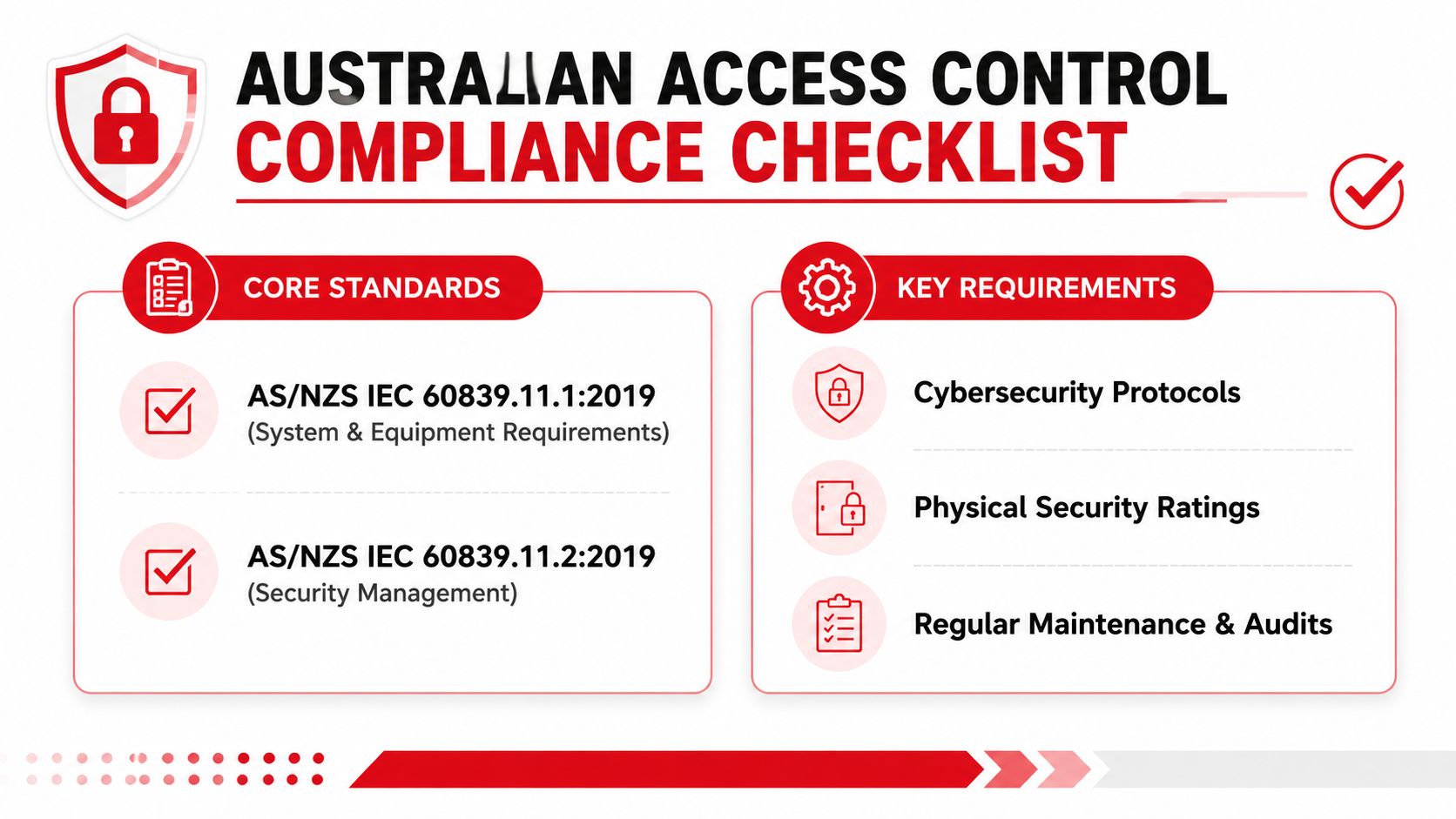
Australian guidance points towards matched security grades, rather than combining components ad hoc. The Australian Security Industry Association Limited standards guidance explains the relevance of defined grades and associated system functions under AS/NZS IEC 60839.11.1:2019. Assess readers, controllers, locks and software as one coordinated system, including how they behave during network or power failure, rather than choosing each item on price alone.
Navigating Australian Compliance and Standards
In Australia, access control installation sits inside a regulated security and building-compliance environment. AS/NZS IEC 60839.11.1:2019 defines electronic access control systems used for physical access in and around buildings and protected areas. Standards Australia published it on 20 December 2019, and the document runs to 51 pages, providing a formal technical baseline for functionality, performance and test methods across components such as readers, controllers, locks and logging functions. The standard is available through Standards Australia's AS/NZS IEC 60839.11.1:2019 listing.
A project also needs a planning and documentation framework. AS/NZS IEC 60839.11.2:2019 covers minimum requirements and guidance for planning, installation, commissioning, maintenance and documentation, with different levels of protection in mind. That makes it useful when preparing the scope, recording design decisions and defining what commissioning evidence the owner should receive.
Compliance reaches beyond security hardware
The National Construction Code states that a building solution must comply with the Disability (Access to Premises, Buildings) Standards 2010. Door locations, operating forces, clearances, access routes and egress behaviour therefore need consideration alongside the security objective. Managers working through a refurbishment or venue upgrade may also benefit from navigating National Construction Code with a building-code consultant when access control affects wider construction decisions.
Electrical and cabling work matters just as much. Installers should coordinate the site requirements with AS/CA S009:2020 for customer cabling and AS/NZS 3000:2018 for electrical installations. Those rules influence power-supply sizing, cable segregation, enclosure placement and commissioning tests. A neat reader installation can still fail operationally if voltage drops, cable routes create interference, or the controller enclosure is difficult to service safely.
For NSW projects, site-specific requirements can be more detailed. NSW Health requires perimeter and external access doors to be locked and access restricted to the minimum necessary points, particularly at night. It also states that keypad access codes must be changed every six months, or sooner where compromise is possible, and that disused codes must not be reused for 12 months, as set out in its Protection of People and Property policy.
Planning Your Installation and Site Survey Checklist
The most economical project is usually the one that identifies difficult doors before equipment is ordered. A site survey should document the building as it operates, not just count entrances on a floor plan.
Five checks before specifying hardware
Map every entry point. Record public doors, staff entrances, gates, loading areas, lifts, plant rooms, tenant areas and emergency exits. Note which openings need control and which must remain available for safe egress.
Observe traffic patterns. Watch arrivals, deliveries, staff changes and event surges. A reader that works for one person at a time may be awkward where a queue forms, and a single controlled entrance may create an operational choke point.
Inspect the opening. Check the door, frame, hinges, closer, latch, exit hardware, fire rating and available mounting space. A reader won't compensate for a door that doesn't close or latch consistently.
Trace power and communications. Identify cable paths, controller locations, network availability, power capacity, backup arrangements and access to ceiling or service spaces. Include long or difficult routes in the scope rather than treating them as installation-day surprises.
Define people and permissions. List employees, managers, cleaners, contractors, suppliers, visitors, tenants and emergency personnel. Assign access by role, zone and schedule, then identify who approves changes and who removes access.
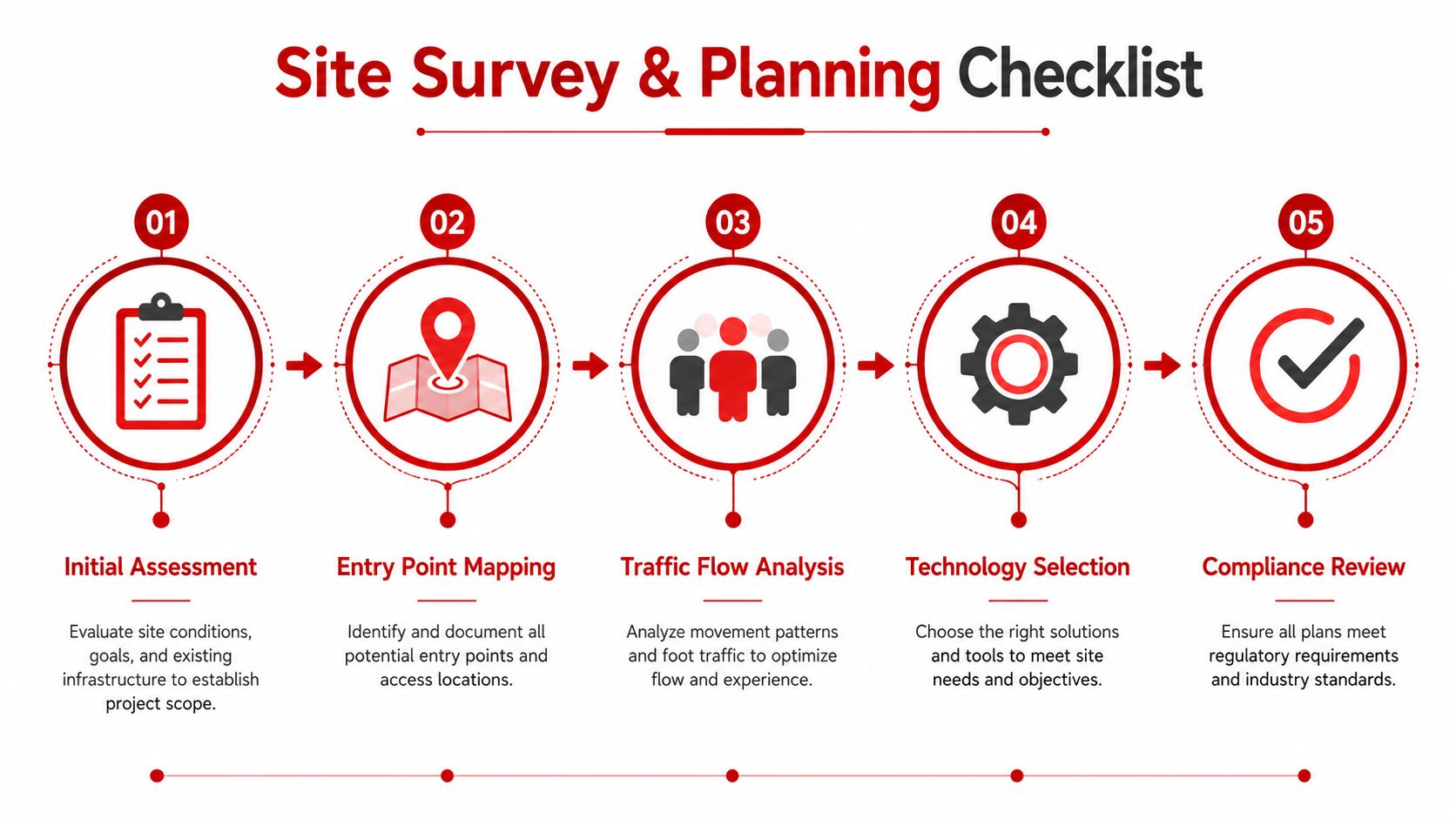
Turn observations into a scope
The scope should name each door, proposed locking method, reader type, door contact, request-to-exit device, controller location, cable route, power arrangement and integration point. It should also state the expected behaviour during power loss, fire alarm activation, network interruption and emergency release.
Keep a door schedule with photographs and notes. This gives the installer, facilities team, IT department and builder a shared reference, and it makes variations easier to challenge. It also prevents a common mistake, where a project is priced around readers and locks but excludes patching, access panels, containment, electrical work, network changes or commissioning.
Before approval: Ask for a door-by-door design review, not just a total equipment list.
Integrating Physical Security with IT and Operations
Modern access control installation creates a cyber-physical system. The reader and lock sit on the door, but permissions, credentials, audit records, remote administration and integrations may sit inside the organisation's digital environment. A venue can secure the physical opening and still leave risk in an unmanaged administrator account, exposed diagnostic port or poorly governed API.
Australian government guidance pairs access restrictions with MFA, RBAC, IP whitelisting, security tokens, audit trails and control of diagnostic and configuration ports. The Australian Government access to information security guidance provides useful context for treating access governance as part of the system design rather than an afterthought.
Assign ownership before commissioning
Physical security teams understand doors, patrols and incident response. IT teams manage networks, identity, authentication and software risk. Facilities teams understand building services, contractors and emergency procedures. The project needs all three perspectives, with a named owner for:
- Credential lifecycle: issuing, suspending, replacing and revoking credentials.
- Permission governance: approving role-based access and reviewing exceptions.
- System administration: managing accounts, MFA, updates, backups and configuration.
- Incident response: linking access events with CCTV, alarms and supervisor actions.
- Operational continuity: defining what staff do if the network, power or platform is unavailable.
Mobile credentials are becoming more relevant to Australian buyers. A 2026 Australian security-industry report cited in the available market material says 29% of organisations already use mobile smartphone credentials, while 27% plan to adopt them within 12 to 18 months. Those figures indicate a shift installers need to accommodate, but mobile access still depends on device ownership, account security, battery availability and a clear fallback process.
Physical measures also support the overall outcome. For exterior approaches and gate areas, venue managers can review practical tips from Lighthouse Energy Services so lighting, surveillance and controlled entry work as one operating plan. The access system should then pass useful events to CCTV or alarms, allowing a supervisor to investigate a forced door or unusual after-hours entry rather than relying on an isolated log.
Understanding Costs and Procurement Strategies
A responsible budget separates the system price from the cost of making the system work in the building. Hardware is visible, but cable routes, door repairs, power supplies, network involvement, software, documentation, training and future support often determine the final value.
The table below is a procurement framework, not a fabricated price list. Australian project pricing varies by opening type, building condition, integration requirements, product selection and labour scope, so a supplier should provide a site-specific quotation rather than a generic allowance.
| Site Type | System Type | Typical Cost Range (AUD) | Key Considerations |
|---|---|---|---|
| Small office | Standalone or small networked system | Obtain a site-specific quote | Door condition, credential administration and future expansion |
| Mixed-use venue | Networked, role-based system | Obtain a site-specific quote | Public and staff flows, contractor access, CCTV and emergency behaviour |
| Construction site | Temporary or phased networked system | Obtain a site-specific quote | Changing contractor permissions, gates, harsh conditions and relocation |
| Hospitality site | Networked system with selected integrations | Obtain a site-specific quote | Guest experience, back-of-house separation, service access and uptime |
| Corporate or government facility | Enterprise or hybrid architecture | Obtain a site-specific quote | Governance, auditability, IT controls, multiple zones and support |
Compare the procurement models
A single-stage rollout can simplify commissioning, but it may create disruption and expose every design assumption at once. A phased rollout lets the team validate a representative area, refine permissions and confirm the installer's documentation before expanding. That approach can be useful for mixed-use buildings where public, tenant, service and event operations differ sharply.
Ask suppliers to identify exclusions. These may include door repairs, electrical work, containment, network configuration, fire-alarm interfaces, lift control, software subscriptions, credential stock, after-hours work and ongoing maintenance. An apparently cheap quote often becomes expensive when those items appear as variations.
Buy for support, not only installation
Assess the platform's credential options, reporting, role-based access, integration capability, upgrade path and administrator controls. Ask who owns configuration data, how changes are documented and whether another qualified provider could support the system later. A proprietary platform may offer a smooth initial experience, while an open approach may provide more flexibility. The right decision depends on governance, technical support and the owner's long-term operating model.
The Australian market estimates show substantial activity, with one source projecting 7.94% CAGR from 2026 to 2034 and another forecasting 9.50% growth during 2026 to 2035. These are projections, not guaranteed outcomes, and they reinforce the need to procure a system that can be maintained as requirements change. See the Australian access control market estimate for the underlying context.
Maintenance and Service Level Expectations
Installation is the beginning of the system lifecycle. Doors settle, closers lose alignment, credentials change hands, users leave, software requires updates and contractors need access removed. Without a maintenance arrangement, small faults can accumulate until staff bypass the system or keep a damaged entrance permanently open.
A maintenance contract should define more than a phone number. It should state what the provider inspects, how faults are prioritised, how remote support works, what documentation is updated and how emergency attendance is handled. The agreement should also identify responsibilities for network services, power supplies, batteries, door hardware and third-party integrations.
Check the failure points that affect operations
A practical service visit should examine:
- Door operation: Confirm that doors close, latch, lock and release as designed.
- Credential performance: Test active, revoked, temporary and replacement credentials.
- Event records: Confirm that access, forced-door and held-door events appear correctly.
- Power resilience: Inspect supplies, batteries, cabling and controller status.
- Permissions: Review role changes, stale accounts, contractor access and administrator activity.
- Integration behaviour: Verify CCTV, alarm, fire and building-system responses where connected.
NSW operators should include keypad governance in their operating calendar. NSW Health's policy requires keypad codes to be changed every six months, or sooner if compromise is possible, and prevents reuse of disused codes for 12 months. That is a concrete example of why maintenance includes access administration, not just cleaning readers.
A service provider should leave you with clearer records than it found, including updated door schedules, configuration notes and unresolved risks.
Choose a provider that can support the actual platform and coordinate with locksmiths, electricians, IT staff and building managers. Ask how the team handles lost credentials, emergency lockouts, failed controllers and planned expansions. A lower installation price won't favour the venue if the first fault leaves staff improvising with keys or shared codes.
Real World Use Cases and Success Stories
An event venue needs a different access control installation from a corporate office, even if both have similar doors. The venue must separate public entry, staff circulation, production areas, hospitality zones and contractor routes while preserving a welcoming experience for guests.
Event venues and festivals
A practical design uses separate permissions for event staff, artists, suppliers, cleaners, security supervisors and temporary contractors. Credentials can be issued for defined zones and removed when a role ends. Supervisors can also use access events alongside CCTV when investigating a forced service door, an unauthorised backstage attempt or an unexpected after-hours movement.
The installation should be tested under realistic conditions. A reader that works during a quiet commissioning session may be poorly positioned once barriers, queue lanes, temporary fencing, lighting and crowd-management staff are in place. GM GROUP Services can form part of the wider operating plan through gatehouse control, security personnel, risk assessments, emergency response and event-focused supervision, while the electronic system manages credentials and audit trails.
Construction and industrial sites
Construction sites change constantly. Hoardings move, subcontractors rotate, temporary buildings appear and deliveries use different gates. A useful design maps access by work zone and contractor role, with a clear process for suspending credentials when a worker or subcontractor no longer needs entry. Controllers, readers and locks also need protection from dust, weather, impact and unauthorised tampering.
Hospitality and corporate environments
Hotels, bars and restaurants must protect staff-only areas without making legitimate guest movement awkward. Corporate offices need a different balance, with role-based access for employees, visitors, facilities, IT and after-hours cleaning teams. In both environments, the administrator workflow matters as much as the reader. If managers can't change access quickly and safely, staff will create workarounds.
For broader examples of how automation can support operational workflows, review these real-world automation results, then ask whether the proposed access platform can produce equally useful records for your own venue.
The next step is a door-by-door survey, followed by a documented scope covering hardware, cabling, permissions, emergency behaviour, cyber controls, commissioning and support. Don't approve a quote until the installer has explained the hidden integration and compliance work.
GM GROUP Services offers coordinated security support for events, venues and businesses across NSW, VIC, QLD and the ACT, including gatehouse control, guards, risk assessments, monitoring and emergency response that can complement your electronic access plan. Visit GM GROUP Services to discuss a fit-for-purpose security approach for your site.